
Mr Coffee Coffee Machine Instructions & User Manuals Guide
To use a Mr Coffee coffee machine, fill the reservoir with cold water, add one level tablespoon of ground coffee per 5-fluid-ounce cup into the filter basket, and press the brew button. For bolder coffee or small batches, activate the Strong Brew or 1-4 Cup function before starting the cycle, as this setting cannot be changed once brewing begins.
Most people grab the carafe, fill it with water, and dump that into the reservoir. That works, but it skips the machine’s actual measuring system and guarantees weak coffee. The manual’s specifics on cup size, button timing, and filter care turn a generic pot into a consistent one.
This guide pulls instructions from five official Mr Coffee manuals. We’ll cover the universal steps, then dive into the model-specific features that actually change your morning cup.
Key Takeaways
- One Mr Coffee “cup” is 5 fluid ounces, not 8. Use one level tablespoon of coffee per cup.
- Activate the Strong Brew or 1-4 Cup mode BEFORE pressing the brew button. You cannot turn it on or off mid-cycle.
- Replace the water filtration disk every month (about 50 brews) and align the red indicator on the frame.
- Fine or decaf grounds can overflow the basket or slip into the carafe. Use a medium grind.
- Descale with white vinegar every 30 days to prevent mineral buildup that slows brewing and alters taste.
What Is One “Cup” on a Mr Coffee Machine?
The most consistent mistake is measuring water by a standard 8-ounce cup. Mr Coffee defines a cup as 5 fluid ounces. This isn’t a suggestion—it’s printed in the specs for models like the BVMC-MMX23. The coffee-to-water ratio in the manual assumes this volume.
For the BVMC-MMX23, BVMC-MMX26, and BVMC-MSX23-NLY models, one “cup” equals 5 fluid ounces. The suggested coffee measurement is 1 level tablespoon (approximately 5 grams) per cup.
If you pour 8 ounces of water per “cup” line, you’re diluting your coffee by nearly 40 percent. The carafe markings are your guide. Fill to the “4” line, and you have 20 ounces of water, not 32. Match that with four level tablespoons of coffee.
TL;DR: Ignore your drinking mug. A Mr Coffee “cup” is 5 fluid ounces. Use one tablespoon of coffee per cup line on the reservoir.
The Universal Brewing Steps for Any Mr Coffee Model
The core process is the same across decades of models. Get these four steps right every time.
-
Fill the Reservoir with Cold Water. Use fresh, cold tap or filtered water. Never use hot water from the tap, as it can contain more minerals from your heater. Pour directly into the reservoir or use the carafe to transfer. Do not exceed the MAX line.
Consequence: Overfilling can cause water to spill into the internal electronics during heating. That leads to a short circuit within a few cycles. -
Prepare the Filter Basket. Insert a paper filter or a clean permanent filter. The basket is removable on most models. For paper, the cone shape is standard. If you use a permanent filter, rinse it first to eliminate any metallic taste from manufacturing.
Consequence: Skipping the rinse on a new permanent filter gives the first pot a sharp, tinny note. It fades, but that first cup is wasted. -
Add the Ground Coffee. Use a medium grind. For decaf or a fine grind, reduce the amount slightly—these grinds expand more when wet. The official measurement is one level tablespoon per 5-ounce cup. For a full 12-cup pot (60 oz), that’s 12 tablespoons, or 3/4 of a standard coffee measuring scoop.
Consequence: Packing the basket with fine grounds restricts water flow. The water backs up, overflows the basket, and runs down the outside of the carafe. You’ll find a puddle of weak, gritty coffee on the warming plate. -
Start the Brew. Place the carafe on the warming plate. Close the lid. Press the Brew, Select, or On button. The machine will heat the water and begin dripping within a few minutes. Many models have an auto-pause feature—you can slide the carafe out to pour a cup mid-brew without coffee dripping onto the hot plate.
| Step | Right Way | If You Skip It |
|---|---|---|
| Water | Cold, to the cup line (5 oz each) | Hot tap water accelerates limescale; wrong volume makes weak coffee. |
| Filter | Paper or rinsed permanent filter | Grounds escape into carafe; coffee tastes gritty. |
| Coffee | 1 level tbsp per cup, medium grind | Fine grind causes overflow; too little coffee tastes watery. |
| Start | Carafe seated, lid closed, press Brew | Coffee drips onto hot plate; machine doesn’t activate. |
Decoding the Control Panel: Buttons, Lights, and Modes
Modern Mr Coffee machines have moved beyond a single switch. The buttons do specific things, and their timing matters.
The Power / Brew Button: This is often a combined button. On the BVMC-JPX Series, pressing it once starts the brew cycle. On programmable models, you might press it to confirm a delay brew time.
The Strong Brew / 1-4 Cup Button: This is the most misused feature. On models like the ABX Series, this single button toggles between two functions: strengthening flavor for a full pot, or slowing the brew for a small batch (1 to 4 cups). The critical rule is in the manual.
Common mistake: Trying to activate Strong Brew after the machine starts heating — the feature must be selected before you press the Brew button. On the ABX Series, the setting locks in and cannot be changed mid-brew.
Press the Strong/1-4 Cup button until the desired light is on. Then press Brew. If you forget and press Brew first, you get a standard batch. No way to change it mid-stream.
The Program / Clock Button: This sets the time of day. Hold it down and press the Hour/Minute buttons to adjust. The clock must be set correctly for delay brew to work.
The Delay Brew / Set Delay Button: This lets you set a future start time. After setting the clock, press Delay Brew. Use the Hour/Minute buttons to set the start time. Press Delay Brew again to confirm. An amber light will blink, then stay solid when set. A final press of the Brew button often arms the system.
The YouTube transcript for the 12-cup model shows the frustration: the documented steps sometimes fail. The workaround is to hit Select (or Brew) one extra time after the delay light stops blinking to lock it in.
Fresh Brew Timer: On higher-end models like the BVMC-JPX, a timer counts up how long the coffee has been sitting on the warmer. It’s a reminder for freshness, not a functional control.
Programming the Clock and Delay Brew
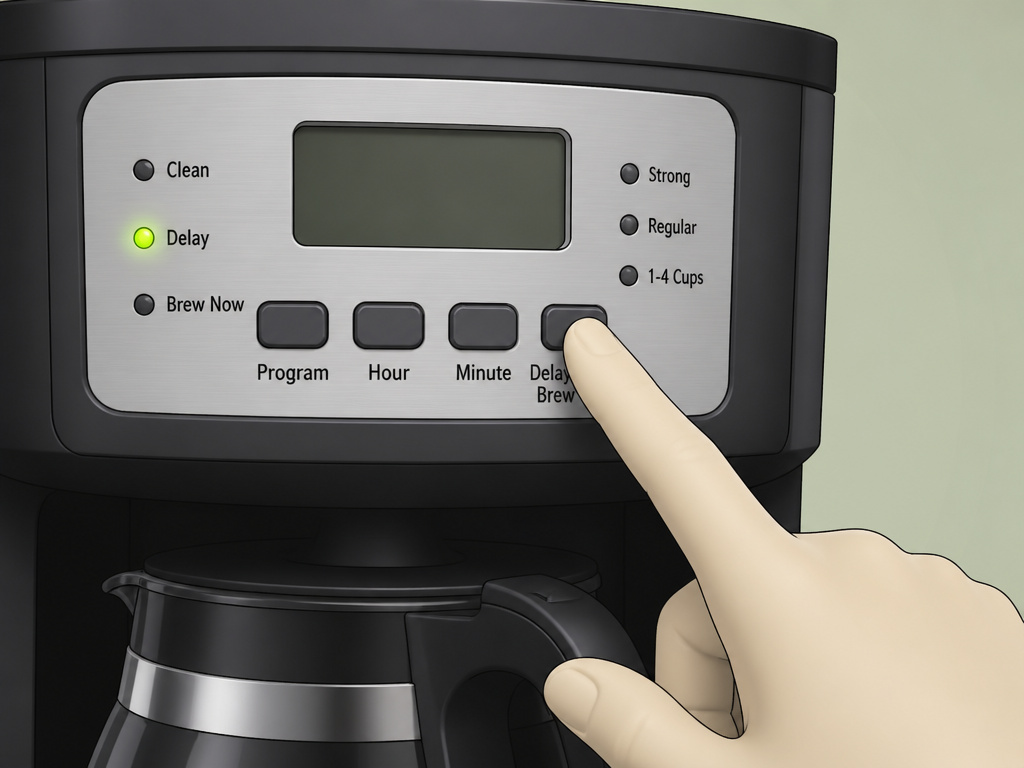
This is where most programmable machines get abandoned. The process is logical but not intuitive.
- Set the Clock. Find the Program or Clock button. Press and hold it. While holding, press the Hour and Minute buttons to advance the time to the current time. Release the Program button.
- Set the Delay Time. Press the Delay Brew button once. The display will likely blink. Use the Hour and Minute buttons to set the time you want the coffee to be ready. This is not the duration, but the actual clock time (e.g., 7:00 AM).
- Confirm and Arm. Press the Delay Brew button again to confirm. You should see a delay light illuminate or blink. On many models, you must now press the main Brew/Select button to arm the delay function. The light will go from blinking to solid.
- Prepare the Machine. You must add water and coffee to the machine before you walk away. The delay function only triggers the brew cycle; it doesn’t magically add ingredients.
Why the extra step? The machine needs to know you’re done programming and that the basket is loaded. The final Brew button press is a safety check. If you skip it, the machine sits idle and you wake up to a cold, empty carafe.
The Mr Coffee Water Filtration System
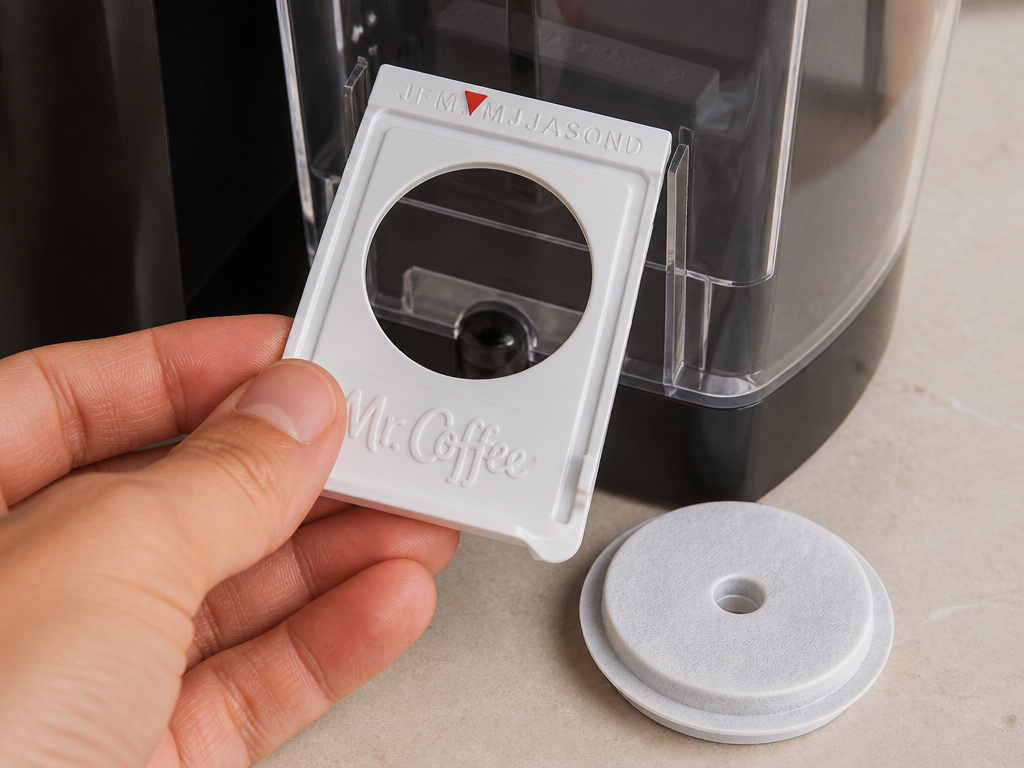
Several models include a water filtration frame that holds a disposable disk. It fits inside the water reservoir.
Installation: Slide the frame into the guides at the back of the reservoir. It clicks into place. The disk snaps into the frame.
Maintenance Schedule: The manual for the BVMC-MMX23 is explicit. When you first install it, align the red indicator on the frame to the letter corresponding to the current month. Change the filter disk every month, which equates to about 50 brewing cycles. Move the red indicator to the next month.
The water filtration system is NOT dishwasher safe. Rinse it under cool tap water. Using it with a permanent coffee filter gives the best results, according to the manual.
What happens if you don’t change it? The disk becomes saturated with minerals and loses effectiveness. Water flow slows, increasing brew time. Eventually, the old filter can introduce a stale, flat taste to the water—and thus, to your coffee. It’s a minor cost that maintains brew speed and clarity.
For a deeper look at how filters affect taste, our guide on bleached vs unbleached filters breaks down the material differences.
Cleaning, Descaling, and Troubleshooting
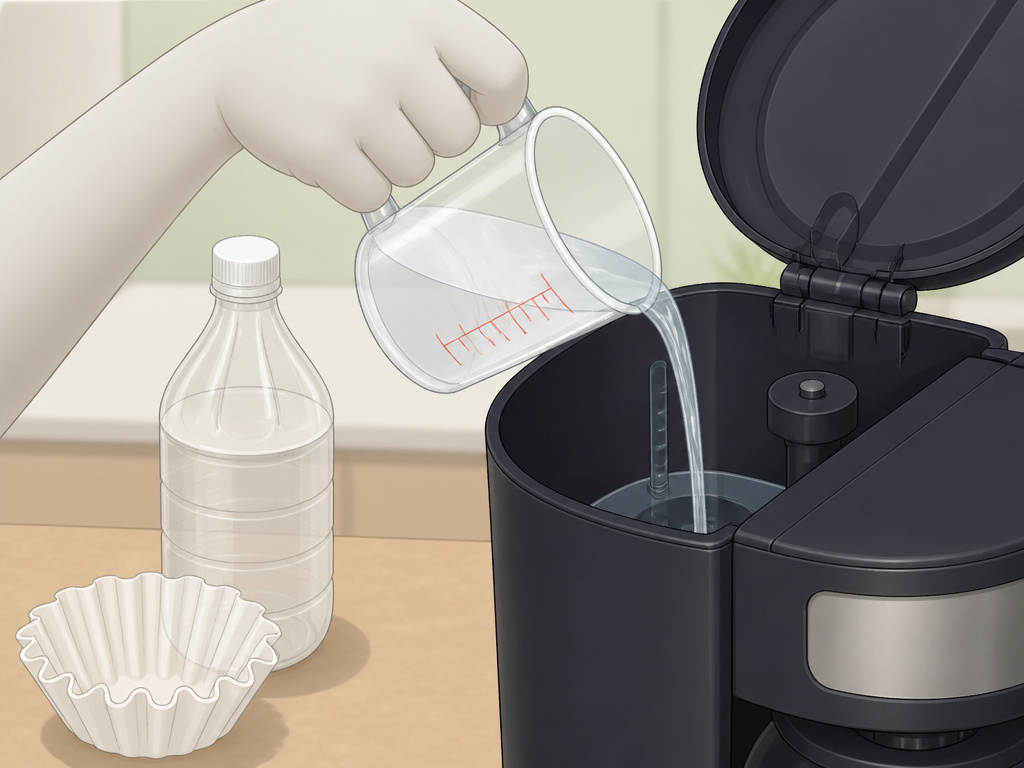
A Mr Coffee machine is simple, but it demands basic upkeep. Neglect leads to slow drips and bad tastes.
Daily Cleaning: After brewing, discard the used filter and grounds. Rinse the carafe and filter basket with warm water. Wipe the warming plate with a damp cloth to remove any coffee syrup. Let the basket and carafe air-dry.
Monthly Descaling: Limescale is the enemy. The BVMC-SC05 Series manual recommends descaling every 30 days.
- Fill the reservoir with 4 cups (20 fl oz) of undiluted white household vinegar.
- Place a paper filter in the empty basket. Do not add coffee.
- Start a brew cycle, letting half the vinegar run through.
- Turn the machine off and let it sit for 30 minutes.
- Turn it back on to finish the cycle.
- Run two full reservoirs of clean water through the machine to rinse.
Vinegar dissolves the mineral deposits that cling to the heating element and tubes. If you don’t descale, the heater works harder, the water heats slower, and your brew time stretches from minutes to a sluggish trickle. The coffee also picks up a metallic, dull flavor.
Troubleshooting Common Issues
| Problem | Likely Cause | The Fix |
|---|---|---|
| Coffee overflows basket | Grind is too fine; too much coffee. | Switch to a medium grind. Reduce coffee by 1 tbsp per pot. |
| Grounds in carafe | Paper filter folded wrong; permanent filter gap. | Ensure filter is fully seated against basket walls. For permanent filters, some fines are normal with decaf. |
| Machine won’t turn on | Not plugged in; power switch off; carafe not seated. | Check plug and outlet. Ensure carafe is fully on the warming plate, triggering the safety switch. |
| Delay brew didn’t start | Clock not set; final “Brew” button not pressed. | Set clock accurately. After programming delay time, press the main Brew button to arm. |
| Coffee tastes bitter/burnt | Old grounds; dirty carafe; scale buildup. | Use fresh coffee within 2 weeks of grinding. Clean carafe with baking soda. Descale the machine. |
| Weak coffee | Wrong water-to-coffee ratio; using decaf. | Adhere to 1 tbsp per 5-oz cup line. For decaf, you may need a slightly darker roast or a pinch more coffee. |
For more detailed repair steps, our Black & Decker coffee maker manual covers similar drip-machine anatomy and solutions.
Choosing the Right Coffee and Grind
The machine is only half the equation. Your coffee choices directly interact with the Mr Coffee’s design.
Grind Size: A medium grind is ideal. It looks like coarse sand. Blade grinders often produce an inconsistent mix of dust and chunks, which can lead to uneven extraction and overflow. A burr grinder is superior for consistency. The debate between a burr vs blade grinder comes down to control over this single variable.
Bean Type: You can use any roast. However, the manual has a specific warning for decaffeinated coffee. The decaffeination process can make the grounds more porous and fine. They absorb water faster and swell, increasing the risk of basket overflow. If you use decaf, consider a slightly coarser grind or a little less coffee per cup.
Freshness: Pre-ground coffee loses its volatile aromatics quickly. For the best flavor, grind beans just before brewing. If you use pre-ground, buy smaller packages and use them within two weeks of opening.
The choice between a blend vs single origin matters less to the machine than to your palate. Blends are crafted for balance and consistency, often working well with drip methods. Single origins highlight specific flavor notes that a clean, well-maintained Mr Coffee can faithfully deliver.
Frequently Asked Questions
How much coffee do I put in a 12-cup Mr Coffee?
For a Mr Coffee 12-cup pot, you are brewing 60 fluid ounces of water (12 x 5 oz). Use 12 level tablespoons of ground coffee. That’s three-quarters of a standard coffee scoop.
Why does my Mr Coffee take so long to brew?
The most common cause is mineral scale buildup in the heating tube. Descale the machine with white vinegar. Other causes include a clogged water filter disk (change it monthly) or using a grind that’s too fine, which restricts water flow through the coffee bed.
Can I make less than 4 cups of coffee in my Mr Coffee?
Yes, but you should activate the “1-4 Cup” function if your model has it. This mode slows the water flow to properly saturate the smaller amount of grounds. Without it, the water rushes through too quickly, resulting in weak, under-extracted coffee.
What does the “Strong Brew” button actually do?
The Strong Brew function slows down the brewing cycle. It introduces brief pauses, allowing the hot water to spend more time in contact with the coffee grounds. This extracts more flavor compounds, resulting in a bolder, more intense cup. It is not just a darker roast setting.
How do I clean the outside of my Mr Coffee machine?
Unplug the machine and let it cool. Wipe the exterior with a soft, damp cloth. Do not use abrasive cleaners or scouring pads. For the warming plate, a paste of baking soda and water can remove baked-on coffee stains. Rinse thoroughly.
Is a Mr Coffee the same as drip coffee?
Yes, a Mr Coffee machine is a type of automatic drip coffee maker. It heats water and drips it over ground coffee in a filter. The result is what most Americans call drip coffee, which is different from an espresso-based drink like an Americano vs drip coffee.
Before You Go
Mr Coffee machines are built for reliability, not mystery. Success hinges on three specifics: measure by their 5-ounce cup, activate special modes before brewing, and maintain the water filter. The Strong Brew button is a game-changer for flavor, but only if you press it first. Descale monthly with vinegar—it’s the single most effective maintenance task. Finally, match your grind. A medium consistency keeps the water flowing and the basket from overflowing. Your machine’s manual has the exact details for your model; this guide just translates them into a morning routine that works.
{
“@context”: “https://schema.org”,
“@type”: “HowTo”,
“name”: “How to Use a Mr Coffee Coffee Machine”,
“totalTime”: “PT10M”,
“tool”: [
{
“@type”: “HowToTool”,
“name”: “Mr Coffee machine”
},
{
“@type”: “HowToTool”,
“name”: “Fresh ground coffee”
},
{
“@type”: “HowToTool”,
“name”: “Cold water”
},
{
“@type”: “HowToTool”,
“name”: “Coffee filter (paper or permanent)”
}
],
“step”: [
{
“@type”: “HowToStep”,
“name”: “Add water to the reservoir”,
“text”: “Fill the reservoir with cold water to the desired cup line, noting that one Mr Coffee ‘cup’ equals 5 fluid ounces.”
},
{
“@type”: “HowToStep”,
“name”: “Prepare the filter basket”,
“text”: “Place a paper or rinsed permanent filter in the basket. Add one level tablespoon of ground coffee per 5-ounce cup.”
},
{
“@type”: “HowToStep”,
“name”: “Select your brew settings”,
“text”: “If using Strong Brew or 1-4 Cup mode, press the button before starting the brew cycle. This setting cannot be changed mid-brew.”
},
{
“@type”: “HowToStep”,
“name”: “Start the machine”,
“text”: “Press the Brew or Select button. The machine will begin heating and brewing. Use the auto-pause feature to pour a cup mid-brew if needed.”
},
{
“@type”: “HowToStep”,
“name”: “Clean up and maintain”,
“text”: “Discard the used grounds and filter. Wipe the warming plate and carafe. Descale with vinegar every 30 days and replace the water filter disk monthly.”
}
]
}
{
“@context”: “https://schema.org”,
“@type”: “FAQPage”,
“mainEntity”: [
{
“@type”: “Question”,
“name”: “How much coffee do I put in a 12-cup Mr Coffee?”,
“acceptedAnswer”: {
“@type”: “Answer”,
“text”: “For a Mr Coffee 12-cup pot, you are brewing 60 fluid ounces of water (12 x 5 oz). Use 12 level tablespoons of ground coffee. That’s three-quarters of a standard coffee scoop.”
}
},
{
“@type”: “Question”,
“name”: “Why does my Mr Coffee take so long to brew?”,
“acceptedAnswer”: {
“@type”: “Answer”,
“text”: “The most common cause is mineral scale buildup in the heating tube. Descale the machine with white vinegar. Other causes include a clogged water filter disk (change it monthly) or using a grind that’s too fine, which restricts water flow through the coffee bed.”
}
},
{
“@type”: “Question”,
“name”: “Can I make less than 4 cups of coffee in my Mr Coffee?”,
“acceptedAnswer”: {
“@type”: “Answer”,
“text”: “Yes, but you should activate the \”1-4 Cup\” function if your model has it. This mode slows the water flow to properly saturate the smaller amount of grounds. Without it, the water rushes through too quickly, resulting in weak, under-extracted coffee.”
}
},
{
“@type”: “Question”,
“name”: “What does the \”Strong Brew\” button actually do?”,
“acceptedAnswer”: {
“@type”: “Answer”,
“text”: “The Strong Brew function slows down the brewing cycle. It introduces brief pauses, allowing the hot water to spend more time in contact with the coffee grounds. This extracts more flavor compounds, resulting in a bolder, more intense cup. It is not just a darker roast setting.”
}
},
{
“@type”: “Question”,
“name”: “How do I clean the outside of my Mr Coffee machine?”,
“acceptedAnswer”: {
“@type”: “Answer”,
“text”: “Unplug the machine and let it cool. Wipe the exterior with a soft, damp cloth. Do not use abrasive cleaners or scouring pads. For the warming plate, a paste of baking soda and water can remove baked-on coffee stains. Rinse thoroughly.”
}
},
{
“@type”: “Question”,
“name”: “Is a Mr Coffee the same as drip coffee?”,
“acceptedAnswer”: {
“@type”: “Answer”,
“text”: “Yes, a Mr Coffee machine is a type of automatic drip coffee maker. It heats water and drips it over ground coffee in a filter. The result is what most Americans call drip coffee, which is different from an espresso-based drink like an Americano vs drip coffee.”
}
}
]
}
