
How to Work a Mr Coffee Maker: Correct Water & Filter Steps
To work a Mr Coffee coffee pot, you add fresh water to the reservoir, insert a #4 paper filter into the basket, measure 1 level tablespoon of ground coffee per 5-ounce ‘cup’, place the empty carafe on the warming plate, and press Brew. The machine heats the water, drips it through the grounds, and keeps the coffee warm on the plate for up to 4 hours before auto-shutoff.
Most people get the water-to-coffee ratio wrong because they ignore what a Mr Coffee “cup” actually measures. They also skip the water filter or use the wrong kind of water, which clogs the internal tubes with scale within a few months. The machine still runs, but the brew gets weaker and takes longer.
This guide walks through the exact steps from the official manuals, explains the model-specific features that matter, and shows you how to avoid the common mistakes that lead to overflow, weak coffee, or a dead machine.
Key Takeaways
- A Mr Coffee “cup” is 5 fluid ounces, not 8. Use 1 level tablespoon (5g) of coffee per cup.
- The carbon water filter removes chlorine and should be replaced every 50 brews; the red indicator aligns with the month.
- The warming plate auto-shuts off after 2 hours (BVMC-JPX) or 4 hours (most other models).
- Using fine grind or decaf coffee can cause overflow and grounds in your carafe.
- Always run a water-only cleaning cycle weekly and descale when the “CLEAN” alert appears.
Before You Start: The Two Things That Wreck a Mr Coffee
Before you start: Mr Coffee makers are not designed for soft water or well water. The mineral content in soft water accelerates limescale buildup in the heating tube, which can cause a clog and overheating failure within a year. Also, never run the machine without the carafe in place and the lid closed. The heated showerhead will spray boiling water and steam onto the warming plate, warping the plastic and creating a burn hazard.
The machine is simple, but its tolerance for error is low. Get these two things right from day one.
The Mr Coffee Water-to-Coffee Ratio That Actually Works
This is the step every generic guide glosses over. They tell you to add “scoops” of coffee. A scoop isn’t a standard measure, and a Mr Coffee “cup” isn’t a standard cup.
According to the BVMC-MMX23 user manual, one Mr Coffee “cup” equals 5 fluid ounces of brewed coffee. The manual also states that 1 level tablespoon holds about 5 grams of ground coffee. Those two numbers are your recipe.
For optimum results using the water filtration system, use the water filtration system with a permanent filter. The carbon filter removes up to 97% of chlorine, which improves taste and reduces scale.
The math is non-negotiable. For a full 12-cup pot, you need 60 ounces of water in the reservoir. That means 12 level tablespoons of coffee in the filter basket. If you use an 8-ounce measuring cup to fill the reservoir, you’ll be 36 ounces short on water. The machine will still brew, but the coffee will be brutally strong and over-extracted.
| Pot Size (Mr Coffee Cups) | Water Needed (fl oz) | Coffee Needed (level tbsp) | Coffee Weight (grams) |
|---|---|---|---|
| 4 cups | 20 oz | 4 tbsp | 20g |
| 8 cups | 40 oz | 8 tbsp | 40g |
| 12 cups | 60 oz | 12 tbsp | 60g |
TL;DR: One Mr Coffee cup = 5 oz water = 1 level tbsp (5g) coffee. Measure both.
Setting Up the Filter and Water System
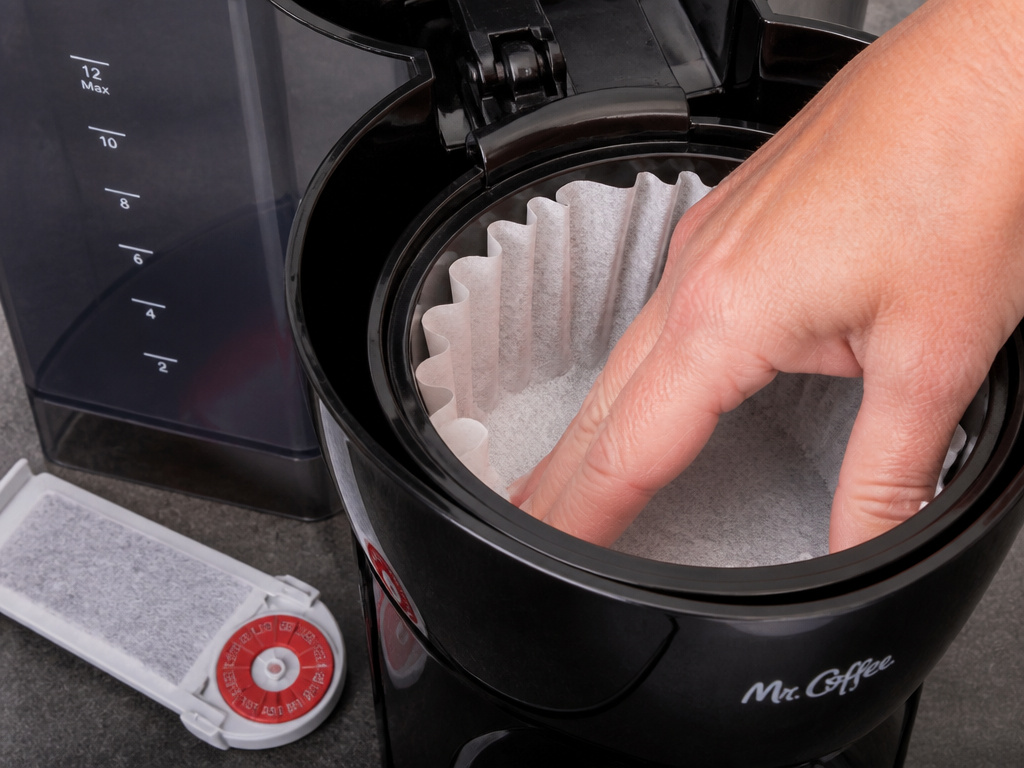
You have two filter choices: disposable paper or a reusable permanent mesh filter. The paper filter (#4 basket shape) gives a cleaner cup, trapping oils and fine sediment. The permanent filter lets more oils through, which some people prefer, but it requires immediate rinsing after each use.
If your model has a water filter slot (like the BVMC-MMX23 or BVMC-PC14), you need to use it. The charcoal cartridge isn’t for flavor alone. It strips chlorine from tap water, which prevents the chlorine from reacting with heating elements and plastic parts to form scale and off-flavors.
- Insert the water filter. Slide the cartridge into its slot in the reservoir. Twist it until the red indicator on the frame points to the current month. This is your reminder. The filter lasts about 50 brew cycles or one calendar month.
- Place the brew filter. Seat a #4 paper filter or the permanent filter in the basket. If using paper, open it fully and press it into the corners. A poorly seated filter can collapse during the brew, dumping grounds into the carafe.
- Add the coffee. Distribute your measured grounds evenly in the filter. A mound in the center can cause channeling, where water races around the edges.
Forgetting the water filter is a common mistake. The machine works without it, but the internal tubing scales up faster. You’ll notice the brew time getting longer long before the “CLEAN” light comes on.
Programming and Using the Brew Functions
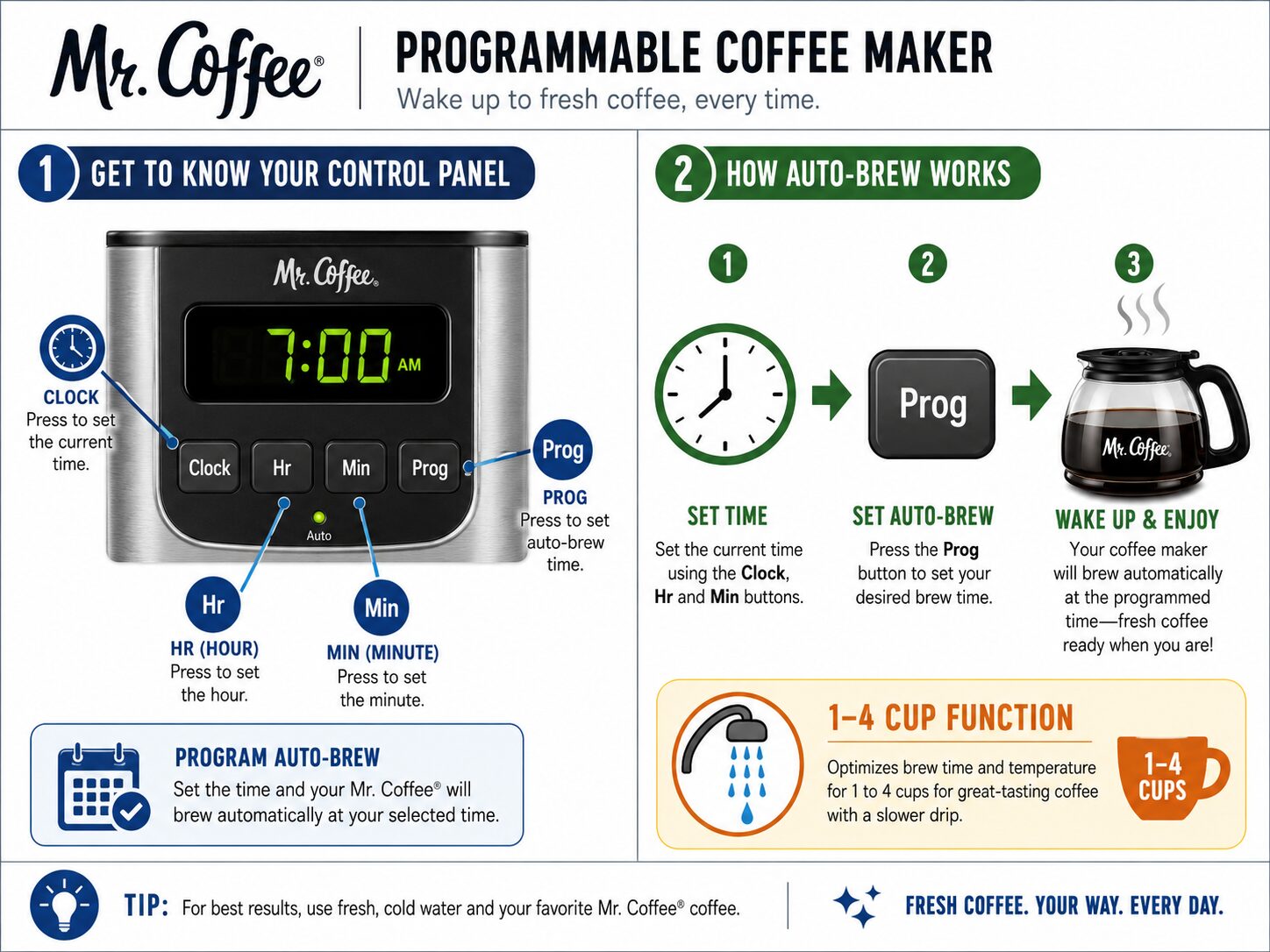
Modern Mr Coffee models have more than an On button. The BVMC-JPX series has a Fresh Brew™ Timer that shows how long your coffee has been sitting. The BVMC-PC14 lets you customize the auto-shutoff from 1 to 4 hours. These features exist for a reason.
Setting the Clock (Programmable Models):
- Press and hold the ‘Clock’ button.
- Use the ‘Hr’ and ‘Min’ buttons to set the time.
- Release the ‘Clock’ button. The display will now show the correct time.
Using the Auto-Brew Program:
- With the machine prepared (water, coffee, carafe in place), press ‘Prog’.
- Set the time you want the brew to start using the ‘Hr’ and ‘Min’ buttons.
- Press ‘Prog’ again to confirm. The ‘Auto’ light will illuminate.
- The machine will now brew at that time every day until you cancel it.
The most valuable feature, especially for small batches, is the 1-4 Cup Function on the BVMC-PC14. It slows the flow of water when brewing fewer than four cups. Without it, a small amount of water blasts through a small amount of coffee, resulting in a weak, under-extracted brew. If you often make just a mug or two, seek out a model with this function.
Common mistake: Assuming “Keep Warm for 4 hours” means all models. The BVMC-JPX series manual specifies a 2-hour auto-shutoff for the warming plate. Leaving coffee on it for a weekend expecting it to turn off can be a fire risk if the thermostat fails.
Why Fine Grind and Decaf Coffee Cause Overflow
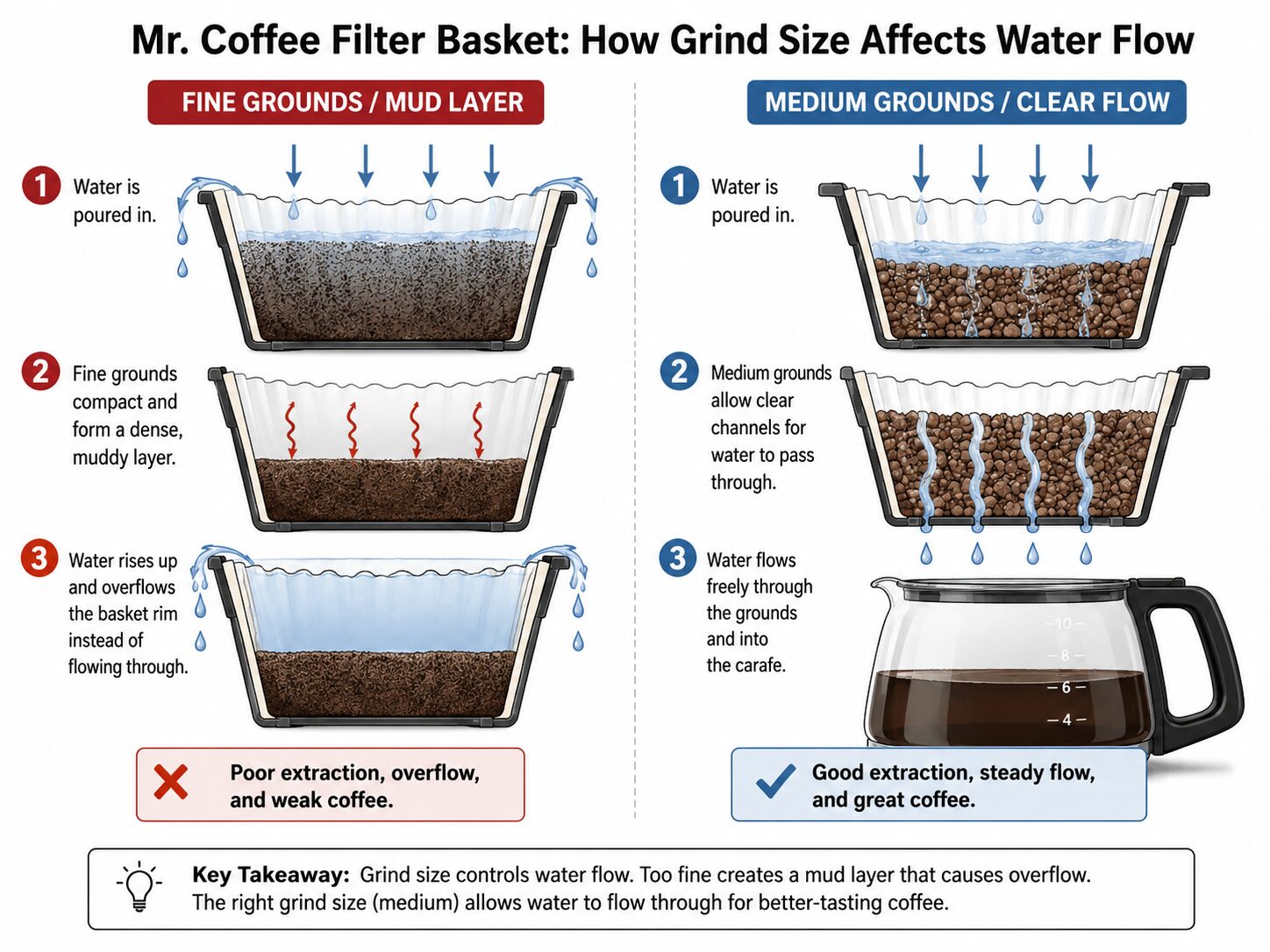
The manuals for the BVMC-MMX23 and BVMC-PC14 series include a specific warning: using fine ground coffee or decaffeinated coffee may cause overflow. This isn’t a maybe.
Fine or decaf coffee may cause overflow. If using extra fine or decaf grounds in the BVMC-PC14, you may notice grounds in the carafe; increasing coarseness of grounds is suggested.
Here’s the why-layer. Fine grounds compact more densely in the filter basket. When hot water hits them, they swell and can form a thick, impermeable mud layer at the bottom of the filter. The water from above has nowhere to go but up and over the edge of the basket, carrying grounds with it. Decaf beans are often processed in a way that makes them more absorbent and prone to swelling.
The fix is simple: use a medium grind size, the consistency of coarse sand. If you only have pre-ground fine coffee, reduce the amount slightly. For decaf, be extra careful with your measurements and consider a slightly coarser grind if you have a burr vs blade grinder that can adjust.
The Cleaning Cycle Nobody Runs (But Should)
The “CLEAN” alert on the display isn’t a suggestion. It’s a diagnosis. It means mineral scale has built up inside the heating tube and water channels to the point where it’s affecting performance. Ignoring it leads to one outcome: the tube clogs completely, the machine overheats, and it dies.
Weekly Maintenance:
- Remove the filter basket and any used filter.
- Fill the reservoir with fresh water to the 4-cup line.
- Place the empty carafe on the warming plate.
- Press ‘Brew’. Let the cycle run completely.
- Discard the hot water and dry the carafe and warming plate.
This weekly flush removes residual coffee oils and loose mineral particles before they bake on.
Descaling (When ‘CLEAN’ Appears):
- Fill the reservoir with a mixture of half white vinegar and half water, or a commercial descaling solution, to the 12-cup line.
- Place the empty carafe on the plate.
- Press ‘Brew’. Let half the solution cycle through, then pause the machine for 30 minutes.
- Restart and let the cycle finish.
- Run 2-3 cycles of clean water through the machine to rinse.
I learned the hard way. I ignored the light on a BVMC-PC14 for two months. The brew time went from 8 minutes to nearly 15. Then one morning, it made a gurgling sound and shut off mid-brew. The heating tube was packed with chalky scale. The repair cost was more than a new machine. Now I descale the instant the light glows.
Your machine’s lifespan depends on this ritual. It’s the difference between replacing it in 18 months and having it last a decade. The process is similar for other brands; the urgency is the same whether you’re consulting a Black & Decker coffee maker manual or a Braun coffee maker manual.
Troubleshooting Common Mr Coffee Issues
| Problem | Likely Cause | The Fix |
|---|---|---|
| Coffee tastes weak/watery | Wrong coffee-to-water ratio; stale beans | Use 1 tbsp per 5 oz water; grind fresh beans within 2 weeks of roast. |
| Brew takes too long | Clogged filter basket; scale in heating tube | Clean basket holes with a pin; run descaling cycle immediately. |
| Coffee is bitter/burnt | Warming plate too hot; coffee sitting too long | Use the 1-4 Cup function for small batches; drink within 30 min of brewing. |
| Machine doesn’t turn on | No power; faulty power cord | Check outlet; ensure cord is fully plugged into machine base. |
| Water leaks during brew | Cracked reservoir; overfilled filter basket | Inspect reservoir for cracks; reduce coffee amount if using fine grind. |
Coffee tastes metallic or odd? Check your water. If you’re not using the carbon filter, chlorine and other minerals are going straight into your cup. That’s the primary reason for installing a Breville coffee machine filter or any other brand’s filtration system. The type of paper filter matters, too. A bleached vs unbleached filters debate often centers on whether the bleaching process leaves a taste, though most modern bleached filters are taste-neutral.
Grinds in the carafe? Your paper filter ripped, or you’re using a permanent filter with a grind that’s too fine. Switch to a sturdier paper filter, like those made for Bunn coffee pot filters, which are thicker, or adjust your grinder to a medium setting.
Frequently Asked Questions
Why does my Mr Coffee have a “CLEAN” light?
The “CLEAN” light is a descaling reminder. Mineral scale from your water has built up inside the machine’s internal heating tube. You need to run a descaling cycle with vinegar or citric acid, then several rinse cycles, to remove it.
Can I use regular coffee filters in a Mr Coffee?
Yes, but they must be #4 basket-style filters. These are the standard size for most 8-12 cup drip coffee makers. Using the wrong size (like a #2 cone filter) will cause it to collapse or not fit properly.
How long does a Mr Coffee water filter last?
The charcoal water filter should be replaced every 50 brewing cycles, or approximately every month. The filter housing has a red indicator you align with the current month as a reminder.
Is the coffee from a Mr Coffee considered drip coffee?
Yes, a Mr Coffee machine is a classic example of an automatic drip coffee maker. It heats water and drips it over ground coffee in a filter. This method produces what is broadly defined as drip coffee brewing, distinct from espresso or French press.
Before You Go
Get the ratio right: 5 ounces of water, 1 tablespoon of coffee. Use the water filter every time, and replace it monthly. Pay attention to your grind size—medium is best. Finally, don’t wait for the “CLEAN” light. Make the water-only flush a weekly habit. Your machine will reward you with consistent, good coffee for years. The goal isn’t just to make coffee; it’s to make a pot that tastes the same tomorrow as it does today. That takes the right steps, not just any steps.
{
“@context”: “https://schema.org”,
“@type”: “HowTo”,
“name”: “How to Work a Mr Coffee Coffee Pot”,
“totalTime”: “PT15M”,
“tool”: [
{
“@type”: “HowToTool”,
“name”: “Mr Coffee drip coffee maker”
},
{
“@type”: “HowToTool”,
“name”: “Fresh, filtered water”
},
{
“@type”: “HowToTool”,
“name”: “#4 paper basket filters or permanent filter”
},
{
“@type”: “HowToTool”,
“name”: “Mr Coffee carbon water filter (model-specific)”
},
{
“@type”: “HowToTool”,
“name”: “Standard tablespoon measure”
}
],
“step”: [
{
“@type”: “HowToStep”,
“name”: “Prepare the water and filter”,
“text”: “Fill the reservoir with fresh, filtered water. Place a #4 paper basket filter or the included permanent filter into the brew basket. If your model has a water filter slot, insert a carbon filter with the red indicator aligned to the current month.”
},
{
“@type”: “HowToStep”,
“name”: “Measure and add the coffee”,
“text”: “Use 1 level tablespoon (5 grams) of ground coffee for every 5 fluid ounces of water in your Mr Coffee ‘cup’. For a full 12-cup pot, that’s 12 tablespoons of coffee.”
},
{
“@type”: “HowToStep”,
“name”: “Set programming and start”,
“text”: “Place the empty carafe on the warming plate. For programmable models, set the clock and brew time if desired. Press the ‘Brew’ button. The machine will begin heating and brewing automatically.”
},
{
“@type”: “HowToStep”,
“name”: “Clean up and maintain”,
“text”: “After brewing, discard the used filter and grounds. Wipe the warming plate and carafe base. Run a water-only brew cycle weekly, and descale when the ‘CLEAN’ light appears, using a citric acid or vinegar solution.”
}
]
}
{
“@context”: “https://schema.org”,
“@type”: “FAQPage”,
“mainEntity”: [
{
“@type”: “Question”,
“name”: “Why does my Mr Coffee have a \”CLEAN\” light?”,
“acceptedAnswer”: {
“@type”: “Answer”,
“text”: “The \”CLEAN\” light is a descaling reminder. Mineral scale from your water has built up inside the machine’s internal heating tube. You need to run a descaling cycle with vinegar or citric acid, then several rinse cycles, to remove it.”
}
},
{
“@type”: “Question”,
“name”: “Can I use regular coffee filters in a Mr Coffee?”,
“acceptedAnswer”: {
“@type”: “Answer”,
“text”: “Yes, but they must be #4 basket-style filters. These are the standard size for most 8-12 cup drip coffee makers. Using the wrong size (like a #2 cone filter) will cause it to collapse or not fit properly.”
}
},
{
“@type”: “Question”,
“name”: “How long does a Mr Coffee water filter last?”,
“acceptedAnswer”: {
“@type”: “Answer”,
“text”: “The charcoal water filter should be replaced every 50 brewing cycles, or approximately every month. The filter housing has a red indicator you align with the current month as a reminder.”
}
},
{
“@type”: “Question”,
“name”: “Is the coffee from a Mr Coffee considered drip coffee?”,
“acceptedAnswer”: {
“@type”: “Answer”,
“text”: “Yes, a Mr Coffee machine is a classic example of an automatic drip coffee maker. It heats water and drips it over ground coffee in a filter. This method produces what is broadly defined as drip coffee brewing, distinct from espresso or French press.”
}
}
]
}
