
How to Work a Cuisinart Coffee Machine & Fix Common Problems
This post contains affiliate links. As an Amazon Associate, we earn from qualifying purchases.
To work a Cuisinart coffee machine, you match three things: the correct filter (paper or permanent), the exact coffee dose (16 scoops max for the DGB-800C), and the machine’s specific safety interlock sequence. Missing an interlock, like an unlatched grinder door, triggers a continuous beep and halts the brew until you fix it.
Most people treat their Cuisinart like any other drip machine. They pour water, dump grounds, and hit brew. Then the machine beeps angrily and does nothing. That’s the interlock system, a physical safety switch Cuisinart builds into its grind-and-brew and thermal carafe models. It won’t start until every door and cover clicks home.
This guide walks through the universal steps, but more importantly, it covers the model-specific quirks that stop the process. You’ll learn the exact capacities that cause overflow, how to cancel a grind cycle on a single-serve brewer, and why the single-serve function locks out during a carafe brew.
Key Takeaways
- The safety interlock system on grind-and-brew models (like the DGB-800C) requires the grinder door, filter basket, and basket cover to be perfectly seated. If one is off, a continuous beep sounds and brewing is disabled.
- Never use both a paper filter and the permanent gold tone filter together in the same basket. This combo blocks water flow and guarantees an overflow mess.
- Model capacities are strict. The DGB-800C holds a maximum of 16 level scoops of ground coffee; the DCC-500 holds 15. Exceeding these, or using too fine a grind, will overflow the basket.
- Sequence locks exist. On the DGB-2C single-serve grind-and-brew, you cannot start a brew while the grinder is active, you must cancel the grind cycle first. On the SS-16C Coffee Center, you cannot use the single-serve (POD) function while the 12-cup carafe is brewing.
- Charcoal water filters need replacement every 60 days or 60 brew cycles, sooner if you have hard water. A spent filter slows brewing and alters taste.
What Makes a Cuisinart Different? (The Safety Interlocks)
Head design changes the entire process. Look at the business end of your trimmer.
Most drip machines are simple: a reservoir, a basket, a heater. Cuisinart’s grind-and-brew and multi-function models add physical safety switches that prevent operation if parts aren’t secure. This isn’t a suggestion. It’s a hard stop.
The DGB-800C’s manual states the system prevents operation if the filter, filter basket cover, or grinder door are not in place. You hear a continuous beep until you correct it. The DGB-2C has a similar interlock for its brew head. The goal is to keep hot water and grounds contained. The side effect is user confusion when the machine seems broken.
Common mistake: Forcing the grinder door shut on a DGB-800C, the latch feels tight, but if the basket cover isn’t also fully rotated into its slots, the interlock remains open and the beep won’t stop. You’ll waste ten minutes checking everything else.
TL;DR: If your Cuisinart beeps continuously and won’t start, methodically reseat the filter basket, its cover, and any access doors until you hear a definitive click.
The Universal Foundation: Water, Filter, Coffee
Every model starts here. Get these three elements wrong and the best machine makes bad coffee.
First, water. Use the carafe to fill the reservoir to your desired cup line. For models with a charcoal water filter (like the DCC-1200C), ensure it’s installed. That filter removes chlorine and calcium, but it’s a consumable part. Per the DCC-500 manual, replace it every 60 days or 60 uses. A clogged filter extends brew time by a minute or more and gives the coffee a flat taste.
Second, the filter. You have two choices, but only one at a time.
| Filter Type | Best For | Risk If Used Wrong |
|---|---|---|
| Paper filter | Cleanest cup, easy disposal | Using with a permanent filter causes overflow |
| Permanent gold filter | Zero waste, reusable | Fines slip through, leaving sediment in the cup |
The DGB-800C manual explicitly warns: using both a paper filter and the included permanent filter simultaneously will cause the unit to overflow. The water has nowhere to drain. Pick one. For a clean cup with no grit, a paper coffee filter is the default. If you prefer the body a permanent filter gives, just know a little silt at the bottom of the carafe is normal.
Third, coffee. This splits by machine type.
| Machine Type | Coffee Form | Max Capacity | Consequence of Overfill |
|---|---|---|---|
| Grind & Brew | Whole beans | Hopper MAX line (e.g., 100g on DGB-2C) | Grinder jams, uneven grind, weak brew |
| Brew Only | Grounds | 16 scoops (DGB-800C), 15 (DCC-500) | Basket overflows, wet grounds everywhere |
The “scoop” is the tablespoon that comes with the machine. A level scoop, not heaped. Exceeding the max capacity, or using a grind finer than drip, blocks the basket. Water pools over the top and spills into the housing.
The Step-by-Step Process for Any Model
The sequence is water, then coffee, then start. But the devil is in the state checks you do first.
- Power and Pre-Check. Plug in the machine. Before adding anything, open and close the grinder door (if present), the filter basket area, and any access panels. Listen for the click of each latch. This ensures no interlocks are tripped from the start.
- Fill the Reservoir. Use cold, fresh water. Fill to the line matching your desired cups. For the SS-16C’s single-serve side, the “Add Water” indicator lights if the reservoir is below 10.5 oz, you must add water above that line to proceed.
- Prepare the Filter Basket. Insert your chosen filter, paper or permanent. If using a paper filter, press it snugly into the basket’s corners. For grind-and-brew, the basket must be empty and seated. For brew-only, add your measured grounds now.
- Add Coffee. For grind-and-brew: pour whole beans into the hopper up to the MAX line. One tablespoon of beans per cup is the rule. For brew-only: add pre-ground coffee to the basket. Do not exceed the scoop limits.
- Select Function and Brew. This is where models diverge.
- Basic Drip (DCC-1200C, DCC-500): Close the basket area, place the carafe, press “Brew”.
- Grind & Brew (DGB-800C, DGB-450): Ensure the grinder door is shut, press “Brew”. The grinder runs first, then brewing auto-starts.
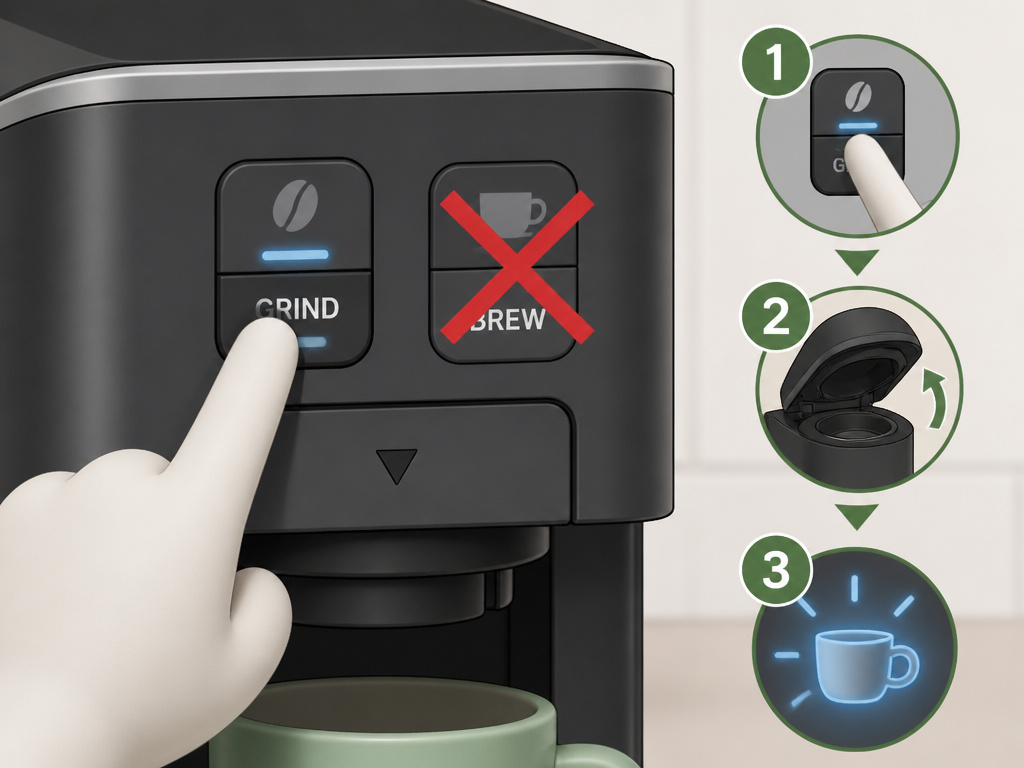
- Single-Serve Grind & Brew (DGB-2C): If the grind light is on, press “Grind” once to cancel. Then open and close the brew head, press your brew size (8, 10, 12 oz).
- Coffee Center (SS-16C): For carafe brew, follow basic drip steps. For single-serve POD mode, wait until the carafe brew is complete and the unit is in “Keep Warm”. The POD function is locked out during a carafe brew.
I prefer the permanent gold tone filter in my DGB-450 for weekday coffee. Not because it’s eco-friendly, though it is, but because the slight silt adds a mouthfeel I miss with paper. Weekends, when I’m serving guests, paper filters go back in. The cup is cleaner and nobody asks about the specks.
TL;DR: Always perform the latch-check ritual first. Then add water, then coffee, then choose the correct function for your model. Ignoring the mode locks leads to a blinking light and no coffee.
Model-Specific Quirks You Will Hit
Cuisinart manuals list these edge cases. You’ll encounter them within the first month of ownership.
The DGB-2C “Grind Cancel” Sequence. This single-serve machine has a dedicated grind cycle. If you press “Brew” while it’s grinding, nothing happens. The manual’s fix: press the Grind button once to cancel, open and close the brew head to reset the sensor, then press your Brew Size button. It’s a three-step override new owners never expect.
The SS-16C Mode Lock. This machine is a 12-cup drip and a single-serve brewer in one. They cannot run simultaneously. If the carafe is brewing, the single-serve side is disabled. It only becomes available after the carafe brew finishes and the unit enters “Keep Warm” mode. Trying to use it earlier just gives you unresponsive buttons.
The Thermal Carafe “No Warm” Reality. Models like the DGB-450 come with a double-wall stainless thermal carafe, not a glass carafe on a warming plate. The manual touts this as a feature, no burnt, stale coffee. But the carafe base still gets hot during brewing. You cannot leave it on a machine that’s powered off and expect it to stay warm for hours. It’s an insulated bottle, not a heater. Coffee temperature drops to about 168°F after pouring, then declines steadily.
The 1-4 Cup Setting on the DCC-500. This isn’t a gentle brew. The machine double-heats the water for small batches to ensure proper extraction temperature. It uses a more aggressive heating cycle. If you use this setting with a too-coarse grind, the coffee tastes weak and sour. You must grind slightly finer for 1-4 cups than you would for a full pot.
Before you start: The grinder assembly and filter basket are hot immediately after brewing. Wait a minute, or use a dry towel to handle them. Grabbing the metal grinder housing on a DGB-450 with bare hands after a brew cycle will leave a red mark for an hour.
Programming and Maintenance: The Long-Term Rules
Setting the clock is commodity content. These two maintenance facts are not.
Descaling is Non-Negotiable. All Cuisinart coffee makers with heating elements need descaling. Mineral buildup from water reduces heating efficiency and can trigger the “Clean” light. Models like the DGB-450 have a dedicated descale mode. You run a vinegar-water solution through a special cycle. Ignoring the “Clean” light for more than three months lets scale solidify on the heating element. Eventually, the machine takes longer to brew and the coffee never gets truly hot.
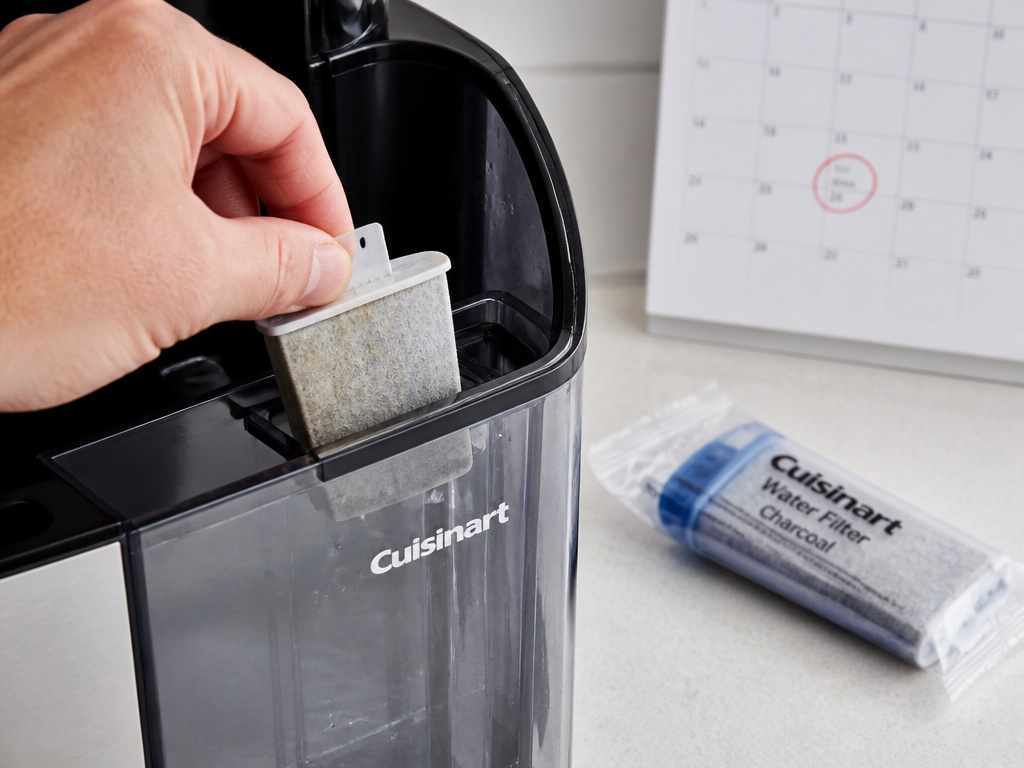
Charcoal Filter Replacement is a Calendar Item. That little filter in the water reservoir isn’t permanent. The DCC-500 manual says replace every 60 days or 60 uses, more often with hard water. Mark your calendar. A spent filter doesn’t just stop filtering, it becomes a flow restriction. Your brew time creeps up from 8 minutes to 10, then 12. The coffee tastes off because the water is both unfiltered and under-extracted from the slower flow.
For detailed steps, your coffee maker manual is the final authority. When the machine acts up, the manual’s troubleshooting table is the first place to look, not a web forum.
Frequently Asked Questions
Why does my Cuisinart beep continuously and not start?
You’ve tripped a safety interlock. On grind-and-brew models, check that the grinder door is fully latched, the filter basket is seated, and the filter basket cover is rotated into its locked position. On single-serve models, ensure the brew head is closed. A missing or misaligned part keeps the circuit open.
Can I use pre-ground coffee in a Cuisinart grind-and-brew machine?
Yes. All grind-and-brew models (DGB-800C, DGB-450, DGB-2C) have a “Grind Off” button or setting. Activate it, add your pre-ground coffee directly to the filter basket, and brew as normal. This bypasses the grinder entirely.
How much coffee do I put in a 12-cup Cuisinart?
For a brew-only model like the DCC-500, the maximum is 15 level scoops (tablespoons) of ground coffee for a full 60-oz pot. For a grind-and-brew like the DGB-800C, fill the bean hopper to the MAX line, which is roughly 16 tablespoons of whole beans. Using more causes overflow.
Why is my coffee weak from my Cuisinart?
Three likely causes: your charcoal water filter is spent (replace it), you’re using the 1-4 cup setting with a grind that’s too coarse (grind finer), or you’ve exceeded the coffee dose and caused channeling where water bypasses the grounds (stick to the scoop limit).
What’s the difference between the permanent filter and a paper filter?
The permanent gold tone filter is reusable and allows more oils and fine particles into your cup, creating a fuller body. A paper coffee filter traps all fines and most oils, yielding a cleaner, brighter cup. Never use both together, it causes an overflow.
How do I clean the grinder on a grind-and-brew model?
After brewing and letting it cool slightly, remove the entire grinder assembly. Dump out the spent grounds. Wipe the interior with a dry brush or cloth. Do not wash the metal burrs under water, moisture leads to rust and stale oil buildup. Reassemble when dry.
The Bottom Line
Working a Cuisinart coffee machine means respecting its engineered limits. The safety interlocks are there for a reason, a hot grinder and boiling water demand containment. The capacity limits are precise because the basket size is fixed.
Remember the three matches: the right filter, the measured dose, and the latched door. Miss one and the machine tells you with a beep. Hit all three and you get a consistent pot every time.
Your machine’s manual holds the specific quirks for your model. When in doubt, that PDF is more reliable than any online summary. Finally, mark your calendar for filter replacements. Sixty days passes faster than you think, and a fresh filter makes a tangible difference in the cup.
{
“@context”: “https://schema.org”,
“@type”: “HowTo”,
“name”: “How to Work a Cuisinart Coffee Machine”,
“totalTime”: “PT15M”,
“tool”: [
{
“@type”: “HowToTool”,
“name”: “Cuisinart coffee maker (DGB-800C, DCC-1200C, DGB-2C, SS-16C, or DCC-500 series)”
},
{
“@type”: “HowToTool”,
“name”: “Fresh coffee beans or pre-ground coffee”
},
{
“@type”: “HowToTool”,
“name”: “Paper filter or permanent gold tone filter”
},
{
“@type”: “HowToTool”,
“name”: “Clean, cool water”
}
],
“step”: [
{
“@type”: “HowToStep”,
“name”: “Check the interlocks”,
“text”: “Ensure the grinder door (if present), filter basket, and basket cover are fully seated. A missing piece triggers a continuous beep and stops operation.”
},
{
“@type”: “HowToStep”,
“name”: “Add water to the reservoir”,
“text”: “Fill to the desired cup line using the carafe or a separate pitcher. For single-serve modes, ensure the water is above the ‘Add Water’ indicator line.”
},
{
“@type”: “HowToStep”,
“name”: “Add coffee to the correct chamber”,
“text”: “For grind-and-brew models, add whole beans to the hopper up to the MAX line. For brew-only models, add ground coffee to the filter basket—16 level scoops max for the DGB-800C, 15 for the DCC-500.”
},
{
“@type”: “HowToStep”,
“name”: “Select your mode and start”,
“text”: “Choose carafe brew, single-serve, or grind-and-brew. Press the Brew button. If the grind cycle is active on a DGB-2C, cancel it first before brewing.”
},
{
“@type”: “HowToStep”,
“name”: “Wait for completion and clean”,
“text”: “The machine will beep when done. For grind-and-brew models, remove the hot grinder assembly and filter basket immediately to clean out spent grounds.”
}
]
}
{
“@context”: “https://schema.org”,
“@type”: “FAQPage”,
“mainEntity”: [
{
“@type”: “Question”,
“name”: “Why does my Cuisinart beep continuously and not start?”,
“acceptedAnswer”: {
“@type”: “Answer”,
“text”: “You’ve tripped a safety interlock. On grind-and-brew models, check that the grinder door is fully latched, the filter basket is seated, and the filter basket cover is rotated into its locked position. On single-serve models, ensure the brew head is closed. A missing or misaligned part keeps the circuit open.”
}
},
{
“@type”: “Question”,
“name”: “Can I use pre-ground coffee in a Cuisinart grind-and-brew machine?”,
“acceptedAnswer”: {
“@type”: “Answer”,
“text”: “Yes. All grind-and-brew models (DGB-800C, DGB-450, DGB-2C) have a “Grind Off” button or setting. Activate it, add your pre-ground coffee directly to the filter basket, and brew as normal. This bypasses the grinder entirely.”
}
},
{
“@type”: “Question”,
“name”: “How much coffee do I put in a 12-cup Cuisinart?”,
“acceptedAnswer”: {
“@type”: “Answer”,
“text”: “For a brew-only model like the DCC-500, the maximum is 15 level scoops (tablespoons) of ground coffee for a full 60-oz pot. For a grind-and-brew like the DGB-800C, fill the bean hopper to the MAX line, which is roughly 16 tablespoons of whole beans. Using more causes overflow.”
}
},
{
“@type”: “Question”,
“name”: “Why is my coffee weak from my Cuisinart?”,
“acceptedAnswer”: {
“@type”: “Answer”,
“text”: “Three likely causes: your charcoal water filter is spent (replace it), you’re using the 1-4 cup setting with a grind that’s too coarse (grind finer), or you’ve exceeded the coffee dose and caused channeling where water bypasses the grounds (stick to the scoop limit).”
}
},
{
“@type”: “Question”,
“name”: “What’s the difference between the permanent filter and a paper filter?”,
“acceptedAnswer”: {
“@type”: “Answer”,
“text”: “The permanent gold tone filter is reusable and allows more oils and fine particles into your cup, creating a fuller body. A paper coffee filter traps all fines and most oils, yielding a cleaner, brighter cup. Never use both together, it causes an overflow.”
}
},
{
“@type”: “Question”,
“name”: “How do I clean the grinder on a grind-and-brew model?”,
“acceptedAnswer”: {
“@type”: “Answer”,
“text”: “After brewing and letting it cool slightly, remove the entire grinder assembly. Dump out the spent grounds. Wipe the interior with a dry brush or cloth. Do not wash the metal burrs under water, moisture leads to rust and stale oil buildup. Reassemble when dry.”
}
}
]
}
