
Download Your Ninja DualBrew Coffee Maker Manual | Setup to Brewing
Your Ninja DualBrew coffee maker manual provides setup, safety, and model-specific instructions for the CFP100, CFP300, and CFP201 series. The key details are voltage (120V), power (1550W), reservoir size (60 oz), and the correct use of the Ninja Grounds Adapter or Ninja Pod Adapter depending on your brew method.
Most people download the PDF, glance at the pictures, and toss the carafe in the sink for a rinse. They miss the one sentence that explains why their first pot tastes like wet paper.
This guide walks through what’s actually in the manual, where to find your model number, and how to avoid the three setup mistakes that cause half the support calls.
Key Takeaways
- Your model number (CFP101, CFP301, CFP201) is on a QR code label on the back of the machine. It dictates which manual you need.
- You must run a full carafe of water through the machine before brewing any coffee. Skipping this leaves manufacturing residue in your first pot.
- The Ninja Grounds Adapter is pre-installed in CFP100 models. You must remove it to use a paper filter for ground coffee.
- The “Keep Warm” plate defaults to ON after brewing and will shut the entire machine off automatically after four hours.
- Using the wrong paper filter size (#4 cone, not basket) causes grounds overflow and a clogged brew basket.
What’s Actually in Your Ninja DualBrew Manual?
The manual isn’t just a booklet. It’s a model-specific technical document. The CFP100 series manual covers the CFP101. The CFP300 series manual covers the CFP300, CFP301, and CFP305. The CFP201 has its own guide.
All Ninja DualBrew Pro models (CFP300 series) operate at 120 volts and 60Hz, with a power rating of 1550W for the CFP300/CFP301 and 1500W for the CFP305. The water reservoir holds 60 fluid ounces. The system includes Classic, Rich, Over Ice, and Specialty brew styles.
The first few pages are critical safety warnings. They specify using the machine on a dry, level surface away from edges. They warn against using abrasive cleaners on the carafe. This isn’t corporate legalese. Using a scouring pad on the carafe creates micro-scratches that trap coffee oils and make every subsequent clean taste stale.
TL;DR: Your manual is keyed to your model’s wattage and features. The safety section explains why your carafe gets cloudy if you wash it wrong.
Finding Your Model and the Right Manual
You cannot use a CFP300 manual for a CFP101. The parts and some functions differ.
Power off and unplug the machine. Tilt it forward and look at the back, near where the power cord exits. You’ll see a white label with a QR code and text. The model number is there. It will read something like CFP101, CFP301, or CFP201.
Write it down.
| Model Series | Example Model Numbers | Key Feature Difference |
|---|---|---|
| CFP100 | CFP101 | Pre-installed Grounds Adapter; basic brew styles. |
| CFP300 (Pro) | CFP300, CFP301, CFP305 | Specialty brew style; thermal carafe on some models. |
| CFP200 | CFP201 | Delay Brew function; customizable grounds/pod sizes. |
If you’ve lost your physical manual, search for “Ninja DualBrew [Your Model Number] manual PDF”. The official owner’s guides are hosted on retailer sites like Home Depot’s catalog (thdstatic.com). These are the primary sources. Avoid third-party aggregator sites that might host outdated versions.
For general troubleshooting, a Braun coffee maker manual or a Black & Decker user guide won’t help. The mechanics are different.
The Critical First-Time Setup Everyone Rushes
Here is the sequence the manual prescribes, and what happens if you cut corners.
- Wash the carafe and brew basket with warm, soapy water. Rinse thoroughly. The carafe has a “max” fill line. Ignoring it leads to overflow during brewing.
- Place the machine on a stable, level surface. An uneven counter makes the water reservoir seat incorrectly. The machine might not detect it’s full.
- Fill the reservoir to the 60 oz max line with fresh, cold water. Do not use distilled water. The mineral content in tap or filtered water is needed for proper heating element operation.
- Place the empty carafe on the warming plate. Do not add coffee or a filter yet.
- Press the power button. Select the largest brew size (e.g., Full Carafe). Press start. This flushes the internal heating tank and lines.
- Discard this water. Your machine is now primed.
Skipping the water flush means your first pots will taste off. You’ll smell a faint, hot plastic scent. That’s the manufacturing oils burning off the heating element. It’s harmless but ruins the coffee.
Common mistake: Adding coffee to the first flush cycle — the coffee absorbs those initial flavors and you waste a full scoop of grounds. The result is a bitter, chemical-tinged pot you have to dump.
Brewing Your First Pot: Grounds vs Pods
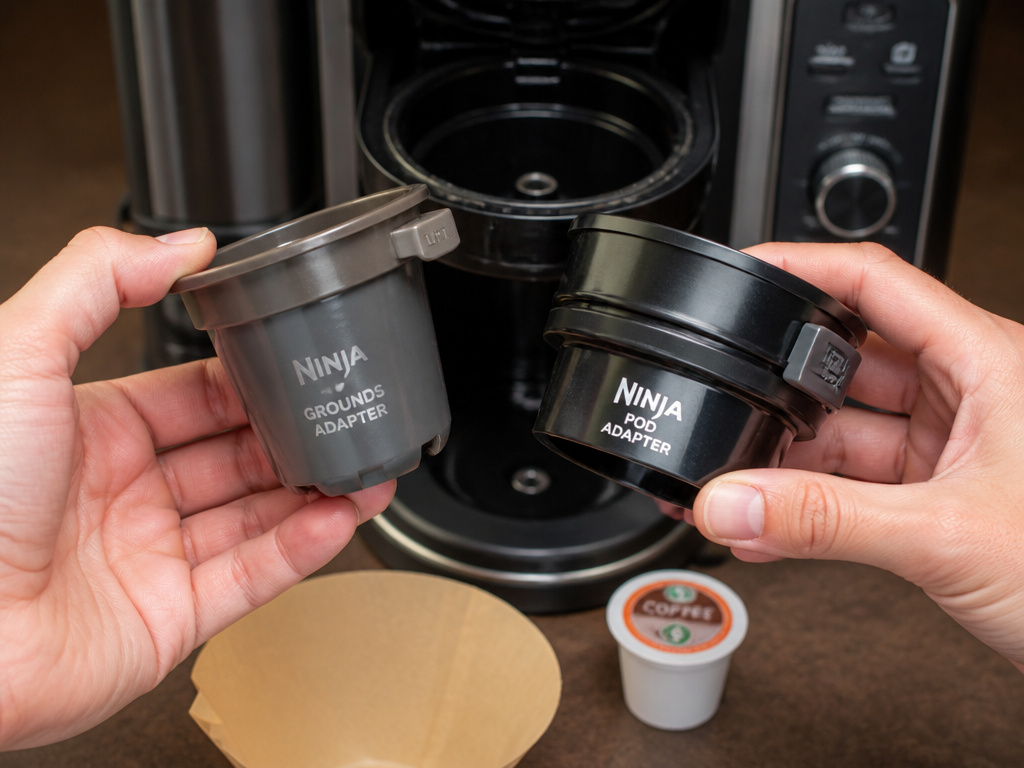
This is where the DualBrew system gets its name. The path differs.
For Ground Coffee (The Manual’s Main Path)
The CFP100 series has a quirk. The Ninja Grounds Adapter is already clicked into the brew basket out of the box. You must remove it to use paper filters.
- Lift the brew basket lid. Pull the gray Grounds Adapter straight up and out. Set it aside.
- Take a #4 paper cone filter. Fold its seams firmly and place it into the empty brew basket. Press it down so it sits flush.
- Use the included Ninja Smart Scoop. The manual has a chart: for a Full Carafe, use 9-12 scoops. For a single cup, use 1-2. More scoops equal stronger coffee.
- Close the sliding lid. The machine detects the basket is present.
The choice between a burr grinder and a blade model matters here. Blade grinders create dust that can clog the small exit holes in the basket. A consistent grind from a burr grinder gives you even extraction and fewer cleanups.
For Pods (K-Cup Style)
You do not use a paper filter. The pod is its own filter.
- Ensure the brew basket is empty. No Grounds Adapter, no paper filter.
- Take the separate Ninja Pod Adapter. Insert it into the brew basket.
- Slide the adapter’s handle forward until it clicks and locks. This is the step people miss. An unlocked adapter leaks hot water around the pod, making weak coffee.
- Lift the handle, drop in your pod, and close the handle firmly.
The machine automatically detects the pod adapter and shows only pod sizes (6, 8, 10, 12 oz). You cannot select a carafe size.
TL;DR: Remove the gray adapter for grounds, use a #4 cone filter. For pods, lock the black adapter into the basket. Mixing these steps floods your counter.
Decoding the Brew Style Buttons
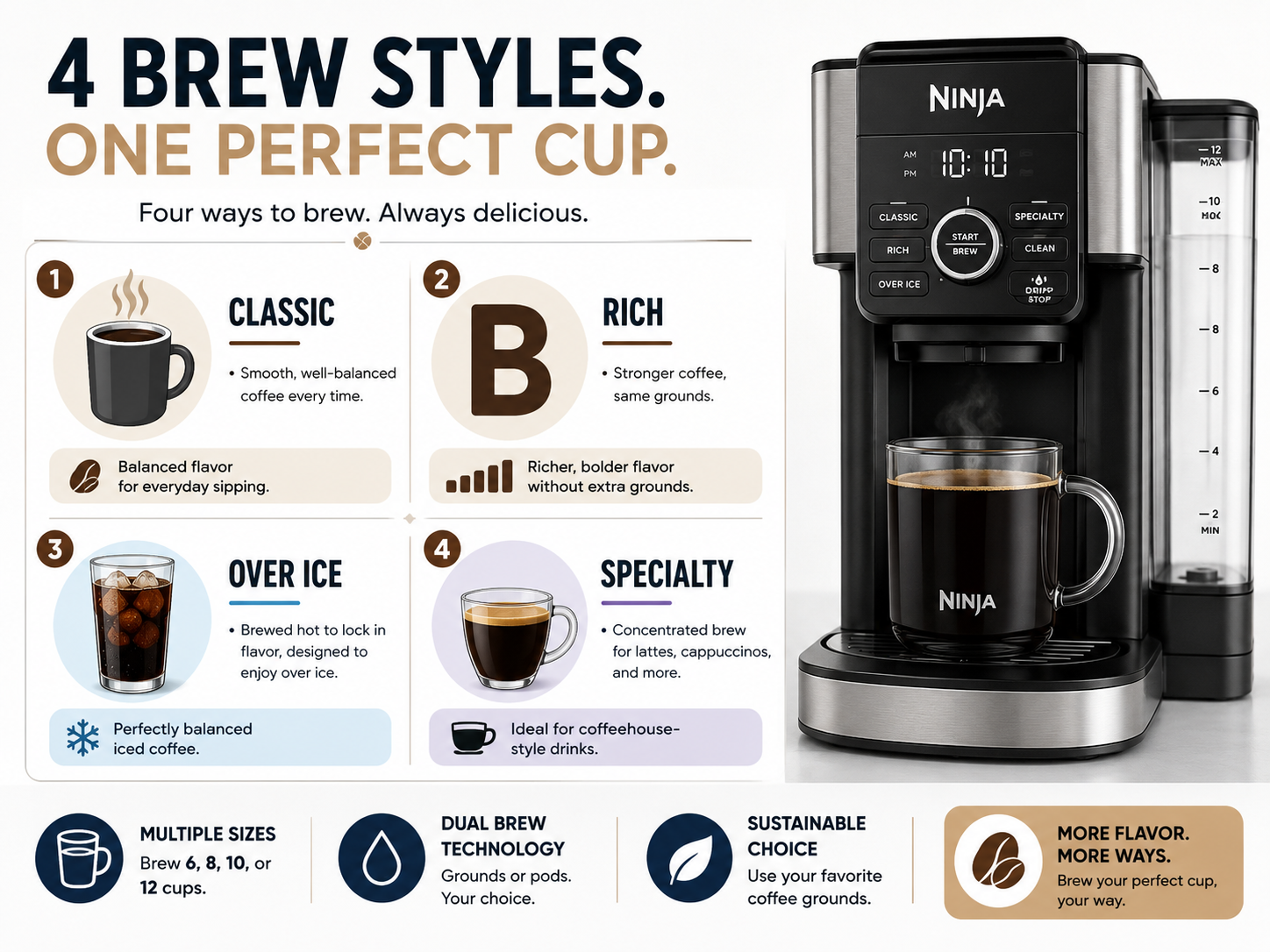
Your model determines your options. CFP100 and CFP201 have Classic, Rich, and Over Ice. CFP300 Pro models add “Specialty”.
- Classic: Standard drip coffee profile. Use this for your everyday pot.
- Rich: Brews slower with a slightly higher temperature for more extraction. It makes stronger coffee from the same amount of grounds. Don’t use this with dark roast pods; it can over-extract and turn bitter.
- Over Ice: Brews a more concentrated coffee directly over a cup of ice so it doesn’t get watered down. It uses less water for the selected size.
- Specialty (Pro Models): Creates a concentrated single serve, similar to a strong espresso shot. Designed for mixing with frothed milk.
The manual doesn’t tell you this, but the Over Ice and Specialty cycles put more stress on the pump. If your water is very hard, scale builds up faster using these modes. Run a descale cycle every 2-3 months if you use them daily.
This is different from the process of making a cafe americano, which dilutes espresso with hot water. Here, the machine does the concentrating for you.
Maintenance the Manual Emphasizes (And What It Hides)
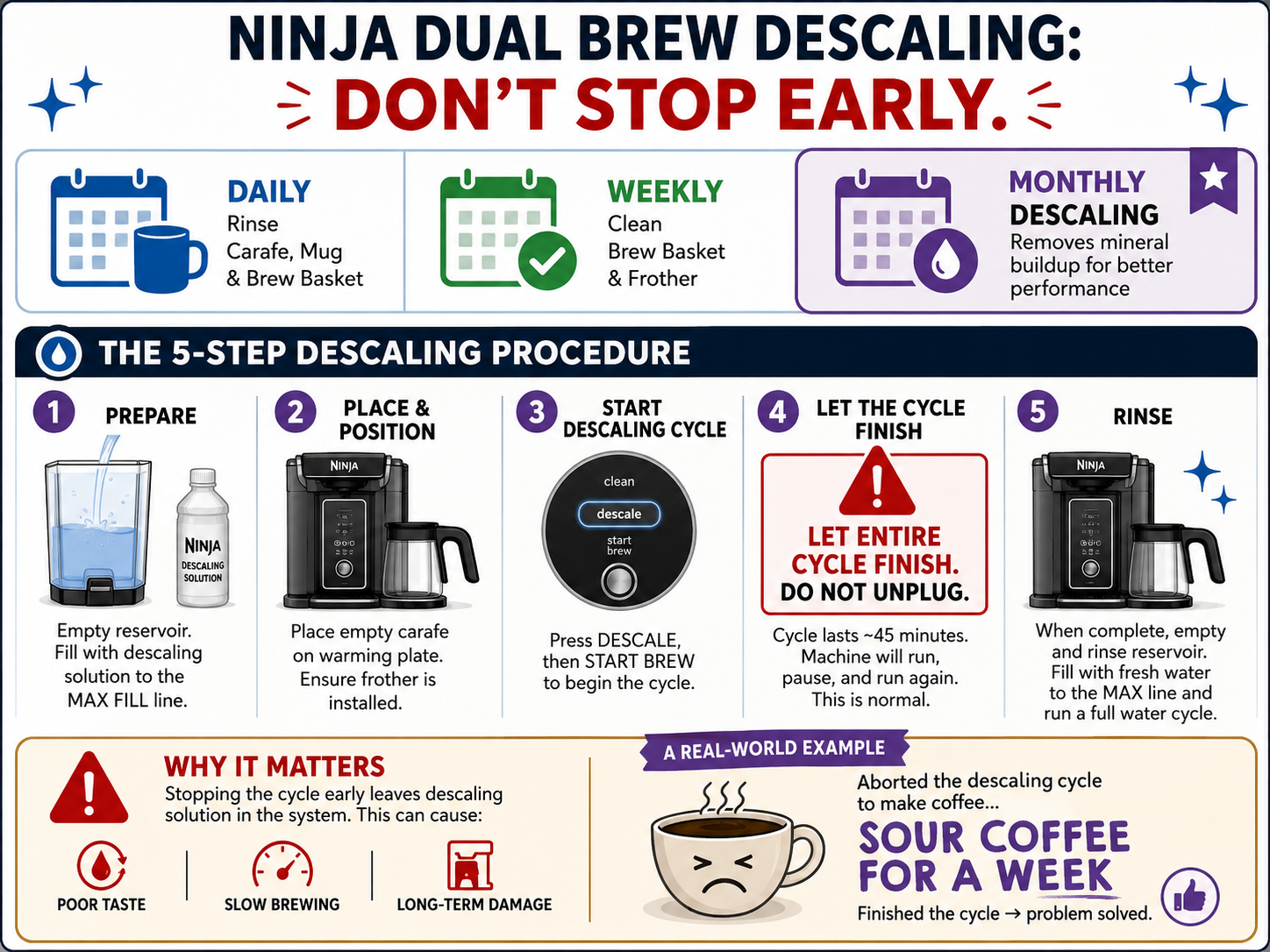
The daily and weekly tasks are straightforward. The monthly one has a catch.
Daily:
- Discard used filter and grounds or pod.
- Rinse brew basket and carafe.
- Wipe the warming plate with a damp cloth.
Weekly:
- Wash the brew basket, carafe, and lid in warm soapy water.
- Remove the water reservoir and wash it. Dry the mating surface before reinserting.
Monthly / As Needed: Descaling.
The manual says to use a “standard coffee maker descaling solution”. It doesn’t specify that citric acid-based descalers are safer for the internal plastic than vinegar. Vinegar works but its smell can linger for several cycles.
Here is the descaling procedure most people abort too early:
- Fill reservoir with 60 oz of water and the correct amount of descaler.
- Place a large bowl or your carafe on the warming plate.
- Press and hold the “Clean” button for 3 seconds (or follow your model’s start command). The cycle begins.
- Let the entire cycle finish, then discard the water. It will pause multiple times. Do not unplug it.
- Refill the reservoir with fresh water only. Run two more full rinse cycles to flush the system.
I stopped a descale cycle halfway through once because it was taking too long. The remaining acid solution sat in the hot tank overnight. The next morning’s coffee tasted sour for a week until I ran three more plain water cycles. Now I set a timer for 45 minutes and walk away.
The machine also has an auto-shutoff. The “Keep Warm” function turns off after four hours, and the entire machine powers down sometime after that for safety.
Troubleshooting Common Issues
The troubleshooting chart is in the back of the manual. These are the common ones it solves.
| Problem | Likely Cause | Manual’s Fix |
|---|---|---|
| Machine won’t power on | Not plugged in; outlet issue; power button not pressed. | Check power cord; try another outlet; press power button firmly. |
| Water not flowing | Reservoir not seated; clogged needle (pod mode); scale buildup. | Remove and re-seat reservoir; clear pod adapter puncture needle; descale. |
| Coffee tastes weak | Too few grounds; wrong grind size; unlocked pod adapter. | Add more coffee; use medium grind; ensure pod adapter handle is locked forward. |
| “Add Water” light on, but reservoir is full | Float in reservoir is stuck. | Remove reservoir, shake it gently to free the float, reinsert. |
If the “Clean” light is flashing, it’s descale time. Ignoring it will eventually lead to slower brewing and luke-warm coffee as scale insulates the heater.
A leak from the bottom usually means the internal water tank seal has failed. This is not a user-serviceable fix. The manual will direct you to contact Ninja customer support. For issues with other components, like finding the right Breville coffee filters or Bunn coffee filters, the process is different.
Paper filter choice impacts taste, too. The debate between bleached and unbleached filters is about taste transfer and environmental impact. Unbleached filters can impart a papery taste to your first pot. Pre-rinsing them with hot water solves it.
Frequently Asked Questions
Where is the serial number for my Ninja DualBrew?
It is on the same white QR code label on the back of the unit as the model number. You’ll need it for warranty registration or service calls.
Can I use my own reusable pod?
Yes. The manual doesn’t forbid it. Use the Pod Adapter and fill a reusable K-cup with your own grounds. Ensure it’s not overfilled, or the handle won’t close tightly, causing leaks.
How long does the “Keep Warm” function last?
It keeps the carafe warm for up to four hours. After that, the warming plate shuts off and the machine will eventually enter a full auto-shutoff to conserve energy.
What size paper filter do I need?
You need #4 cone-style paper filters, not basket-style. Using a basket filter causes grounds to spill over the edges and clog the system. For a deeper dive on filter materials, our article on biodegradable filters covers your eco-friendly options.
Why is my Over Ice brew not strong enough?
You are likely using too much ice. The cycle is calibrated for a specific ice-to-coffee ratio. Use the cup size recommended in the manual (usually 16 oz) and fill it halfway with ice before brewing.
Can this machine grind coffee beans?
No. The Ninja DualBrew is only a brewer. For that, you’d need a separate appliance, though some explore using a Ninja blender for grinding beans in a pinch. For consistent results, a dedicated grinder is best.
The Bottom Line
Your Ninja DualBrew manual is specific to your three-digit model code. Find that code first. The initial water flush is non-negotiable. Remember the adapter swap: grounds need the gray adapter out and a #4 cone filter in; pods need the black adapter locked in place.
The brew styles are more than marketing. Rich uses a hotter, slower flow. Over Ice and Specialty modes accelerate scale buildup. Descaling with a proper solution, not vinegar, keeps the machine running quietly for years. Keep the warming plate clean and dry, and the machine will handle the rest, whether you’re making a simple drip coffee or a fancy specialty drink.
{
“@context”: “https://schema.org”,
“@type”: “HowTo”,
“name”: “How to Set Up and Use a Ninja DualBrew Coffee Maker”,
“totalTime”: “PT15M”,
“tool”: [
{
“@type”: “HowToTool”,
“name”: “Ninja DualBrew coffee maker (CFP100, CFP300, or CFP201 series)”
},
{
“@type”: “HowToTool”,
“name”: “#4 paper cone filters”
},
{
“@type”: “HowToTool”,
“name”: “Ninja Smart Scoop (included)”
},
{
“@type”: “HowToTool”,
“name”: “Measuring cup for water”
}
],
“step”: [
{
“@type”: “HowToStep”,
“name”: “Locate your model number”,
“text”: “Find the QR code label on the back of the unit, near the power cord. Your specific model (e.g., CFP301) determines which manual to use.”
},
{
“@type”: “HowToStep”,
“name”: “Perform the initial water run”,
“text”: “Fill the 60 oz reservoir with fresh water. Place a carafe or mug under the brew head and run a full cycle without coffee to clean the internal lines.”
},
{
“@type”: “HowToStep”,
“name”: “Install the correct filter for grounds”,
“text”: “Insert a #4 paper cone filter into the brew basket, pressing it firmly so the seams are folded and the filter sits flush. The included Ninja Grounds Adapter must be removed for this step.”
},
{
“@type”: “HowToStep”,
“name”: “Brew with grounds or pods”,
“text”: “For grounds: add coffee with the Smart Scoop, close the lid, select size and style. For pods: lock the Ninja Pod Adapter over the empty brew basket, insert pod, close handle firmly.”
},
{
“@type”: “HowToStep”,
“name”: “Select your brew style”,
“text”: “Choose Classic for balanced flavor, Rich for stronger coffee, Over Ice for concentrated brew over ice, or Specialty for a single-serve concentrated blend.”
}
]
}
{
“@context”: “https://schema.org”,
“@type”: “FAQPage”,
“mainEntity”: [
{
“@type”: “Question”,
“name”: “Where is the serial number for my Ninja DualBrew?”,
“acceptedAnswer”: {
“@type”: “Answer”,
“text”: “It is on the same white QR code label on the back of the unit as the model number. You’ll need it for warranty registration or service calls.”
}
},
{
“@type”: “Question”,
“name”: “Can I use my own reusable pod?”,
“acceptedAnswer”: {
“@type”: “Answer”,
“text”: “Yes. The manual doesn’t forbid it. Use the Pod Adapter and fill a reusable K-cup with your own grounds. Ensure it’s not overfilled, or the handle won’t close tightly, causing leaks.”
}
},
{
“@type”: “Question”,
“name”: “How long does the \”Keep Warm\” function last?”,
“acceptedAnswer”: {
“@type”: “Answer”,
“text”: “It keeps the carafe warm for up to four hours. After that, the warming plate shuts off and the machine will eventually enter a full auto-shutoff to conserve energy.”
}
},
{
“@type”: “Question”,
“name”: “What size paper filter do I need?”,
“acceptedAnswer”: {
“@type”: “Answer”,
“text”: “You need #4 cone-style paper filters, not basket-style. Using a basket filter causes grounds to spill over the edges and clog the system. For a deeper dive on filter materials, our article on biodegradable filters covers your eco-friendly options.”
}
},
{
“@type”: “Question”,
“name”: “Why is my Over Ice brew not strong enough?”,
“acceptedAnswer”: {
“@type”: “Answer”,
“text”: “You are likely using too much ice. The cycle is calibrated for a specific ice-to-coffee ratio. Use the cup size recommended in the manual (usually 16 oz) and fill it halfway with ice before brewing.”
}
},
{
“@type”: “Question”,
“name”: “Can this machine grind coffee beans?”,
“acceptedAnswer”: {
“@type”: “Answer”,
“text”: “No. The Ninja DualBrew is only a brewer. For that, you’d need a separate appliance, though some explore using a Ninja blender for grinding beans in a pinch. For consistent results, a dedicated grinder is best.”
}
}
]
}
