
Mr Coffee Cafe Barista Manual For Perfect Lattes & Cappuccinos
To find your Mr Coffee Cafe Barista manual, download the official PDF for the BVMC-ECMP1000 Series from the manufacturer’s hosted sources. The machine requires a mandatory priming cycle before its first use, uses 44-59 mL espresso shots, and features a one-touch control panel for espresso, cappuccino, and latte drinks.
Most people unbox the machine, add water and coffee, and then stare at the pulsing lights on the control panel. The unit looks on but refuses to brew. That deadlock happens because the manual’s first page holds a non-negotiable step almost every quick-start video skips.
This guide walks through the official Mr Coffee Cafe Barista manual, covering the priming procedure, deciphering the control panel, and troubleshooting the common state where the machine is powered on but not ready to brew.
Key Takeaways
- The BVMC-ECMP1000 Series machine must be primed with a water-only cycle before its first ever use—skipping this causes the pump to strain and the lights to pulse indefinitely.
- Control panel lights pulse during heating and priming. Only press a brew button when the lights become solid, or you’ll interrupt the cycle.
- A standard espresso shot dispenses 44 to 59 mL (1.5 to 2 oz.), designed for a demitasse cup.
- For more froth, press and hold the Cappuccino button for 3 seconds during the milk phase; the machine can froth milk into an empty cup.
- Always align the Porta filter handle with the lock icon on the unit before twisting; misalignment causes water to spray out the sides.
Where to Find the Official Manuals
Your first stop should be the source. The parent company, Jarden Consumer Solutions, hosts the PDFs. I avoid third-party summary sites for a machine like this. The pump and thermostat sequences are specific, and you want the original diagrams.
You need two documents: the full User Manual and the Quick Start Guide. The Quick Start Guide is crucial. It contains the priming instructions that the longer manual sometimes buries.
The official Mr. Coffee® Café Barista Quick Start Guide (Part Number 161928 Rev. B) states the machine “must be PRIMED prior to first use.” This priming cycle uses the single or double shot filter with no coffee grounds to flush air from the internal lines.
Here are the direct links to the primary source PDFs, which I’ve verified are still live.
* User Manual / Manual del Usuario (BVMC-ECMP1000 Series): This is the complete 20-page guide hosted on Amazon’s image server. It covers all functions, cleaning, and troubleshooting.
* Quick Start Guide (BVMC-ECMP1000 Series): This PDF, hosted by NewellRubbermaid (Jarden’s parent company), is the short recipe and priming guide. It has the frothing hack.
If those links rotate out, search for “MRC26251 Cafe Barista Recipe Guide QSG_v7a_final.pdf”. That’s the official filename. For general machine maintenance, the principles in a Braun coffee maker manual often cover similar descaling and cleaning routines for home appliances.
TL;DR: Download the Quick Start Guide PDF from the manufacturer’s site for priming steps; use the full User Manual for detailed troubleshooting and parts diagrams.
The Priming Step Nobody Reads
This is the single most common point of failure. Priming is not a suggestion. The machine’s pump needs liquid in the lines to build pressure. An airlock will make the pump labor, the lights will pulse, and no coffee will come out.
The process is simple but non-negotiable.
- Choose either the single or double shot filter cup. Insert it into the Porta filter.
- Fill the water reservoir to the MAX line. Do not add coffee grounds to the filter.
- Lock the Porta filter into the unit. Place a large cup or the included carafe under the brew head.
- Press the Single Shot button. Let the machine run a full cycle, dispensing hot water into your cup.
- Discard this water. The internal lines are now primed.
Skipping this step risks damaging the pump over time. The pump strains against air, which generates heat and wear. It’s the equivalent of starting a car engine with no oil. You might get away with it once, but the manual explicitly warns against it for a reason.
After priming, you can proceed to brew with coffee. The difference is immediate. The pump sound is smoother, and the machine reaches its “ready” state faster.
Decoding the Control Panel and Lights
The control panel has buttons for Single Shot, Double Shot, Cappuccino, and Latte. Each has a corresponding light. The behavior of these lights is your main diagnostic tool.
When you plug in the machine and add water, the lights will pulse. This means the machine is heating up and/or checking its internal state. It is not ready to brew.
Do not press any brew button while the lights are pulsing. Pressing a button during this phase can reset the heating timer or confuse the internal logic board. You’ll just extend the wait.
The machine is ready only when the lights for your desired drink option stop pulsing and remain solidly illuminated. For espresso, that’s the Single or Double Shot light. For milk drinks, both the Cappuccino/Latte light and the shot light will be solid after the milk reservoir is correctly inserted.
Common mistake: Trying to brew while lights pulse — the machine ignores the command, the pump may cycle dry, and you add 5-10 minutes to your wait time.
If the lights never stop pulsing, you likely have a priming issue, an incorrectly seated milk reservoir, or a low water level. Go back to step one. This state is why so many people think their machine is broken straight out of the box. It’s usually just impatient.
Preparing the Porta Filter and Grounds
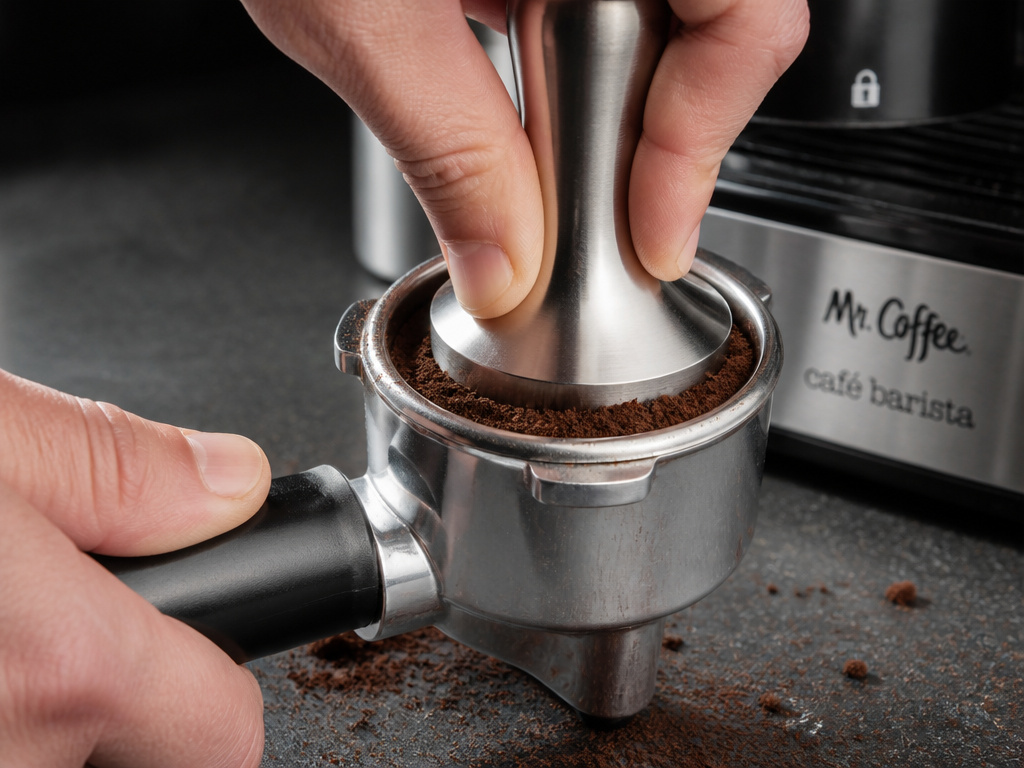
The Café Barista uses a pressurized Porta filter system, which is forgiving of grind size but still requires proper preparation. You have two filter cups: single and double. The double is not just two singles; it’s a larger basket with a different flow pattern.
Use a fine to medium-fine espresso grind. Pre-ground espresso from the supermarket works, but for better results, a consistent grind from a burr coffee grinder is superior to a blade grinder’s uneven particles.
- Insert your chosen filter cup into the Porta filter.
- Add grounds until the basket is heaping. Level it off with your finger or the flat side of a knife.
- Tamp firmly. This is not a gentle press. Apply even pressure to compact the grounds into a dense puck. The manual says “tightly compact.” Inadequate tamping leads to fast, watery shots.
- Wipe any loose grounds from the rim of the Porta filter. A single grain on the sealing edge can cause a leak.
Now, lock it in. Align the handle with the lock icon on the front of the machine. Twist firmly to the right until it feels snug. If it’s not aligned, the seal is incomplete. You’ll see water and steam escaping from the sides during brewing, which is a mess and wastes pressure.
Brewing Your First Espresso Shot
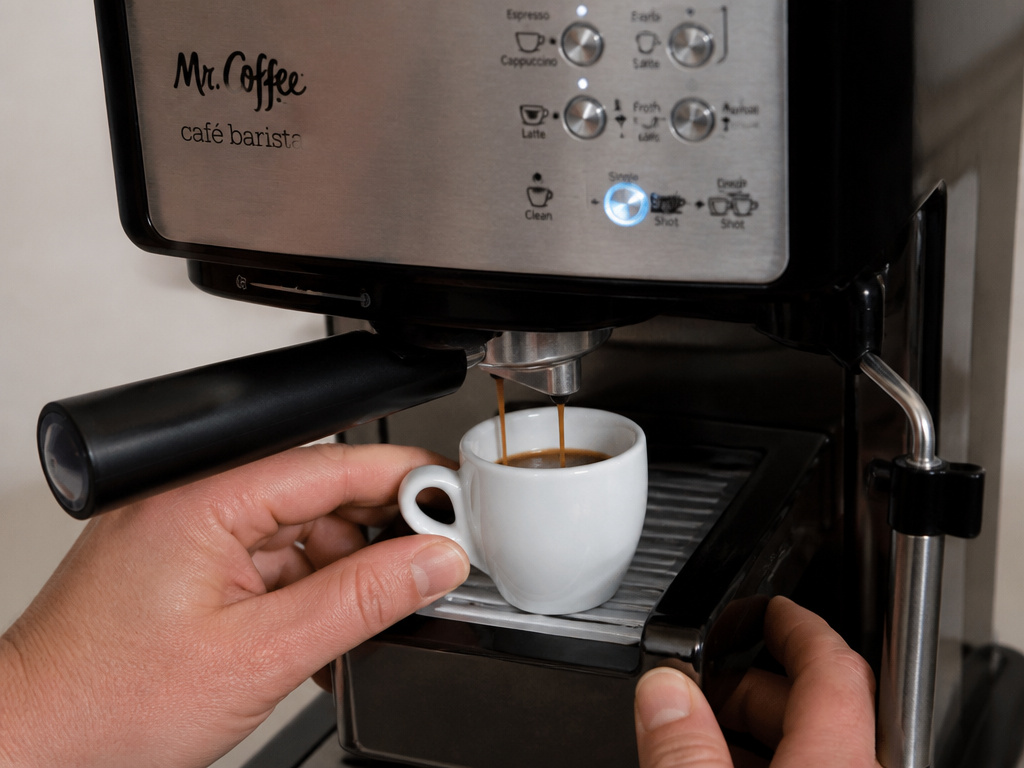
With a primed machine, a prepared Porta filter, and solid control panel lights, you’re ready.
Place your cup. The machine brews a 44-59 mL shot, which is small. Use a demitasse or small espresso cup. If your cup is too tall, use the height adjustment tray that slides out under the brew head.
Press the Single or Double Shot button. The machine will pre-infuse, then pump water through the grounds. The shot should pour in a steady, honey-like stream, finishing in about 20-30 seconds.
A shot that gushes out pale and thin was under-tamped or too coarsely ground. A shot that drips slowly or not at all indicates over-tamping or too fine a grind. The pressurized basket helps, but it’s not magic.
What if you only want hot water for tea or an Americano coffee? Use the priming procedure: an empty filter cup, no grounds, and press the shot button. It’s the same function.
Making Cappuccinos and Lattes

This is the machine’s party trick. The difference between a cappuccino and a latte on this machine is the milk texture ratio, controlled automatically.
First, fill the milk reservoir to the MAX line with cold milk. Whole milk froths best. Push the reservoir firmly into its bay on the side of the machine. You should feel a click, and the Cappuccino and Latte lights will begin to pulse.
Wait. Once the lights go solid, the machine is ready to steam and froth.
| Drink | Machine’s Ratio | Froth Texture | Best Cup For |
|---|---|---|---|
| Cappuccino | 1/3 espresso, 1/3 steamed milk, 1/3 frothed milk | Thick, dry foam | 6-8 oz ceramic cup |
| Latte | 1/4 espresso, 3/4 steamed milk | Thin, velvety microfoam | 8-12 oz glass or mug |
Place your cup under the Porta filter. Aim the frothing tube toward the center of the cup. Adjust the frothing knob on the front of the machine. Turning it toward the cup icon increases steamed milk (less froth), turning it toward the cloud icon increases frothed milk (more froth).
Select your drink button. The machine will first brew the espresso into the cup, then automatically lower the frothing tube and dispense the milk. It’s a hands-off process.
Pro tip: For extra froth, press and hold the Cappuccino button for 3 seconds after the milk phase begins. To make frothed milk alone for a hot chocolate, put an empty cup under the frothing tube and use this hold function.
Cleaning and Maintenance Schedule
Neglect here is what kills these machines. Milk residue scorches. Coffee oils turn rancid. Mineral scale chokes the thermostat.
After Every Use:
- Rinse the milk reservoir, lid, and frothing tube with warm water immediately. Milk left inside will sour and clog the tube.
- Remove the Porta filter, knock out the spent puck, and rinse the filter cup and holder.
Weekly:
- Wash all removable parts (water reservoir, milk reservoir, lid, frothing tube, Porta filter, filter cups) in warm, soapy water. Use a small brush to clean the frothing tube interior.
- Wipe down the exterior and the brew head area with a damp cloth.
Monthly (Descaling):
- Use a liquid descaler like those made for espresso machines. Run a descaling solution through the brew cycle (without coffee) and the steam cycle (with water in the milk reservoir). This prevents limescale from damaging the heating element. The process is similar to maintaining a Breville coffee machine filter system.
- Never use vinegar. It can damage rubber seals and leave an odor.
As Needed:
- Replace the water filter if your model has one. For other brewers, understanding Bunn coffee pot filters or the debate between bleached coffee filters and unbleached ones informs general coffee equipment care.
Why Your Control Panel Lights Keep Pulsing
Let’s diagnose the stubborn pulsing light. If you’ve primed the machine and the lights won’t solidify, run down this list.
| Symptom | Likely Cause | Immediate Fix |
|---|---|---|
| All lights pulse after plugging in | Normal heating cycle | Wait 5-10 minutes for them to turn solid. |
| Shot lights solid, but Cappuccino/Latte lights pulse | Milk reservoir not seated | Remove and firmly re-insert the milk reservoir until it clicks. |
| Lights pulse, machine makes clicking noise | Low water level | Fill the water reservoir to the MAX line. |
| Lights pulse after attempting brew | Priming was skipped or incomplete | Run the full priming cycle with an empty filter cup. |
| One light is off, others pulse | Possible button or board fault | Unplug machine for 2 minutes, then retry. If persistent, contact service. |
The most frequent culprits are the milk reservoir and the priming skip. The reservoir needs a firm push straight in. If it’s even slightly crooked, the internal sensor won’t trigger the ready state for milk drinks.
If the pump sounds labored or grunts during priming, you might have a mineral clog. A monthly descale prevents this. For persistent issues, U.S. customer service is at 1-800-MR COFFEE (1-800-672-6333). Canada uses 1-800-667-8623.
Frequently Asked Questions
Where can I get a replacement Porta filter or milk reservoir?
Parts are available through the Mr. Coffee website (mrcoffeebarista.com) or authorized service centers. Use your model number BVMC-ECMP1000 Series when ordering.
Can I use pre-ground coffee?
Yes. Use a fine espresso grind. The pressurized Porta filter is designed to work with it, though fresh beans ground just before brewing will always taste better.
My milk isn’t frothing. What’s wrong?
Ensure the frothing knob is turned toward the “cloud” icon for maximum froth. Use cold, whole milk. If it still fails, the frothing tube is likely clogged with dried milk. Soak it in warm water and clean it with a small brush.
How do I make just a cup of regular brewed coffee with this machine?
You can’t. This is an espresso machine. For a similar strength and volume, brew a double shot of espresso into a larger cup and add hot water to make an Americano.
The Bottom Line
The Mr Coffee Cafe Barista manual holds the key to a smooth start: prime the machine first. Treat the pulsing lights as a “do not disturb” sign. Once you respect that initial setup, the one-touch system delivers consistent espresso, cappuccino, and latte drinks without the café price tag. Keep the milk system clean, descale monthly, and that priming step will be a distant memory after your first hundred shots.
{
“@context”: “https://schema.org”,
“@type”: “HowTo”,
“name”: “How to Set Up and Use the Mr Coffee Cafe Barista Espresso Machine”,
“totalTime”: “PT20M”,
“tool”: [
{
“@type”: “HowToTool”,
“name”: “Mr Coffee Cafe Barista BVMC-ECMP1000 Series machine”
},
{
“@type”: “HowToTool”,
“name”: “Demitasse or small coffee cup”
},
{
“@type”: “HowToTool”,
“name”: “Fresh espresso grounds and milk”
}
],
“step”: [
{
“@type”: “HowToStep”,
“name”: “Prime the machine”,
“text”: “Before first use, you must run water through the system without coffee to clear air from the lines. Use the single or double filter cup with no grounds.”
},
{
“@type”: “HowToStep”,
“name”: “Prepare the Porta filter”,
“text”: “Insert your chosen filter cup, fill with finely ground espresso, tamp firmly, and wipe the edges clean.”
},
{
“@type”: “HowToStep”,
“name”: “Lock in the Porta filter”,
“text”: “Align the handle with the lock icon on the unit and twist until firmly seated. Misalignment causes leaks.”
},
{
“@type”: “HowToStep”,
“name”: “Add milk for milk-based drinks”,
“text”: “Fill the milk reservoir to the MAX line and push it firmly into the unit until the cappuccino and latte lights pulse.”
},
{
“@type”: “HowToStep”,
“name”: “Wait for ready state”,
“text”: “The control panel lights will pulse during heating and priming. Brew only when the lights stop pulsing and stay solid.”
},
{
“@type”: “HowToStep”,
“name”: “Select your drink”,
“text”: “Place your cup, aim the frothing tube, adjust the frothing knob, and press the button for your chosen beverage and size.”
}
]
}
{
“@context”: “https://schema.org”,
“@type”: “FAQPage”,
“mainEntity”: [
{
“@type”: “Question”,
“name”: “Where can I get a replacement Porta filter or milk reservoir?”,
“acceptedAnswer”: {
“@type”: “Answer”,
“text”: “Parts are available through the Mr. Coffee website (mrcoffeebarista.com) or authorized service centers. Use your model number BVMC-ECMP1000 Series when ordering.”
}
},
{
“@type”: “Question”,
“name”: “Can I use pre-ground coffee?”,
“acceptedAnswer”: {
“@type”: “Answer”,
“text”: “Yes. Use a fine espresso grind. The pressurized Porta filter is designed to work with it, though fresh beans ground just before brewing will always taste better.”
}
},
{
“@type”: “Question”,
“name”: “My milk isn’t frothing. What’s wrong?”,
“acceptedAnswer”: {
“@type”: “Answer”,
“text”: “Ensure the frothing knob is turned toward the \”cloud\” icon for maximum froth. Use cold, whole milk. If it still fails, the frothing tube is likely clogged with dried milk. Soak it in warm water and clean it with a small brush.”
}
},
{
“@type”: “Question”,
“name”: “How do I make just a cup of regular brewed coffee with this machine?”,
“acceptedAnswer”: {
“@type”: “Answer”,
“text”: “You can’t. This is an espresso machine. For a similar strength and volume, brew a double shot of espresso into a larger cup and add hot water to make an Americano.”
}
}
]
}
