
Master Your Brew: How to Program a Cuisinart Coffee Maker
To program a Cuisinart coffee maker, you must complete two separate sequences: setting the current clock time, then setting and activating a future auto-brew time. The process hinges on a mode selector switch or dedicated ‘Prog’ and ‘Auto On’ buttons, and the most common failure point is forgetting to move the switch to ‘Auto On’ after programming.
People get this wrong because they set the program time and walk away, missing the final activation step. The machine sits in ‘Program’ mode, display flashing, and never brews. That silent failure is why you wake up to a cold pot.
This guide walks through the universal steps for all Cuisinart models, drills into the specific switch sequences that actually work, and covers the extra features like auto-off and brew strength that change between the DCC-1200, DCC-3200, and Grind & Brew series.
Key Takeaways
- The clock must be set first and correctly; an wrong clock means your coffee brews at the wrong time.
- Programming is a two-phase process: set the future time in ‘Program’ mode, then switch to ‘Auto On‘ to activate the schedule. The ‘Auto On’ light must be on.
- Most models have a 0–4 hour auto-off setting (default 2 hours). You can disable it by setting it to 0.
- Grind & Brew models like the DGB-550 require an extra step: after setting the program time, you must press the ‘Program’ button once more to lock it in and illuminate the steady ‘Auto On’ light.
- Always prep the machine the night before, water, grounds, filter, empty carafe. The programmer only starts the brew cycle; it doesn’t load ingredients for you.
The Universal First Step: Setting the Clock
Your coffee maker’s brain needs to know what time it is now before it can calculate when to start later. Every Cuisinart model, from the basic DCC-1200 to the fancy Grind & Brew, follows the same initial clock-setting logic.
Plug the machine into power. The display will likely show 12:00 or blink. Find the button labeled ‘Clock’ or, on models with a rotary switch, turn the selector to the ‘Clock’ position. Now press and hold the ‘Hour’ button. After a second, the hour digits on the display will begin to flash. Tap the ‘Hour’ button to advance to the current hour. Use the ‘Minute’ button to set the correct minutes.
Setting the clock on a Cuisinart coffee maker requires holding the ‘Hour’ button until the display flashes, then using the ‘Hour’ and ‘Minute’ buttons to input the current time. The machine uses a 12-hour format with only a PM indicator light.
Here is the nuance most guides skip. Cuisinart uses a 12-hour format with only a PM indicator. If it’s 8 AM, you set the hour to 8 and ensure the PM light is off. If it’s 8 PM, set the hour to 8 and the PM light should be on. Getting this wrong means your 6 AM auto-brew becomes a 6 PM surprise. Once the time is correct, press the ‘Clock’ button again or simply wait 5 seconds. The flashing will stop, and the time will be set.
TL;DR: Hold ‘Hour’ until it flashes, set the correct hour (AM=no PM light, PM=PM light on), set minutes, confirm. Do this first.
Programming the Auto-Brew (The Core Sequence)
This is where the magic happens, and where most people trip. Programming is not one action but two: telling the machine when to brew, and then telling it to brew at that time.
Phase 1: Inputting the Future Brew Time
With the clock set, you now tell the machine your target. On most models, you press a button labeled ‘Prog’ or ‘Auto On’. On others, you turn the mode selector switch from ‘Clock’ or ‘Brew’ over to ‘Program’. When you do this, the time display changes. It now shows a new time, usually the current time or a default like 12:00, and it begins flashing. This flashing display is now your programmed brew time, not the clock.
Use the ‘Hour’ and ‘Minute’ buttons to set this to when you want your coffee ready. Want coffee at 6:15 AM? Set the flashing display to 6:15 and ensure the PM light is off. The machine is now in a holding pattern. It knows the target, but the schedule is not yet armed.
Phase 2: Arming the Schedule (The Step Everyone Forgets)
This is the critical, silent step. The machine is in ‘Program’ mode, display flashing. If you walk away now, nothing will happen. You must activate the schedule.
On models with a rotary switch, you must turn the selector from ‘Program’ to ‘Auto On‘. On button-based models, you press the ‘Auto On’ button after setting the program time. A dedicated ‘Auto On’ indicator light will turn on and stay on steadily. This solid light is your confirmation. The display may stop flashing and revert to showing the current clock time. That’s fine. The steady ‘Auto On’ light is the only signal you need.
Common mistake: Setting the program time but leaving the selector switch on ‘Program’, the display keeps flashing, the ‘Auto On’ light never comes on, and the machine will not brew. You wake up to a cold, empty pot.
I learned this the hard way with a Cuisinart DCC-3200. I set the program for 5:30 AM, saw the time flashing, and assumed it was set. The next morning: silence. The switch was still on ‘Program’. Moving it to ‘Auto On’ that night fixed it. The light came on, and coffee greeted me the next day. That tiny switch position makes all the difference.
TL;DR: Set the future time in ‘Program’ mode, then move the switch to ‘Auto On‘ or press the ‘Auto On’ button. Look for the steady ‘Auto On’ light.
Model-Specific Features and Quirks
While the core clock-and-program logic is universal, button layouts and extra functions vary. Knowing your model’s specifics prevents frustration.
The DCC-1200 / DCC-3200 / DCC-T20 Family
These popular 12-cup models use a rotary mode selector switch. The sequence is physical: Clock -> Program -> Auto On. They also share two key programmable features: Auto-Off and Brew Strength/Temperature.
| Feature | Default Setting | How to Adjust | Why It Matters |
|---|---|---|---|
| Auto-Off | 2 hours | Press ‘Hour’ button within 3 secs of power-on. Press ‘Auto Off’ to cycle: 0-1-2-3-4 hrs. | Sets how long the hot plate stays on after brewing. Set to ‘0’ to disable and keep warm indefinitely (check carafe safety). |
| Brew Strength (DCC-3200) | Regular | Press ‘Strength’ button before brewing to toggle Regular/Bold. | Bold mode slows water flow for longer ground contact, extracting more flavor. |
| Temp Control (DCC-T20) | Regular | Press ‘Temperature’ button before brewing to toggle Regular/Hot. | Hot setting increases brew water temperature slightly for a potentially hotter final pot. |
The Auto-Off setting is buried. To access it, you must press the ‘Hour’ button within three seconds of plugging in the machine. Then you tap the ‘Auto Off’ button to cycle through the durations (0, 1, 2, 3, 4 hours). A setting of ‘0’ means the hot plate turns off immediately after brewing. This is useful if you take the carafe to the table and don’t want the plate burning empty.
Grind & Brew Models (DGB-550, DGB-600)
These combine a grinder and brewer. The programming has an extra quirk. After you set the program time (Phase 1), you must press the ‘Program’ button one more time to lock it in. This final press is what changes the ‘Auto On’ indicator from flashing to a steady light. If the light is flashing, the program is not active.
Also, remember to fill the bean hopper and set the grind amount if you want fresh-ground coffee. If you’re using pre-ground, put it in the basket and make sure the grinder is turned off. The machine will bypass the grinding phase.
The Night-Before Prep Checklist
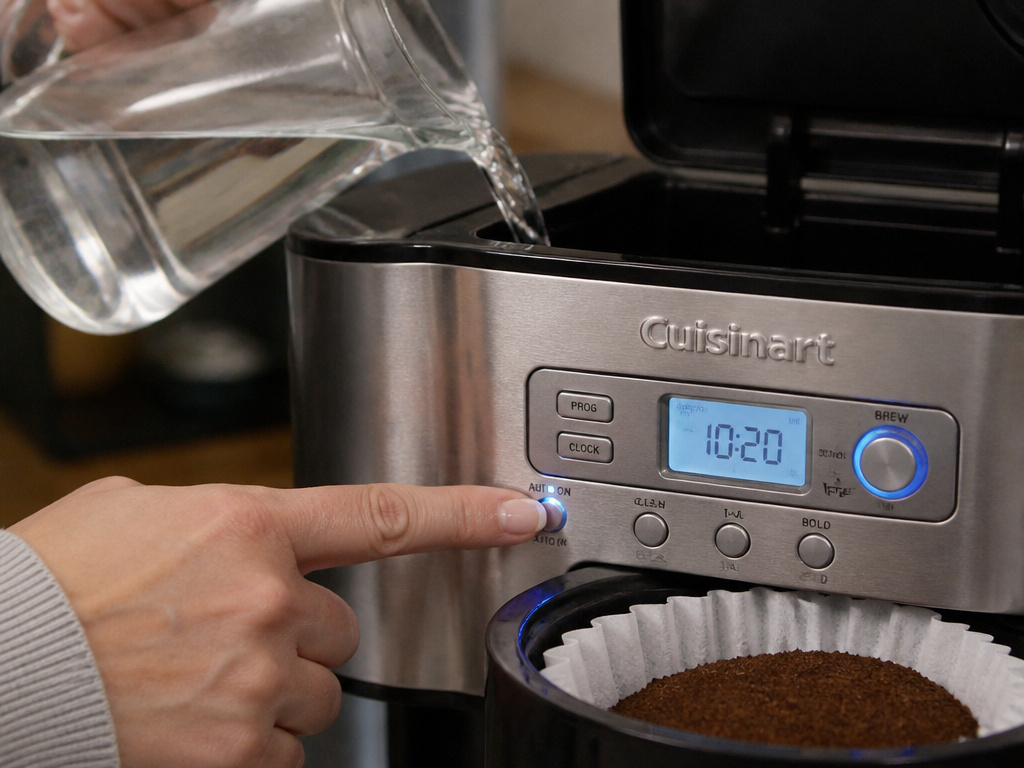
The programmer is not a butler. It triggers a mechanical process that requires everything to be in place. An hour before your target time, it won’t add water or coffee. You must do that.
- Fill the Reservoir: Add fresh, cold water to the desired cup line. Use the markings on the side or the carafe as a guide.
- Prepare the Basket: Insert a paper filter or your permanent reusable filter. Add one tablespoon of ground coffee per cup, or measure your beans into the grinder hopper on Grind & Brew models. Using the right paper coffee filters matters for taste and clarity.
- Secure the Carafe: Ensure the carafe is completely empty, clean, and seated correctly on the warming plate. The Brew Pause feature lets you sneak a cup mid-brew, but the carafe must be present to start the cycle.
- Double-Check the Switch: Verify the mode selector is on ‘Auto On‘ and the indicator light is steady. The display should show the current time, not a flashing program time.
Skip any of these, and the machine will either not start or brew a pot of hot water. I’ve done the last one, forgot the coffee. The smell of brewing water is a sad, confusing way to start the day.
Troubleshooting: When the Program Doesn’t Run
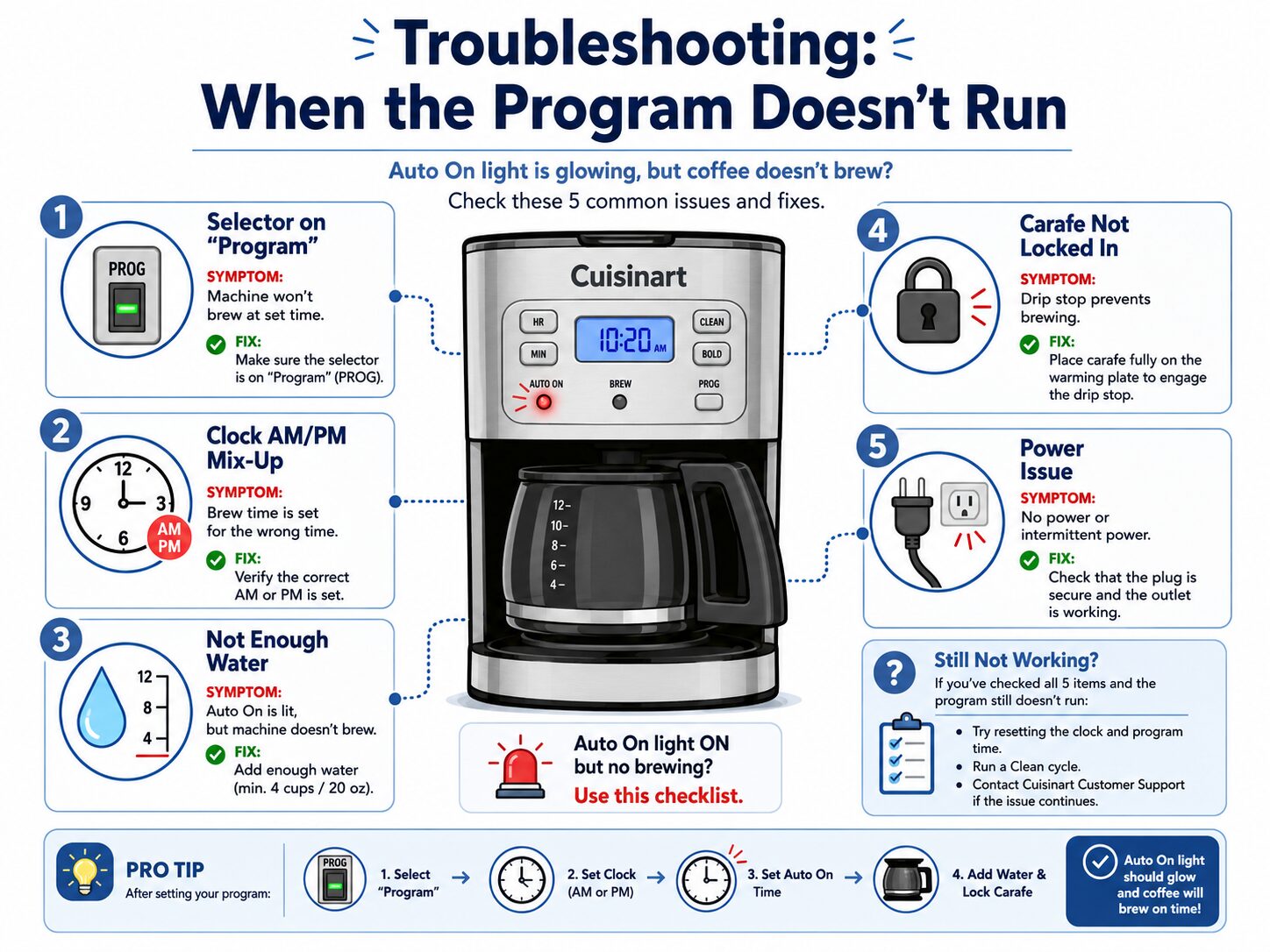
Your machine is prepped, the ‘Auto On’ light is on, but morning comes with no coffee. Run through this diagnostic table before you decide the unit is broken.
| Symptom | Likely Cause | The Fix |
|---|---|---|
| No brew, ‘Auto On’ light off. | Selector left on ‘Program’, not ‘Auto On’. | Move switch to ‘Auto On’ or press ‘Auto On’ button to activate. |
| Brew occurs at wrong time. | Clock set incorrectly (AM/PM mix-up). | Re-set the clock, confirming AM/PM status. |
| Machine beeps or display flashes at target time, but no water flows. | Empty water reservoir or clogged water inlet. | Fill reservoir and run a clean water cycle without coffee. |
| ‘Auto On’ light is flashing (Grind & Brew). | Program not locked in. | After setting program time, press ‘Program’ button once more to get a steady light. |
| Machine doesn’t power on at all. | Tripped thermal fuse from dry boil or faulty power connection. | Unplug for 30 minutes, ensure carafe is seated, then retry. If persistent, consult a Black & Decker troubleshooting guide for similar thermal safety systems. |
A persistent issue might be a failed internal clock or programmer board. If basic resetting doesn’t work, your next stop is the official Braun coffee maker manual library for schematic logic, as many drip machines share similar low-voltage control systems.
Frequently Asked Questions
Why does my Cuisinart coffee maker beep at the programmed time but not brew?
This usually signals an interruption in the water path. The heater has engaged, but no water is flowing into the heating tube. Check that the water reservoir is full and properly seated. Also, ensure the brewer basket is correctly locked into place. A misaligned basket can block the water inlet.
Can I set two different auto-brew times?
No. Standard Cuisinart programmable models support only one auto-brew schedule. You can change it nightly, but you cannot set, for example, a 7 AM weekday and a 9 AM weekend time to run automatically on different days. You must manually reprogram it.
How do I turn off the auto-brew function after it’s set?
Simply move the mode selector switch from ‘Auto On’ back to ‘Brew’ or ‘Off’. On button models, press the ‘Auto On’ button again to turn off the indicator light. This cancels the scheduled brew without erasing the programmed time. You can turn it back on the next night by reactivating ‘Auto On’.
What’s the difference between ‘Bold’ and ‘Regular’ brew strength?
On models like the DCC-3200, ‘Bold’ mode slows the flow of water over the coffee grounds. This extends the contact time, which typically extracts more oils and solubles, resulting in a richer, more intense flavor compared to the faster ‘Regular’ cycle. It’s not just a stronger cup; it’s a different extraction profile.
Before You Go
Programming your Cuisinart boils down to two truths: set the clock right, and remember to throw the ‘Auto On’ switch. That final activation is the gatekeeper. Prep the machine the night before with water, a clean filter, and fresh grounds, whether from a burr coffee grinder for consistency or pre-ground. Familiarize yourself with your model’s extra features, like the 0-4 hour auto-off, to tailor its behavior. Once this ritual is locked in, you’ve effectively given yourself a morning barista that never sleeps in.
{
“@context”: “https://schema.org”,
“@type”: “HowTo”,
“name”: “How to Program a Cuisinart Coffee Maker for Auto-Brew”,
“totalTime”: “PT5M”,
“tool”: [
{
“@type”: “HowToTool”,
“name”: “Cuisinart programmable coffee maker”
},
{
“@type”: “HowToTool”,
“name”: “Power outlet”
}
],
“step”: [
{
“@type”: “HowToStep”,
“name”: “Set the current clock time”,
“text”: “Plug in the machine. Locate the ‘Clock’ button or mode switch. Press and hold ‘Hour’ until the display flashes, then set the correct hour and minute. Confirm by pressing ‘Clock’ again or waiting a few seconds.”
},
{
“@type”: “HowToStep”,
“name”: “Enter programming mode”,
“text”: “Press the ‘Prog’ or ‘Auto On’ button, or turn the mode selector switch to ‘Program’. The target brew time on the display will start flashing.”
},
{
“@type”: “HowToStep”,
“name”: “Set your desired brew time”,
“text”: “Use the ‘Hour’ and ‘Minute’ buttons to input the time you want the coffee to be ready. Remember AM has no light; only PM is indicated.”
},
{
“@type”: “HowToStep”,
“name”: “Activate the auto-brew function”,
“text”: “This is the critical step. You must turn the mode selector switch to ‘Auto On’ or press the ‘Auto On’ button to engage the scheduled brew. A light, often labeled ‘Auto On’, should illuminate steadily.”
},
{
“@type”: “HowToStep”,
“name”: “Prepare the machine the night before”,
“text”: “Add fresh water to the reservoir, insert a filter and the correct amount of coffee grounds into the basket, and ensure the carafe is empty and correctly seated.”
}
]
}
{
“@context”: “https://schema.org”,
“@type”: “FAQPage”,
“mainEntity”: [
{
“@type”: “Question”,
“name”: “Why does my Cuisinart coffee maker beep at the programmed time but not brew?”,
“acceptedAnswer”: {
“@type”: “Answer”,
“text”: “This usually signals an interruption in the water path. The heater has engaged, but no water is flowing into the heating tube. Check that the water reservoir is full and properly seated. Also, ensure the brewer basket is correctly locked into place. A misaligned basket can block the water inlet.”
}
},
{
“@type”: “Question”,
“name”: “Can I set two different auto-brew times?”,
“acceptedAnswer”: {
“@type”: “Answer”,
“text”: “No. Standard Cuisinart programmable models support only one auto-brew schedule. You can change it nightly, but you cannot set, for example, a 7 AM weekday and a 9 AM weekend time to run automatically on different days. You must manually reprogram it.”
}
},
{
“@type”: “Question”,
“name”: “How do I turn off the auto-brew function after it’s set?”,
“acceptedAnswer”: {
“@type”: “Answer”,
“text”: “Simply move the mode selector switch from ‘Auto On’ back to ‘Brew’ or ‘Off’. On button models, press the ‘Auto On’ button again to turn off the indicator light. This cancels the scheduled brew without erasing the programmed time. You can turn it back on the next night by reactivating ‘Auto On’.”
}
},
{
“@type”: “Question”,
“name”: “What’s the difference between ‘Bold’ and ‘Regular’ brew strength?”,
“acceptedAnswer”: {
“@type”: “Answer”,
“text”: “On models like the DCC-3200, ‘Bold’ mode slows the flow of water over the coffee grounds. This extends the contact time, which typically extracts more oils and solubles, resulting in a richer, more intense flavor compared to the faster ‘Regular’ cycle. It’s not just a stronger cup; it’s a different extraction profile.”
}
}
]
}
