
Philips 5500 Coffee Machine Manual for Setup and Daily Care
To access the Philips 5500 coffee machine manual, download the official PDF from the Philips support website using your model number (like EP5544/50). The manual covers first-time setup, daily cleaning, descaling with the AquaClean filter, and troubleshooting for over 20 hot and iced beverages.
Most people unbox the machine, add beans and water, and press a button. The machine then grinds, tamps, and brews a disappointing, weak shot. They blame the beans or the machine itself. The problem is almost always the setup, specifically, skipping the mandatory self-adjustment cycle the manual explicitly requires.
This guide walks through the official manual, but it focuses on the steps you shouldn’t skip. We’ll cover the differences between the 5200 and 5500 models, explain why your new machine might have coffee residue inside, and lay out a realistic maintenance schedule that prevents the most common failures.
Key Takeaways
- The machine requires brewing 5 initial coffees to complete its internal self-adjustment; the first few drinks will be weak.
- The included AquaClean water filter must be soaked for 5 minutes before installation to prevent airlocks in the system.
- All removable parts, especially the LatteGo milk container, must be rinsed with hot water before first use to remove manufacturing residues.
- Grind setting 5 on the ceramic burr grinder is the recommended starting point for most medium-roast beans.
- Ignoring the “empty grounds container” prompt for more than a day can cause a motor blockage that requires a service reset.
Before You Brew: The Mandatory First-Time Setup
Opening the box reveals more than just the machine. You get the water filter, a test strip, a grease tube, and a stack of paper. Do not plug the machine in yet. The first hour determines its reliability for the next thousand shots.
Before you start: The machine’s internal brewing unit contains precision gears and seals. Running it without water locks the mechanism in under 30 seconds, requiring a manual reset. The high-temperature steam and hot water system can cause burns; always ensure the LatteGo is securely clicked into place before frothing.
First, rinse every part that touches water or milk. This includes the 1.8-liter water tank, the drip tray, the 12-puck grounds container, and all three pieces of the LatteGo system. Use warm water and a soft cloth. The manual notes that even new machines may have harmless coffee residue inside from factory testing, this is normal, but rinsing removes any dust or oils.
Next, install the AquaClean filter. This is the step most people bungle.
1. Submerge the filter in a cup of water for five full minutes. Soaking activates the filtering media and purges air.
2. Insert the filter into the empty water tank until it clicks. Fill the tank with fresh cold water to the max line. You’ll see bubbles as the system primes.
3. Use the included test strip to check your water hardness. Enter this setting into the machine’s menu later; it dictates the descaling reminder frequency.
Now plug in the machine. It will power on and guide you through language selection. Fill the 275-gram bean hopper with fresh, medium-roast coffee. Avoid oily dark roast or flavored beans, they gum up the grinder and brewing chamber.
The most critical step is hidden in the manual’s small print: the automatic adjustment. The machine’s internal computer needs to calibrate the amount of ground coffee it uses.
The machine automatically adjusts the amount of ground coffee. It requires brewing 5 coffees initially to complete its self-adjustment.
Brew five black coffees or espressos in a row. Use the bypass chute if you don’t have beans yet. Discard these drinks. By the fifth cup, the grind quantity, tamping pressure, and water flow will be synchronized. Your sixth coffee will taste fundamentally different, stronger and more balanced.
TL;DR: Rinse everything, soak the filter for 5 minutes, then brew and dump five coffees to let the machine self-calibrate before expecting a good drink.
The Heart of the Machine: Key Components Explained
You operate the machine from the control panel, but the real work happens inside. Knowing what each part does explains why maintenance is non-negotiable.
The ceramic burr grinder is the first point of failure for bad coffee. It’s set with a knob numbered 1 (finest) to 12 (coarsest). Setting 5 is the factory default for a reason. Going finer than 3 on a dark roast creates a powder so dense it chokes the brewing unit. Going coarser than 8 on a light roast produces a fast, sour shot. Ceramic burrs stay sharp for years, but they are brittle. Never force the knob or try to grind rice or other grains to clean it.
The brewing unit is the mechanical heart. It receives the ground coffee, tamps it into a puck, brews under pressure, then ejects the spent puck into the container. This unit has moving parts and rubber seals. The included grease tube is for lubricating its rails and gears every 500 drinks or so. If you hear a loud grinding noise during the puck ejection cycle, lubrication is overdue.
Your drinks come out of the adjustable spout, which moves from 88mm to 145mm high. This isn’t just for cup clearance. For drinks with crema like espresso, position the spout close to the liquid surface to preserve the foam layer. For an Americano where hot water is added, height matters less.
| Component | Capacity / Spec | What Happens If You Ignore It |
|---|---|---|
| Water Tank | 1.8 liters | Machine stops mid-drink with an error code. |
| Bean Hopper | 275 grams | Exposing beans to air for more than a week stale the entire hopper. |
| Grounds Container | 12 pucks | Overflow blocks the ejection hatch. The machine locks out until you empty it and reset the counter in the menu. |
| LatteGo Milk Container | 250 ml | Old milk residue in the air chamber sours and contaminates every subsequent froth. |
| Drip Tray | Not specified | The red float rises and eventually overflows, spilling water onto your counter. |
The LatteGo system is brilliantly simple and a common source of frustration. It has three parts: the milk carafe, the air chamber/lid, and the outlet. They must click together firmly. If the milk isn’t frothing, the lid isn’t sealed. After each use, disassemble and rinse it immediately. Milk proteins harden into a cement-like film in about an hour.
5200 vs. 5500: What Your Manual Actually Covers
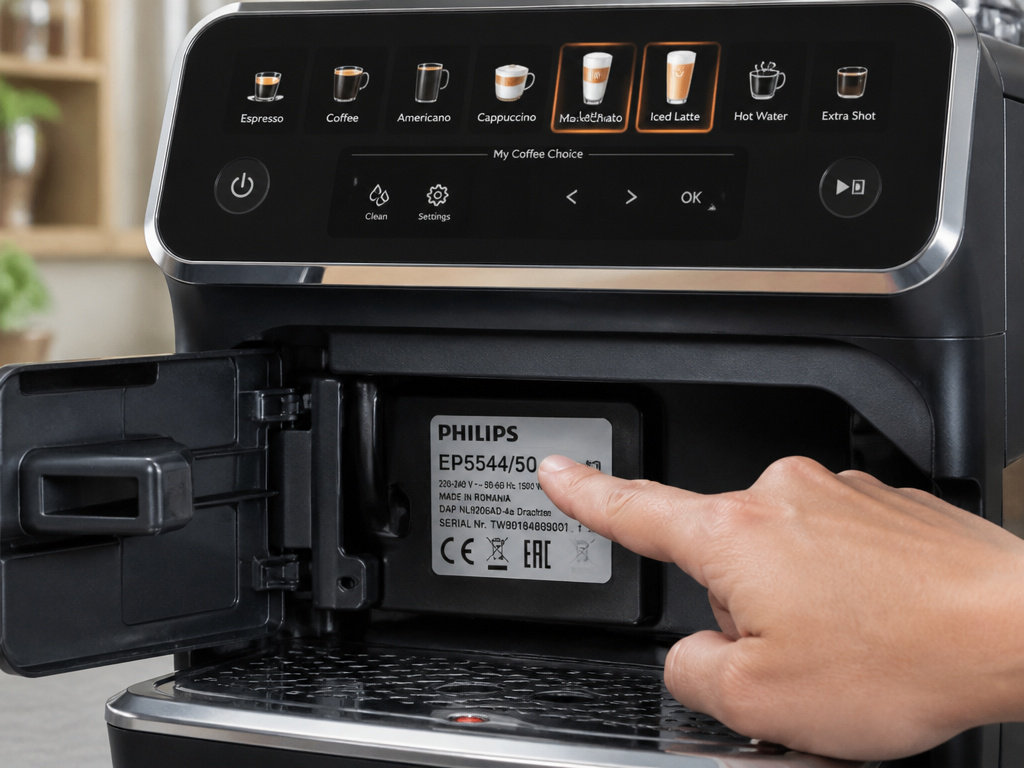
Philips groups the 5200 and 5500 series in the same manual. This causes confusion. The machines share core anatomy, the same brewing unit, grinder, and basic software. The differences are in the interface and drink options.
The 5200 series control panel has six one-touch drink icons: Espresso, Coffee, Americano, Iced Coffee, Cappuccino, and Macchiato. The 5500 series panel adds two more: Latte Macchiato and Iced Latte. This means your 5500 can access a Latte Macchiato directly, while a 5200 owner must customize a different drink to approximate it.
Both machines access a “More Drinks” menu, which unlocks options like hot water, cafe crema, flat white, and milk froth. The 5500’s “More Drinks” menu also includes the Iced Cappuccino and Iced Cafe Latte. If your manual shows a drink you can’t find on your machine, you likely have the other model series.
Common mistake: Using a 5200-series manual setting for a 5500 machine’s extra shot feature, the programming menus are identical, but the default drink volumes differ, so a copied setting can over-extract.
This shared documentation is why you must identify your exact model number. It’s printed on the rating plate inside the service door (near the drip tray). Common 5500 model numbers are EP5544/50, EP5544/90, and EP5547/90. Downloading the manual specific to this code ensures the troubleshooting steps and error codes are correct.
Programming Your Perfect Drink: Strength, Volume, and Profiles
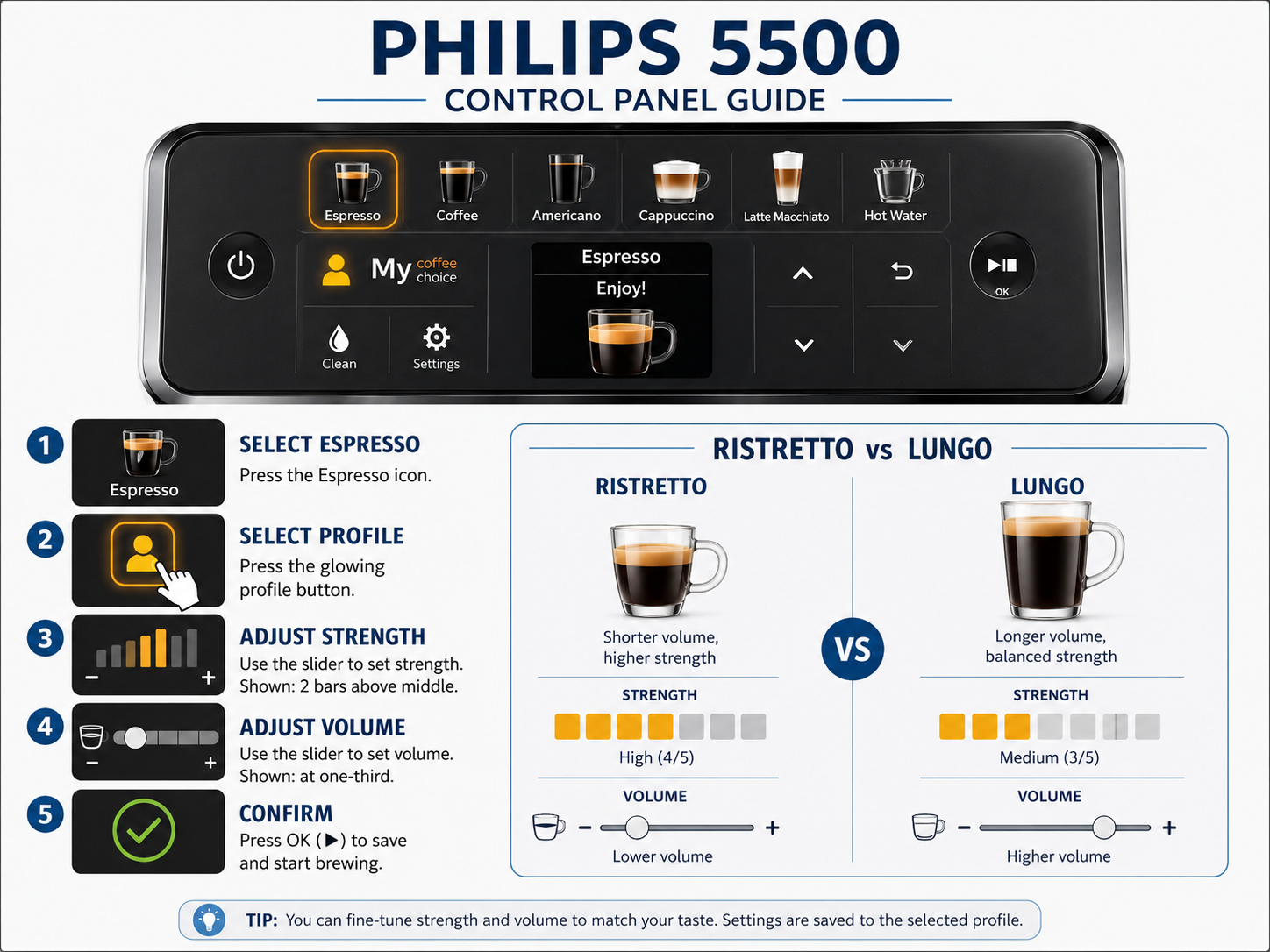
Out of the box, every drink is set to a middle-of-the-road standard. The machine’s real value unlocks when you tailor it. This isn’t complexity for its own sake. It’s the difference between a generic coffee and your perfect morning cup.
Start with the grinder. The knob controls dose and fineness together. For a stronger, more intense espresso, turn the knob towards 1 (finer). Do this one click at a time and brew two espressos between adjustments. The change isn’t immediate because the chute holds some ground coffee. If the machine sounds strained and the output is a slow drip, you’ve gone too fine, back off two clicks.
The digital strength and volume settings work on top of the grinder adjustment. Strength controls how much coffee ground coffee is used per shot. Volume controls how much water passes through that coffee. They are independent.
For example, you can have a ristretto (short, strong espresso) by setting strength high and volume low. You can have a lungo (long, milder espresso) by setting strength medium and volume high. The “Extra Shot” function, accessed by pushing the strength slider to its maximum, simply brews two consecutive shots into the same cup.
The four color-coded user profiles are for different people or different moods. Program Profile 1 (Yellow) for your double espresso. Program Profile 2 (Blue) for your spouse’s milky latte. This is faster than adjusting sliders every time. The guest profile is the default factory setting, useful for resetting if you ever get lost in the menus.
Here is a quick programming sequence for a classic espresso:
1. Select the Espresso icon.
2. Press and hold the desired user profile button (Yellow, Blue, Green, Red) for 3 seconds.
3. Adjust the strength slider. A good start is two bars above the middle.
4. Adjust the volume slider. For a 40ml espresso, set it to about one-third of the scale.
5. Press the checkmark to save. The profile button will now glow that color when selected.
TL;DR: Adjust the physical grinder knob for major changes in intensity. Use the digital strength and volume sliders to fine-tune each specific drink, then save it to a user profile.
The Non-Negotiable Maintenance Schedule
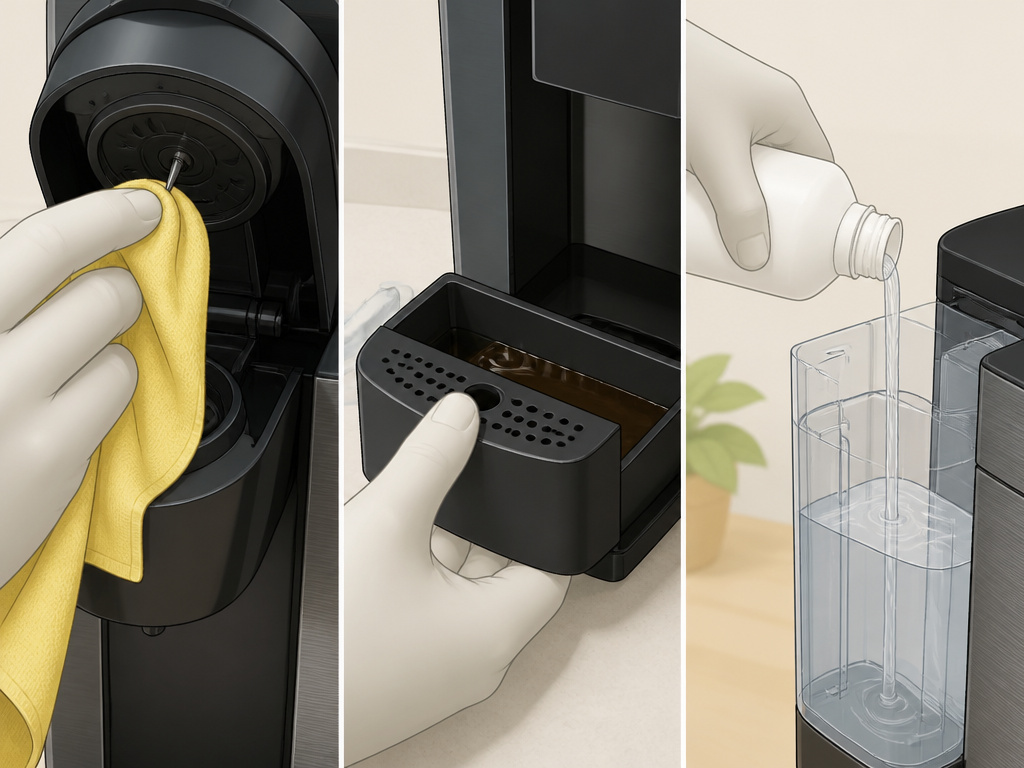
A superautomatic machine is a miniature coffee shop. It needs daily, weekly, and monthly care. The manual provides the ideal schedule, but real life often intervenes. This is the bare-minimum schedule that keeps it running without a service call.
Daily, after your last drink:
– Run the “Milk Rinse” program from the menu. This flushes the LatteGo system with water. It takes 60 seconds. If you skip this, sour milk smell becomes permanent in about three days.
– Remove the drip tray and grounds container. Empty both. Wipe the tray with a damp cloth. This prevents overflow and odors.
Weekly, or after every 30 drinks:
– Remove the brew group. Press the two release buttons on the front and pull the unit straight out. Rinse it under warm running water. Use a soft brush to dislodge any ground coffee stuck in the seals. Let it air dry completely before reinserting. The machine will not operate without the brew group correctly locked.
– Wipe the coffee outlet spout with a damp cloth. Coffee oils build up here and eventually drip onto your cup.
Monthly, or when the machine prompts you:
– Replace the AquaClean water filter. The machine displays a reminder. If you don’t use the filter, it will prompt you to descale instead. Descaling is a 20-minute process that involves running a solution through the entire hot water system. It’s messier and more disruptive than swapping a filter.
– Lubricate the brew group. Apply a rice-grain-sized amount of the included grease to the two metal rails on the brew group before reinserting it. Do this every 500 drinks or so. Over-greasing attracts coffee grounds and creates a sludge.
| Maintenance Task | Manual’s Ideal Frequency | Real-World Minimum | Consequence of Skipping |
|---|---|---|---|
| Milk System Rinse | After each use | Once daily | Clogged air chamber, impossible-to-clean milk residue. |
| Empty Drip Tray/Grounds | When prompted | Every 2-3 days | Overflow, motor blockage, machine lockout. |
| Brew Group Rinse | Every 60 drinks | Once a week | Stale coffee oils affect taste, seals dry out and crack. |
| Lubricate Brew Group | Every 500 drinks | When you hear grinding | Increased wear, eventual gear failure. |
| Descaling / Filter Change | As prompted (by water hardness) | Do not ignore the prompt | Limescale blocks narrow tubes, leading to heater failure. |
Never use vinegar, citric acid, or other homemade descaling solutions. They are not formulated for the machine’s internal rubber and plastic components. Vinegar residue will etch into the plastic and produce a permanent smell that taints every coffee. Use only Philips-branded descaling solution or tablets.
Troubleshooting: Decoding Error Messages and Fixes
The machine communicates problems through its display. A generic “Error” message is useless. The real code is usually a combination of flashing icons or a number found by pressing certain buttons in sequence. The manual has the full list, but these are the most common.
“Empty Grounds Container” (even though it’s empty).
This is a sensor or counter issue. Empty the container. Then, with the machine on, press and hold the Espresso and Coffee buttons simultaneously for 5 seconds. This resets the internal counter. The message should clear.
“Fill Water Tank” (even though it’s full).
This often means the AquaClean filter is not seated correctly or has an airlock. Remove the tank, take out the filter, and re-soak it for 2-3 minutes. Reinstall it firmly. Also, check the tank’s float valve moves freely.
Coffee is too weak or watery.
You likely skipped the initial 5-drink adjustment cycle. The machine is under-dosing coffee. Run three to five black coffees through the bypass chute (using pre-ground) to force the adjustment cycle to complete. Also, check your grinder setting is not on 12 (coarsest).
Milk froth is thin or non-existent.
First, ensure the LatteGo lid is clicked on securely. Second, ensure you’re using cold milk, straight from the fridge. The system relies on a temperature differential to create good texture. Whole milk works best. Third, run the “Clean Milk System” program from the settings menu, it’s more intense than the daily rinse and clears clogs.
Machine makes loud grinding noise during brewing.
Immediately stop the machine and unplug it. This is the sound of the brewing unit trying to move against a jam or without lubrication. You must remove the brew group, inspect it for a foreign object (like a rock from unwashed beans), clean it, lubricate the rails, and reinsert it. If the noise persists, a gear is likely damaged.
Common mistake: Ignoring a minor error code and continuing to use the machine, this often allows a small problem (like a slightly full drip tray) to cascade into a major one (a water short circuit) that requires professional repair.
Frequently Asked Questions
Where can I download the official Philips 5500 manual?
Go to the Philips support website for your region (e.g., philips.ca or usa.philips.com). Search for your exact model number (like EP5544/50). The support page will have a “Documents” or “Manuals” section where you can download the PDF.
My new machine has coffee grounds inside. Is it used?
No. The manual states: “This machine has been tested with coffee. Although it has been carefully cleaned, there may be some coffee residues left. We guarantee, however, that the machine is absolutely new.” This is residue from factory quality testing. A simple rinse cycle clears it.
What’s the difference between the AquaClean filter and descaling?
The AquaClean filter softens the water before it enters the machine, preventing limescale from forming. Descaling removes limescale that has already built up. Using the filter correctly can delay the need to descale for up to 5000 cups, depending on your water hardness.
Can I use pre-ground coffee?
Yes, via the bypass chute on the front of the machine. Use the included measured scoop (one level scoop per drink). This is ideal for decaf, flavored coffee, or when you run out of beans. Remember to run a cleaning brew afterward to clear the chute of grounds.
Why is my coffee not hot enough?
Check the temperature setting in the machine’s menu. It has Low, Medium, and High settings. Ensure it’s on High. Also, preheat your cup by running a short hot water cycle into it before brewing. The machine’s brew temperature is consistent, but a cold cup will drop it instantly.
How do I clean the ceramic grinder?
You don’t, mechanically. The best way to clean it is to run a small amount of grinder cleaning tablets or uncooked white rice through it once every 6 months. This absorbs oils and clears stale particles. Never use liquid or attempt to disassemble the grinder yourself.
The Bottom Line
The Philips 5500 manual is a necessary reference, but it assumes you’ll read it cover-to-cover. Most people don’t. The machine’s performance hinges on three things done right at the start: soaking the water filter, completing the five-drink self-adjustment, and rinsing the LatteGo after every single use. Get those right, and the machine delivers consistent, high-quality drinks for years.
Treat the maintenance alerts as mandatory, not suggestions. The “empty grounds” and “rinse milk system” prompts are there because the engineers know exactly what fails when you skip them. Keep the brew group clean and lightly greased, use fresh beans, and stick with the recommended cleaning solutions. This isn’t a simple drip machine; it’s an appliance that earns its keep by replacing a daily cafe visit, but it demands a café-level of routine care in return.
{
“@context”: “https://schema.org”,
“@type”: “HowTo”,
“name”: “How to Set Up and Maintain a Philips 5500 Coffee Machine”,
“totalTime”: “PT20M”,
“tool”: [
{
“@type”: “HowToTool”,
“name”: “Philips AquaClean water filter”
},
{
“@type”: “HowToTool”,
“name”: “Water hardness test strip”
},
{
“@type”: “HowToTool”,
“name”: “Lubrication grease tube (included)”
}
],
“step”: [
{
“@type”: “HowToStep”,
“name”: “Rinse all removable parts”,
“text”: “Wash the water tank, drip tray, grounds container, and LatteGo milk parts with warm water before first use.”
},
{
“@type”: “HowToStep”,
“name”: “Install the AquaClean filter”,
“text”: “Soak the filter for 5 minutes, install it in the empty water tank, then fill the tank to prime the system.”
},
{
“@type”: “HowToStep”,
“name”: “Run the initial 5-drink cycle”,
“text”: “Brew five coffees without milk to let the machine’s internal mechanism self-adjust. Discard these first drinks.”
},
{
“@type”: “HowToStep”,
“name”: “Set the grinder and user profiles”,
“text”: “Turn the ceramic grinder knob to setting 5, then program your preferred drink strength and volume into a user profile.”
}
]
}
{
“@context”: “https://schema.org”,
“@type”: “FAQPage”,
“mainEntity”: [
{
“@type”: “Question”,
“name”: “Where can I download the official Philips 5500 manual?”,
“acceptedAnswer”: {
“@type”: “Answer”,
“text”: “Go to the Philips support website for your region (e.g., philips.ca or usa.philips.com). Search for your exact model number (like EP5544/50). The support page will have a \”Documents\” or \”Manuals\” section where you can download the PDF.”
}
},
{
“@type”: “Question”,
“name”: “My new machine has coffee grounds inside. Is it used?”,
“acceptedAnswer”: {
“@type”: “Answer”,
“text”: “No. The manual states: \”This machine has been tested with coffee. Although it has been carefully cleaned, there may be some coffee residues left. We guarantee, however, that the machine is absolutely new.\” This is residue from factory quality testing. A simple rinse cycle clears it.”
}
},
{
“@type”: “Question”,
“name”: “What’s the difference between the AquaClean filter and descaling?”,
“acceptedAnswer”: {
“@type”: “Answer”,
“text”: “The AquaClean filter softens the water before it enters the machine, preventing limescale from forming. Descaling removes limescale that has already built up. Using the filter correctly can delay the need to descale for up to 5000 cups, depending on your water hardness.”
}
},
{
“@type”: “Question”,
“name”: “Can I use pre-ground coffee?”,
“acceptedAnswer”: {
“@type”: “Answer”,
“text”: “Yes, via the bypass chute on the front of the machine. Use the included measured scoop (one level scoop per drink). This is ideal for decaf, flavored coffee, or when you run out of beans. Remember to run a cleaning brew afterward to clear the chute of grounds.”
}
},
{
“@type”: “Question”,
“name”: “Why is my coffee not hot enough?”,
“acceptedAnswer”: {
“@type”: “Answer”,
“text”: “Check the temperature setting in the machine’s menu. It has Low, Medium, and High settings. Ensure it’s on High. Also, preheat your cup by running a short hot water cycle into it before brewing. The machine’s brew temperature is consistent, but a cold cup will drop it instantly.”
}
},
{
“@type”: “Question”,
“name”: “How do I clean the ceramic grinder?”,
“acceptedAnswer”: {
“@type”: “Answer”,
“text”: “You don’t, mechanically. The best way to clean it is to run a small amount of grinder cleaning tablets or uncooked white rice through it once every 6 months. This absorbs oils and clears stale particles. Never use liquid or attempt to disassemble the grinder yourself.”
}
}
]
}
