
Miele Built-In Coffee Machine Usage Guide: Setup & Operation
To use a Miele built-in coffee machine, you must complete three specific setup actions: verify the water supply configuration, fill all containers with the correct materials, and physically lock the Brew Unit into its down position. The machine’s touchscreen then lets you select and infinitely customize drinks before dispensing.
Most people treat the first startup like any other appliance—plug it in and press a button. They miss the model-specific configuration step, use the wrong beans, or leave the Brew Unit unlocked. The machine either won’t start or it jams on the first cycle.
This guide walks through the exact first-use sequence, the hidden customization menus, and the daily ritual that keeps a Miele system running for years. It is based on the OEM manuals for models like the CVA6800 and CVA6805.
Key Takeaways
- Miele machines like the CVA6805 have a selectable water supply: “On” for plumbed connection or “Off” for manual tank filling. Setting this wrong prevents the machine from filling.
- Use only non-flavored, non-oily coffee beans. Oily or flavored beans coat the internal grinder and brewing chamber, causing performance drops within weeks.
- The Brew Unit has a physical locking tab and must be seated with its handle in the down position. An unlocked unit triggers an error and halts operation.
- Change the water in the tank every single day, even if not used. Stale water affects taste and can promote bacterial growth in the milk and water lines.
- The touchscreen’s “Edit” function lets you change a drink’s strength, temperature, and caffeine level by adjusting bean quantity, pre-brew time, and milk volume.
The First-Time Setup Checklist (What Most Manuals Skip)
You have power and a water line. The manual says to read the instructions. That is not enough. Three things stop a first brew cold: the water supply mode, the bean type, and the Brew Unit lock.
First, identify your water source. The Miele CVA6805 has a menu setting for water supply. If you have a direct plumbing connection, set it to “On” for automatic filling. If you are using the removable water tank, set it to “Off”. Getting this backwards means the machine waits for a tank that is always full or tries to pull from a line that does not exist. The error does not always display clearly.
Second, fill the whole bean container. This is not a suggestion about quality. It is a mechanical requirement.
Use only plain, non-flavored coffee beans with a matte, non-oily finish. Flavored beans or oily beans damage the integrated grinder and brewing chamber. The oils and flavor compounds coat the burrs and seals, increasing friction and causing residue buildup that standard cleaning cycles cannot remove.
The provided scoop measures the dose. Do not skip it. Ground coffee goes in the separate, smaller container for manual bypass brewing.
Third, handle the Brew Unit. This is the metal block that moves the coffee puck through the system. To remove it, press up on the button on its side and slide the handle forward. Then, depress the small plastic locking tab near the base and pull the unit straight out. To reinsert it, the handle must be in the forward position. Slide it back into the guides until you hear a solid click. This is not the end.
You must now lock it. Press the same side button and slide the handle down to the vertical position. It will click again. If the handle is left horizontal, the machine detects an unseated unit and will not operate.
TL;DR: Configure the water supply mode, fill with non-oily beans, and lock the Brew Unit handle down. Miss one, and the machine errors out.
Understanding the Control Panel and Drink Selection
The control panel is a smartphone interface glued to a coffee machine. You do not press physical buttons for drinks. You touch, drag, and tap through menus. This feels familiar, but the depth is in the “Edit” function.
Start by browsing. You can scroll with the arrow buttons or touch and drag the screen. Categories include espresso, coffee, milk-based drinks, and specialties like latte macchiato. Selecting a drink is just the first step.
Tap the drink name. Look for the word “Edit” directly below it. This is your gateway to customization. Tapping “Edit” opens two primary menus: “Change portion sizes” and “Change parameters”.
The portion menu controls volume. You can adjust the amount of hot milk, frothed milk, and espresso in your drink independently. Making a cappuccino with extra foam and less hot milk takes two taps.
The parameters menu changes the coffee itself. Here you find the real controls.
| Parameter | What It Changes | Default Range |
|---|---|---|
| Bean quantity | Grams of beans used per cup; directly impacts strength and body. | Adjustable in steps |
| Temperature | Brew water temperature; higher temps extract more, lower temps yield brighter cups. | Max, High, Medium, Low, Min |
| Pre-brewing | Time water pre-infuses the grounds; affects caffeine extraction and flavor clarity. | Short, Medium, Long |
| Strength | Overall extraction profile; a combination of grind, time, and pressure. | Mild, Normal, Strong |
Changing the bean quantity is the most direct strength adjustment. Increasing it makes a more intense, robust cup. Decreasing it makes a lighter, faster-drinking coffee. Temperature is critical for dark versus light roasts. Dark roasts often taste better at a slightly lower temperature to avoid burnt notes. Light roasts need the “Max” setting to fully extract their complex acids.
Pre-brewing is the hidden variable. A longer pre-brew time allows more caffeine and delicate aromatics to dissolve before the main pressure pulse. It can make a strong shot taste smoother. A shorter pre-brew gives a sharper, more intense caffeine hit.
Common mistake: Adjusting only the strength setting — this is a composite variable. For precise control, change the individual parameters: bean quantity for potency, temperature for roast matching, and pre-brew for caffeine and acidity.
The Step-by-Step Guide to Your First Brew
With the machine set up and a drink selected, you are ready to brew. The process is automated, but your preparation dictates the result.
- Place your cup(s). The machine can brew two drinks simultaneously. Position cups under the central dispenser. For a latte macchiato, use a clear glass to see the layers.
- Confirm the drip tray is seated. The drip tray has metal sensor contacts at the back. If these are wet or missing, the machine may think the tray is full and stop. Ensure it is pushed all the way in.
- Initiate the brew. Tap your customized drink on the screen. The display will show a progress sequence.
- Watch the process. For milk drinks, the machine dispenses in a specific order. It will first pour hot milk, then froth milk, then pull the espresso shot. The espresso, being denser than foam but lighter than liquid milk, settles between them to create the signature layers.
- Retrieve your drink. The dispenser arm will rise at the end. Remove your cup promptly to avoid drips.
What happens if you skip step 2? If the drip tray contacts are dirty, the machine might pause mid-brew and display a “drip tray full” warning, even if the tray is empty. You will have to remove the tray, dry the contacts, and restart the cycle, which often ruins the drink timing.
The machine preheats the system before the first shot of the day. You will hear water moving and the grinder spinning. This is normal. Do not interrupt it.
Essential Daily Maintenance (Non-Negotiable)
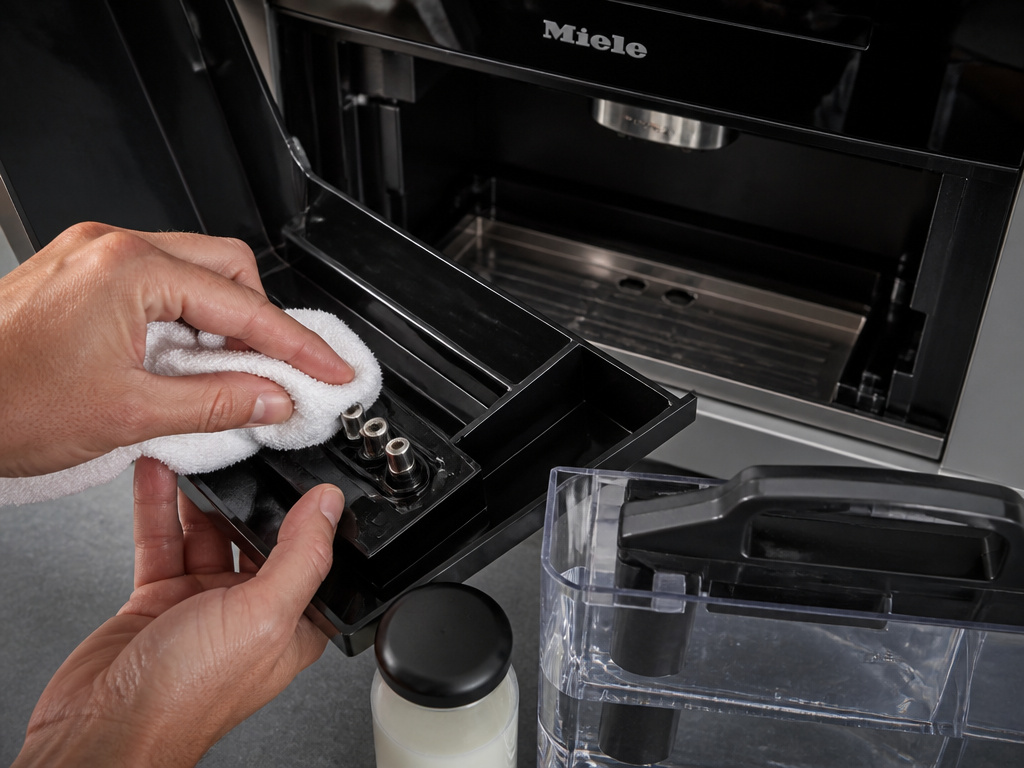
Miele built-in machines are not set-and-forget. A daily five-minute routine prevents 90 percent of service issues. This routine is about moisture and residue.
Every morning, or after your last drink, do this:
* Pull out the drip tray and the waste container. Empty both.
* Remove the water container. Dump any remaining water and refill it with fresh, cold tap water.
* Wipe the drip tray’s metal sensor contacts completely dry with a cloth.
* If you used milk, remove the milk flask from the front of the machine, seal it, and store it in the refrigerator. The flask is not insulated.
I left the milk flask in the machine overnight once during a warm week. By morning, the milk had soured. The next cappuccino carried a faint, sharp tang that cleaning the system twice could not fully eliminate. The milk residue had already coated the internal tubing.
The waste container holds used coffee pucks. It does not need rinsing daily, but empty it before it reaches the “max” line. An overfull waste container can prevent the Brew Unit from ejecting the next puck, causing a jam.
The water container has level marks for filling. Ignore them for daily use. The rule is fresh water every day, period. Stagnant water tastes flat and can introduce impurities into the brewing circuit.
| Component | Daily Action | Weekly/Bi-Weekly Action | Risk If Skipped |
|---|---|---|---|
| Drip Tray | Empty, dry sensor contacts | Full wash with mild soap | False “full” errors, mid-brew stoppages |
| Waste Container | Empty when ¾ full | Rinse and dry | Puck jam, Brew Unit blockage, unpleasant odor |
| Water Container | Dump old water, refill with cold | Deep clean with vinegar solution* | Stale-tasting coffee, mineral buildup in lines |
| Milk Flask | Refrigerate | Clean with warm, soapy water | Soured milk, clogged milk frother, bacterial growth |
| Brew Unit | Visual check for residue | Remove and rinse under warm water | Poor extraction, coffee oil buildup, mechanical strain |
*Follow Miele’s descaling instructions for cleaning the water circuit; do not pour vinegar directly into the tank.
Advanced Features and Configuration
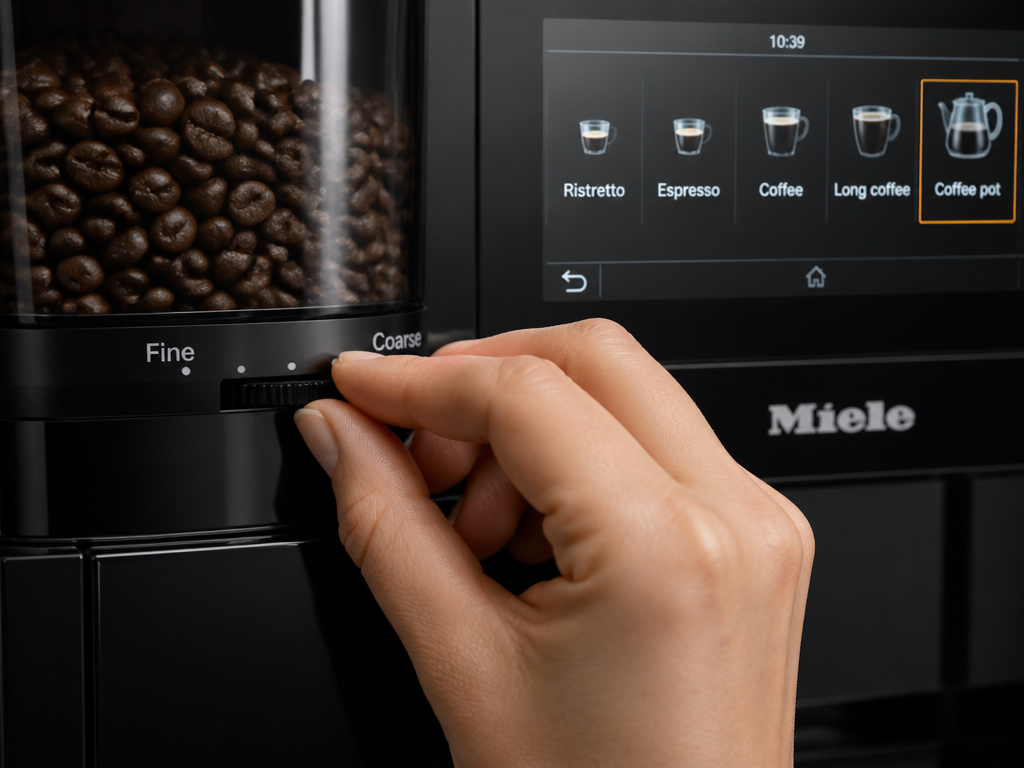
Beyond single drinks, the machine handles entertaining and fine-tuning. Two features matter most: the coffee pot function and the grinder adjustment.
To make a coffee pot, navigate to the “Coffee pot” option on the far right of the touchscreen menu. You can brew up to eight cups into a carafe. This uses a different, faster brew path than single espresso shots. The strength and temperature settings you configured for single drinks do not automatically apply here. You must set the pot parameters separately in its own menu.
The grinder adjustment is physical. Next to the whole bean container, there is a lever. It moves between fine and coarse. This setting is crucial for dialing in espresso extraction.
Before you start: Never adjust the grinder while it is running. You risk damaging the burrs. Always make adjustments with the machine idle, and only move the lever one notch at a time between test shots.
Moving the lever toward “fine” increases extraction pressure and can slow the shot down, making it stronger and more bitter. Moving toward “coarse” does the opposite. The correct setting depends on your bean density, roast, and humidity. Start in the middle and pull a test shot. If the espresso pours too fast and tastes weak, go one click finer. If it drips slowly and tastes harsh, go one click coarser.
The machine also has an integrated Wi-Fi module (on models like M.-Nr. 11 815 150). This allows for remote diagnostics and firmware updates. It is not a critical feature for daily use, but ensuring your machine is connected can provide access to new drink recipes and maintenance alerts from Miele.
Troubleshooting Common Issues
Even with perfect care, things can go quiet or messy. Here is how to diagnose the frequent stoppages.
Machine won’t turn on or respond to touch.
Check the power connection at the wall and at the machine’s installation point. Built-in units often have a separate service switch or circuit breaker. Ensure it is on. If power is confirmed, a hard reset by disconnecting power for 60 seconds sometimes clears a software hang.
“Drip tray full” error, but tray is empty.
This is almost always the sensor contacts. Pull the drip tray out. Look at the two metal pins at the very back. Dry them thoroughly with a paper towel. Also, check for coffee grounds or syrup bridging the gap between the pins. Clean the area.
Milk frother is not producing foam or delivers weak froth.
First, check your milk. Use fresh, cold plain milk. Skim milk froths abundantly but with large bubbles. Whole milk gives denser, creamier foam. Next, remove the milk flask and inspect the frother nozzle at the machine’s front. Wipe it with a damp cloth. If residue is baked on, soak a cloth in warm water and hold it against the nozzle for a minute before wiping.
Coffee tastes weak or watery.
This is a multi-point check. First, verify your drink’s “bean quantity” parameter is not set to minimum. Second, check the grinder adjustment lever—it may have drifted too coarse. Third, your beans might be stale or improperly stored. Fresh, high-quality beans are the foundation of all other settings.
Water does not flow; machine beeps or displays a water error.
Confirm the water container is fully seated or the direct water line is open. For tank models, ensure the water supply setting is set to “Off”. For plumbed models, ensure it is set to “On”. Also, check for kinks in the internal line if you recently moved the machine.
Frequently Asked Questions
Can I use flavored coffee beans in my Miele machine?
No. The manufacturer’s instructions explicitly warn against flavored beans. The flavoring oils and compounds are not food-grade lubricants; they are adhesives. They gum up the grinder burrs, coat the Brew Unit seals, and contaminate the brewing chamber. The residue is difficult to remove and will alter the taste of every subsequent shot.
How often should I clean the Brew Unit?
visual check should happen weekly. If you see coffee oil residue, remove the unit and rinse it under warm running water. Do not use soap or immerse it fully. Dry it thoroughly before reinserting. Miele typically recommends a more thorough cleaning every few months using their specific cleaning tablet, which runs an automated cycle.
My machine has a Wi-Fi symbol. What does it do?
Models with the Wi-Fi module (like M.-Nr. 11 815 150) can connect to your home network. This enables remote diagnostics, over-the-air firmware updates, and the potential to receive new drink recipes. You manage this through the Miele Smart Home app. It is not required for basic operation.
Can I install this machine in an outdoor kitchen or at a high-altitude cabin?
No. The operating instructions for models like M.-Nr. 11 815 150 state the machine is for household use only and is not permitted for outdoor use. Furthermore, it is not intended for use at altitudes above 2000 meters (about 6560 feet). The reduced atmospheric pressure can affect pump performance and brewing thermodynamics.
What is the difference between the “Coffee” and “Espresso” options on the menu?
The “Coffee” option uses a longer, lower-pressure brewing cycle suitable for a larger volume of water passing through more ground coffee, resulting in an Americano-style drink or a classic drip-style cup. The “Espresso” option uses the high-pressure pump and the finer grinder setting to produce a concentrated shot with crema. The Americano vs drip coffee debate often starts here, as the machine can make both.
Before You Go
Using a Miele built-in coffee machine is a commitment to a process. The reward is a cup that is exactly yours. Start by matching the water supply setting to your plumbing—that is the most common first-day stall. Fill it with matte-finish beans, never oily or flavored ones. Lock the Brew Unit handle down until it clicks.
Your daily habit is simple: empty the drip tray and waste container, refresh the water tank, and fridge the milk. This takes three minutes and prevents most problems. When you want a change, dive into the “Edit” menu. Adjust the bean quantity for strength, the temperature for the roast, and the pre-brew time for clarity. The physical grinder lever is your final tool for dialing in espresso.
Remember the limits. This is a precision appliance for indoor use below 2000 meters. It makes everything from a single, tailored macchiato to a full pot of coffee, but it demands clean inputs and consistent care. Follow the specifics, and the machine will deliver for years.
{
“@context”: “https://schema.org”,
“@type”: “HowTo”,
“name”: “How to Use a Miele Built-In Coffee Machine”,
“totalTime”: “PT20M”,
“tool”: [
{
“@type”: “HowToTool”,
“name”: “Miele built-in coffee machine (e.g., CVA6800, CVA6805)”
},
{
“@type”: “HowToTool”,
“name”: “Fresh, cold tap water”
},
{
“@type”: “HowToTool”,
“name”: “Non-flavored, non-oily coffee beans”
},
{
“@type”: “HowToTool”,
“name”: “Plain milk (1% to whole)”
},
{
“@type”: “HowToTool”,
“name”: “Provided measuring scoop”
}
],
“step”: [
{
“@type”: “HowToStep”,
“name”: “Verify electrical and water connections”,
“text”: “Ensure the machine is installed, connected to power, and plumbed to a water line if using automatic filling. Models like the CVA6805 must have the water supply setting configured correctly.”
},
{
“@type”: “HowToStep”,
“name”: “Fill all containers for first use”,
“text”: “Insert the water container filled with cold tap water. Fill the whole bean container with high-quality, non-flavored beans. Place the empty waste container and ground coffee container.”
},
{
“@type”: “HowToStep”,
“name”: “Insert and lock the Brew Unit”,
“text”: “Press the button on the Brew Unit, slide the handle forward, depress the locking tab, and pull the unit out. Reinsert it with the handle forward until it clicks, then press the button and slide the handle down to lock.”
},
{
“@type”: “HowToStep”,
“name”: “Navigate the touchscreen to select a drink”,
“text”: “Use the smartphone-like touchscreen to browse drink categories. Touch and drag or use arrows to scroll. Select a drink like ‘Latte Macchiato’.”
},
{
“@type”: “HowToStep”,
“name”: “Customize drink parameters before brewing”,
“text”: “Tap ‘Edit’ on your selected drink. Adjust portion sizes (milk, froth, espresso), bean quantity, temperature, and pre-brew time to tailor strength and caffeine level.”
},
{
“@type”: “HowToStep”,
“name”: “Perform daily emptying and rinsing”,
“text”: “Every day, pull out the drip tray, waste container, and water container. Empty and rinse them. Wipe the drip tray’s metal sensor contacts dry to ensure proper full-tray detection.”
}
]
}
{
“@context”: “https://schema.org”,
“@type”: “FAQPage”,
“mainEntity”: [
{
“@type”: “Question”,
“name”: “Can I use flavored coffee beans in my Miele machine?”,
“acceptedAnswer”: {
“@type”: “Answer”,
“text”: “No. The manufacturer’s instructions explicitly warn against flavored beans. The flavoring oils and compounds are not food-grade lubricants; they are adhesives. They gum up the grinder burrs, coat the Brew Unit seals, and contaminate the brewing chamber. The residue is difficult to remove and will alter the taste of every subsequent shot.”
}
},
{
“@type”: “Question”,
“name”: “How often should I clean the Brew Unit?”,
“acceptedAnswer”: {
“@type”: “Answer”,
“text”: “visual check should happen weekly. If you see coffee oil residue, remove the unit and rinse it under warm running water. Do not use soap or immerse it fully. Dry it thoroughly before reinserting. Miele typically recommends a more thorough cleaning every few months using their specific cleaning tablet, which runs an automated cycle.”
}
},
{
“@type”: “Question”,
“name”: “My machine has a Wi-Fi symbol. What does it do?”,
“acceptedAnswer”: {
“@type”: “Answer”,
“text”: “Models with the Wi-Fi module (like M.-Nr. 11 815 150) can connect to your home network. This enables remote diagnostics, over-the-air firmware updates, and the potential to receive new drink recipes. You manage this through the Miele Smart Home app. It is not required for basic operation.”
}
},
{
“@type”: “Question”,
“name”: “Can I install this machine in an outdoor kitchen or at a high-altitude cabin?”,
“acceptedAnswer”: {
“@type”: “Answer”,
“text”: “No. The operating instructions for models like M.-Nr. 11 815 150 state the machine is for household use only and is not permitted for outdoor use. Furthermore, it is not intended for use at altitudes above 2000 meters (about 6560 feet). The reduced atmospheric pressure can affect pump performance and brewing thermodynamics.”
}
},
{
“@type”: “Question”,
“name”: “What is the difference between the \”Coffee\” and \”Espresso\” options on the menu?”,
“acceptedAnswer”: {
“@type”: “Answer”,
“text”: “The \”Coffee\” option uses a longer, lower-pressure brewing cycle suitable for a larger volume of water passing through more ground coffee, resulting in an Americano-style drink or a classic drip-style cup. The \”Espresso\” option uses the high-pressure pump and the finer grinder setting to produce a concentrated shot with crema. The Americano vs drip coffee debate often starts here, as the machine can make both.”
}
}
]
}
