
A Complete Guide on How to Work a Nespresso Coffee Machine
To work a Nespresso coffee machine, ensure the water tank is full, power it on, and wait for the steady ready light. Insert a capsule—dome-side down for OriginalLine, dome-side up for VertuoLine—close the lever, place your cup, and press the brew button. Remove your cup only after the dripping stops.
To work a Nespresso machine, fill the water tank, turn it on, wait for the steady ready light, insert a capsule dome-side down for OriginalLine or dome-side up for VertuoLine, close the lever, place your cup, and press the brew button. Wait for the dripping to stop before removing your cup. The Nespresso Pixie heats up in 30 seconds, while the Creatista Plus does it in 3 seconds, ignoring the ready light causes weak, lukewarm coffee.
People get this wrong because they skip the light. They fill the tank, shove a pod in, and hit a button while the machine is still blinking. That gives you a tepid, under-extracted shot. The machine is waiting for the thermoblock to hit 90–92°C, and the light is the only signal it has.
This guide covers the sequence for every common Nespresso model, explains what the lights and buttons actually mean, and details the one maintenance step that will keep your machine from locking you out.
Key Takeaways
- The steady ready light is non-negotiable. Brewing while it’s blinking gives you water that’s 15–20 degrees too cold.
- Capsule orientation matters: OriginalLine capsules go dome-side down; VertuoLine capsules go dome-side up. Getting it wrong jams the mechanism.
- Descaling isn’t optional. The Nespresso [Creatista](https://www.amazon.com/dp/B0BXPFSMPL?tag=beanthusiast-20&linkCode=osi&th=1&psc=1) Plus will lock you out after 10 uses if you skip it, and the KitchenAid manual explicitly warns against vinegar solutions.
- Let the machine drip until it stops. Yanking the cup early leaves 10–15ml of coffee in the pod, wasting your shot and making a mess in the drip tray.
- Model-specific quirks exist. The Pixie overheats after 10 consecutive shots, the Vertuo Pop+ reads a barcode on the pod rim, and the Siemens TK70 has a warming plate that stays hot.
The Three-Step Sequence (and the Light That Tells You It’s Ready)
Fill the tank first. Use cold, fresh water every time. Stale water picks up flavors from the reservoir plastic, and hot water from the tap can contain more minerals that scale the thermoblock faster.
Turn the machine on by pressing any brew button or, on lever-based models, closing the head. The light will blink. This is the heat-up phase.
Wait for the blinking to stop and the light to hold steady. This is your go signal.
The Nespresso Pixie takes approximately 30 seconds to heat up, while the Creatista Plus does it in about 3 seconds, according to their respective user manuals. Brewing before the light steadies draws water that hasn’t reached the optimal 90–92°C extraction temperature.
The first shot on a cold morning will always be a few degrees cooler than the third. That’s the thermoblock physics, not a machine fault. If your coffee tastes weak on the first go, let the machine idle for another 30 seconds after the light steadies, then pull a blank shot (no capsule) to pre-heat the group. Your second capsule will be perfect.
TL;DR: Never press a brew button while the light is blinking. The steady light means 90–92°C water is ready.
Capsule Orientation Is Not Intuitive
There are two incompatible capsule systems: OriginalLine and VertuoLine. You cannot use an Original capsule in a Vertuo machine, or vice versa.
For OriginalLine machines (Pixie, Citiz, KitchenAid, Creatista), insert the capsule with the dome facing down. The flat foil lid faces up toward you. The machine’s spikes puncture the foil from above.
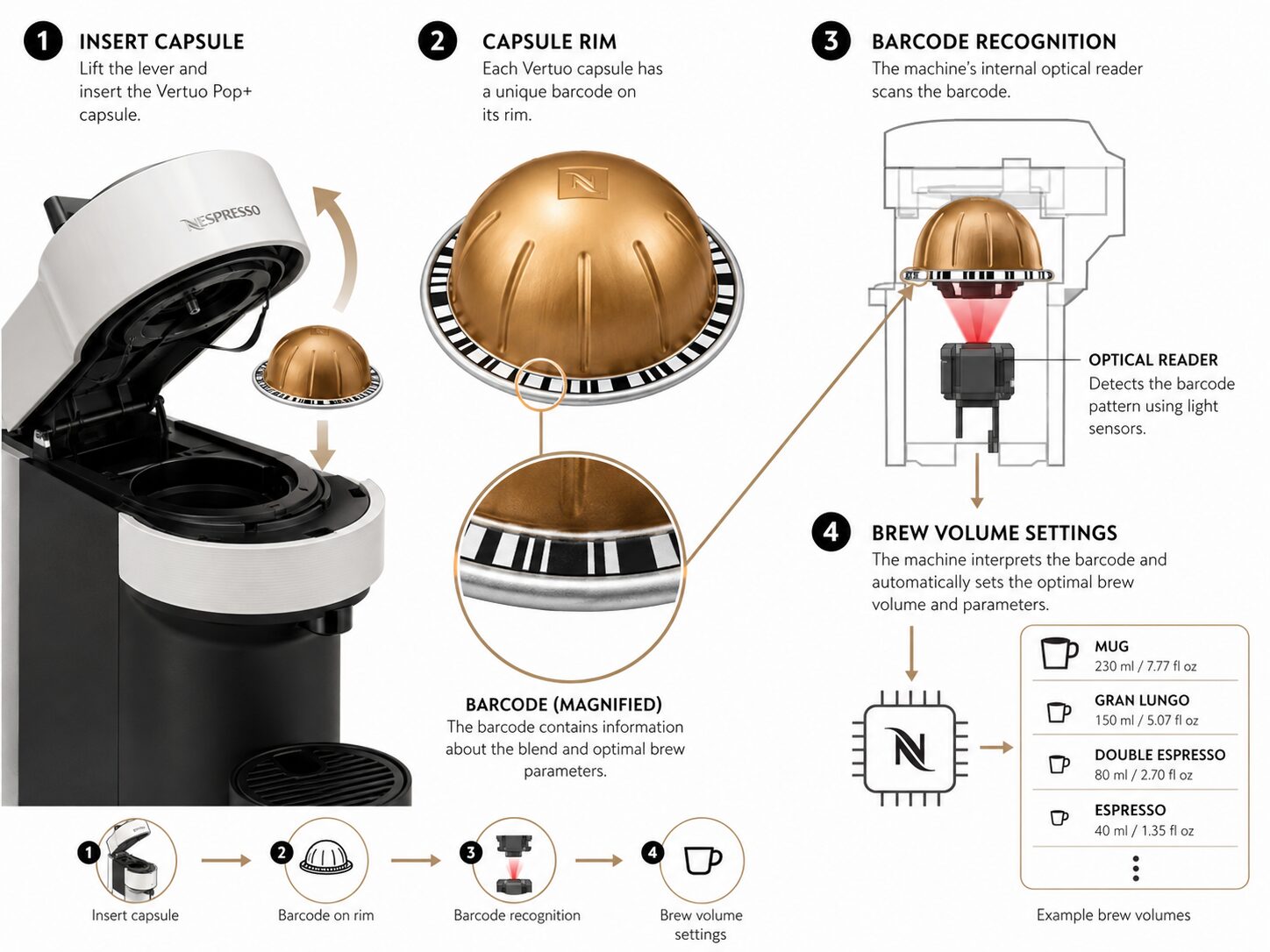
For VertuoLine machines (Vertuo Pop+, Vertuo Next), insert the capsule with the dome facing up. The flat side with the barcode ring sits downward. The machine reads the barcode to set the brew volume and spins the pod during extraction.
Getting this wrong has one of two outcomes. An Original capsule dome-up in a Vertuo machine simply won’t fit, the pod is too tall. A Vertuo capsule dome-down in an Original machine might seem to seat, but the brewing chamber won’t seal. You’ll get a loud grinding noise, no coffee flow, and a pod shredded by the wrong mechanism.
Common mistake: Forcing a Vertuo capsule into an Original machine, the chamber won’t seal, the motor grinds against the pod, and you’ll get a blinking error light within 10 seconds.
Why Your Machine Has Two Buttons (And When To Use Them)
Most OriginalLine machines have two buttons: one for a short pour (espresso, ~40ml) and one for a long pour (lungo, ~110ml). Some models, like the KitchenAid, offer up to six programmable volumes.
The short button isn’t just less coffee. It runs the pump for a shorter duration at the same pressure, yielding a more concentrated, intense shot. The long button adds more water, extracting more from the same grounds for a larger, milder cup.
| Button | Typical Volume | Best For | Risk If Misused |
|---|---|---|---|
| Short / Espresso | 40 ml (1.35 oz) | Straight espresso, macchiato, Americano base | Over-extraction if grounds are spent; bitter, thin shot |
| Long / Lungo | 110 ml (3.7 oz) | Larger black coffee, latte base | Under-extraction if stopped early; weak, watery coffee |
| Programmable (KitchenAid) | 25–130 ml | Custom drinks, travel mugs | Incorrect volume memory if power cycles |
The Creatista Plus manual specifies 25ml for ristretto, 40ml for espresso, and 110ml for lungo. If your lungo tastes weak, you might be using the long button on an espresso capsule designed for 40ml. Stick to the capsule’s intended volume.
Pressing both buttons simultaneously often triggers a descaling or cleaning mode. On the Pixie, holding both for more than 6 seconds starts the descaling cycle. Don’t do this accidentally.
Let It Drip. The Last 10ml Is Free
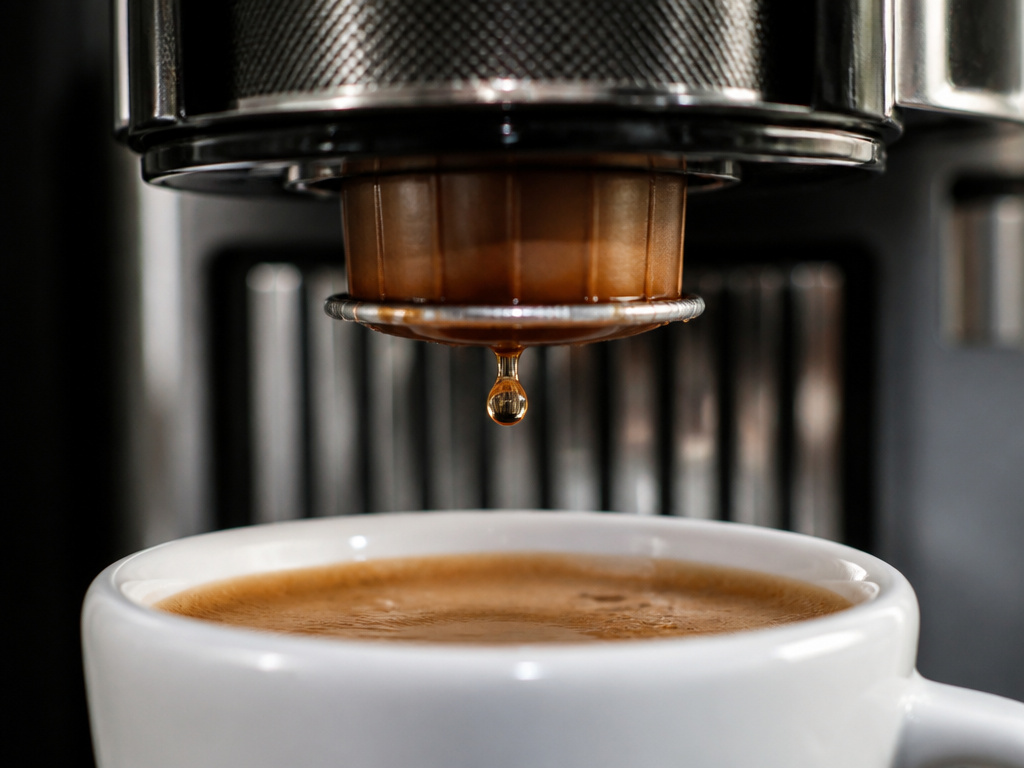
When the pump stops humming, the coffee is not done. Residual pressure in the system and gravity will continue to drip for another 5–10 seconds. This post-brew dripping adds the last 10–15ml of coffee to your cup.
Removing the cup the second the pump stops leaves that coffee in the capsule. It then drips into the drip tray, wasting your shot and creating a sticky mess that attracts ants. Wait until the drips slow to one every two or three seconds.
The drip tray is there for overflows and the occasional drip after you remove the cup, not as a primary waste reservoir. If you’re emptying it more than once a month, you’re pulling the cup too early.
This final drip also cools the group head slightly. That’s why the next shot might take a second or two longer to start, the machine is reheating that last bit of water left in the lines.
The Maintenance That Prevents a Lockout
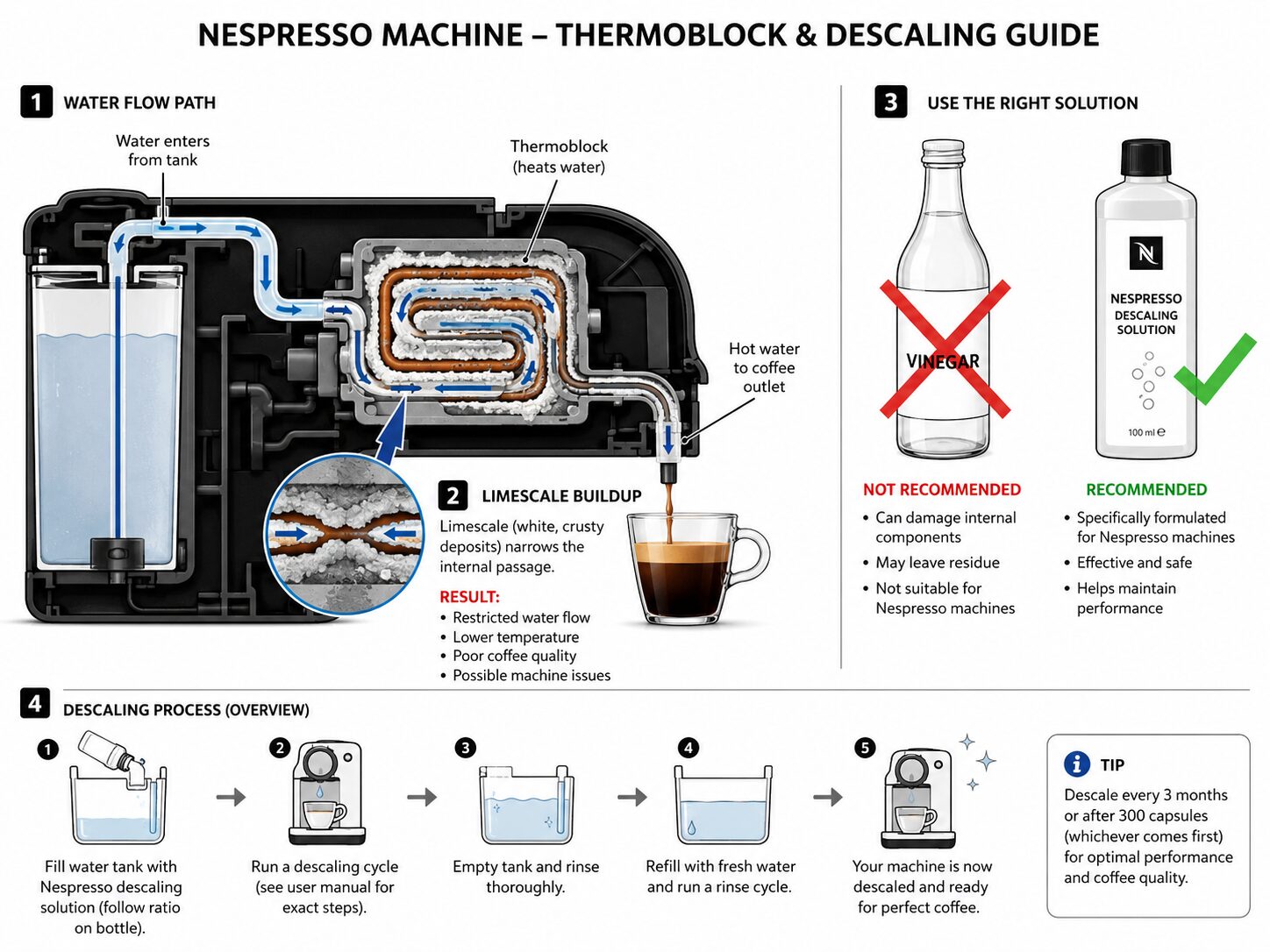
Descaling is the one task you cannot ignore. Limescale builds up inside the thermoblock and tubing, restricting water flow, reducing temperature, and eventually causing a complete blockage.
The frequency depends on your water hardness. The Krups Nespresso Citiz & Milk manual recommends descaling every three months for average water, more often if you have hard water.
Common mistake: Using vinegar or lemon juice to descale, the Nespresso KitchenAid user manual explicitly states, “KitchenAid does not recommend using home remedies or water and vinegar solutions to descale the Espresso Machine.” The acid can damage internal seals and leave a residue that affects taste.
Use the Nespresso-branded descaling solution or a citric-acid-based descaler labeled safe for espresso machines. The process usually involves putting the machine into descaling mode, running the solution through, then flushing with several tanks of clean water.
The Nespresso Creatista Plus has a hard lockout. If you ignore the descale reminder, the machine will display a countdown after 10 uses and eventually refuse to brew until you complete the cycle. The descaling cycle itself takes about 15 minutes.
Regular cleaning of the drip tray, capsule container, and water tank prevents mold and mineral deposits from affecting your Breville coffee machine filter or the machine’s internal pathways. A clogged drip tray can cause water to back up into the machine.
Model-Specific Quirks You Won’t Find in the Manual
Not all Nespresso machines are the same. The manuals hide the interesting bits in the troubleshooting section.
The Nespresso Pixie has an overheating protection mode. If you make more than 10 coffees in a row without stopping, both lights will flash slowly. The manual says to wait, up to 10 minutes, for it to cool down. Unplugging it during this mode can cause a fault.
The Nespresso Vertuo Pop+ (and most Vertuo machines) uses barcode recognition. The barcode on the rim of the capsule tells the machine the blend, roast, and optimal brew volume. If the barcode is smudged or the pod is a third-party copy, the machine might misread it and default to a generic setting.
The Siemens TK70 has a warming plate on top. It gets hot enough to keep a cup warm but not hot enough to brew with. If you’ve just used the steam wand, the machine will automatically cool down before allowing you to draw coffee, a safety feature to prevent steam burns.
The Krups Nespresso Citiz & Milk manual notes that if the appliance hasn’t been used for several months, the pump may have difficulty restarting water flow. You might need to prime it by running a water-only cycle (no capsule) a few times.
These quirks explain why generic advice fails. Knowing your specific model’s manual, like the Black & Decker coffee maker manual for another appliance, is the difference between a quick fix and a service call.
Troubleshooting the Lights and Error Codes
A blinking light usually means the machine needs attention. The pattern tells you what.
Two lights flashing fast together every 3 seconds on a Pixie indicates an error. The manual’s first step is to unplug the machine, wait 30 seconds, and plug it back in. If it persists, it’s a call to Nespresso support.
A single light blinking rapidly after you press a brew button often means no water. Check the tank is seated correctly and full. Even a slightly unseated tank can break the sensor contact.
A steady light that won’t respond to button presses could be the descaling lockout, especially on a Creatista Plus. The display will show a countdown.
If the machine makes a grinding noise but no coffee comes out, you’ve likely inserted the capsule upside down or used the wrong capsule system. Open the lever immediately to prevent motor damage.
If coffee flows very slowly or drips, the machine is likely scaled. Descaling is the next step. If that doesn’t work, the thermoblock or pump may be failing, time to consult a resource like a Braun coffee maker manual for similar pump-based troubleshooting.
What You Need for Your First Cup
You don’t need much beyond the machine. This isn’t a full espresso setup.
- The machine itself. Plug it in.
- Nespresso capsules. Decide between OriginalLine or VertuoLine based on your machine. Don’t mix them.
- A cup. Make sure it’s large enough for your chosen drink volume. A standard espresso cup is too small for a lungo.
- Fresh, cold water. Avoid distilled or softened water; the minerals in tap water are needed for the machine’s scale sensor in some models.
- A descaling solution. Buy the Nespresso kit or a citric-acid descaler. Have it on hand before you need it.
That’s it. You don’t need a separate grinder like you would for a burr vs blade grinders comparison, nor do you need a frothing pitcher unless your model has a milk system.
Frequently Asked Questions
Why is my Nespresso machine blinking after I turn it on?
The machine is heating up. Wait for the light to become steady. If it continues blinking after 60 seconds (Pixie) or 10 seconds (Creatista), check the water tank is fully seated and filled. A misaligned tank is the most common cause.
Can I use other brands of capsules in my Nespresso?
For OriginalLine machines, many third-party and reusable capsules exist. For VertuoLine, the barcode patent is stricter, and third-party options are limited and may not work reliably. Always ensure the capsule is designed for your specific machine line.
How do I descale my Nespresso without the official solution?
The official manuals advise against homemade solutions like vinegar. If you must use an alternative, a citric acid powder solution (1 tablespoon per liter of water) is less likely to damage seals than acetic acid (vinegar). Flush with at least two tanks of clean water afterward.
My coffee tastes weak. What am I doing wrong?
You are likely brewing before the ready light is steady, using the wrong button for the capsule (e.g., lungo button on an espresso capsule), or your machine is scaled. Let the machine heat fully, match the button to the capsule type, and run a descaling cycle.
How often should I clean the drip tray and capsule container?
Empty the capsule container after every use. Rinse the drip tray and capsule container with warm water weekly. A full container can block the ejection mechanism and cause used capsules to stack up incorrectly.
Before You Go
The sequence is simple: water, power, wait for the light, insert the capsule right-side up, brew, let it drip. The complexity is in the details your model’s manual holds, the Pixie’s 30-second heat-up, the Creatista’s 3-second lock, the Vertuo’s barcode reader.
Ignore the ready light once, and you get a lukewarm shot. Ignore the descale reminder ten times, and the machine locks you out. The difference between a machine that lasts five years and one that dies in eighteen months is reading the thirty-page PDF from the manufacturer.
Keep the water tank fresh, use the right capsules, and descale before the machine tells you to. That’s the whole manual.
