
Learn How to Use a Jura Coffee Machine Like a Professional
To use a Jura coffee machine like a professional, match three things: the mandatory water hardness setting during setup, daily operation via the machine’s prompts, and immediate response to its maintenance alarms. Ignoring a cleaning alert for over a week can polymerize oils, requiring a costly professional disassembly.
To use a Jura coffee machine, you match three things: correct initial setup (water hardness setting is mandatory), daily operation following the machine’s prompts, and strict adherence to its maintenance alarms for cleaning and descaling. Ignoring the water hardness setting or a “CLEAN MACHINE” message for more than a week lets coffee oils polymerize inside the brewing unit, requiring a professional service visit to dismantle and scrape the gaskets.
Most people treat a Jura like a simple pod machine, fill beans, push button, ignore beeps. That works for about six months. Then the shots run weak, the machine beeps constantly, and a repair bill arrives that costs half the machine’s price. The difference between a Jura that lasts a decade and one that dies young is treating its intelligence with respect, not as a nuisance.
This guide walks through the first-time setup you must not rush, the daily ritual that becomes second nature, and the maintenance routines you cannot postpone. We’ll cover the ENA 4, E8, and Z10 specifics where they matter, and explain why the machine’s prompts are non-negotiable.
Key Takeaways
- The water hardness setting during first-time setup is not a suggestion. Getting it wrong disables the descaling timer, leading to limescale damage that isn’t covered under warranty.
- “CLEAN MACHINE” means now. This prompt appears after 180 drinks. Delaying this cleaning cycle for more than a week lets coffee oils harden inside the brewing unit, eventually seizing the mechanical arms.
- Use the pre-ground coffee bypass for one drink at a time only. Adding more than the provided scoop’s worth or leaving grounds in the chute will clog the system, forcing a manual clear-out.
- CLARIS water filters last for 50 liters or two months. The “CHANGE FILTER” alert is based on water volume, not time. In a hard water area, ignoring it for three months guarantees scale buildup in the thermoblock.
- For storage or transport, you must run the descaling program first and empty all tanks. Residual water left inside can freeze or stagnate, corroding internal valves and leaving a permanent stale taste.
The 7-Step First-Time Setup (and the One Step Nobody Skips)
Unboxing a Jura feels like unwrapping a luxury car. You want to plug it in and go. Resist that. The first 20 minutes decide its long-term health.
First, remove all external packaging and internal transit locks. These are usually bright orange or yellow plastic blocks securing the brewing unit. Leaving them in will break the gearbox on the first power-up. Place the machine on a level, stable counter with at least four inches of clearance above and behind for the water tank lid and ventilation.
Now install the CLARIS Smart water filter if your model includes one. Soak the cartridge in a cup of water for five full minutes. Insert it into the empty water tank until it clicks. This filter is your first line of defense against limescale. Fill the tank with fresh, cold water. Fill the bean hopper with whole coffee beans, avoid oily dark roasts or flavored beans. Their oils coat the grinder burrs and turn into a sticky paste.
Plug the machine into a dedicated outlet. Turn it on. Here is the step every manual includes and most users skip: setting the water hardness.
The Jura ENA 4 operating manual states the “CHANGE FILTER” message appears after 50 liters of water have flowed through or after 2 months. This volume count is accurate only if the water hardness is set correctly in the machine’s menu first.
The machine will prompt you. Use the included test strip or look up your local water report. If you set it too soft, the machine will think it needs a filter change prematurely. Set it too hard, and the descaling alarm will trigger too late, after mineral deposits have already formed on the heating element. This mistake voids the intelligence of the machine’s entire maintenance system.
The machine will then guide you through an initial rinse cycle. Place a large cup under both the coffee spout and the hot water spout. Let it run. This flushes any manufacturing residues from the internal lines. It’s not optional.
Finally, program your first drink. Navigate to a simple espresso or coffee. Adjust the grind setting one notch finer if the shot seems weak, coarser if it’s bitter. Set the volume to fill your favorite cup. Save it to a one-touch button. Your setup is complete.
TL;DR: The water hardness setting is the foundational calibration. Skip it, and every maintenance alert that follows will be wrong, leading to scale or unnecessary filter costs.
Daily Operation: From Power-On to Perfect Pour
Using the machine day-to-day is where the engineering shines. The process is automated, but your choices direct it.
Power on. The machine performs a short, quiet rinse, you’ll hear water flow into the drip tray. This is the switch-on rinse that keeps the brew path fresh. The display will show the main menu with drink icons.
Select your drink. For a standard coffee, press the “Coffee” button. For an espresso, press “Espresso.” If you programmed a favorite, press that button. The machine takes over.
First the coffee beans are processed. The beans are ground fresh in the grinder each time preparation takes place. The ground coffee is delivered from the grinder to the brewing chamber.
That’s the Jura Key Technology summary. In practice, you’ll hear the grinder spin for 3-5 seconds, then a quiet mechanical whir as the brewing unit compresses the grounds. The I.P.B.A.S. (Intelligent Pre-Brew Aroma System) wets the puck, then the main brew begins. The entire process for an espresso takes about 30 seconds from button press to finished drink.
Want to use pre-ground coffee? Locate the bypass chute, usually on the front or side. Use only one level measuring spoon of grounds, the one provided with the machine. Add the grounds immediately before pressing the drink button. Leaving grounds in the chute attracts moisture and causes clogs.
For milk-based drinks on an E8 or Z10, attach the milk tube to the container of cold milk. Select “Cappuccino” or “Latte Macchiato.” The machine will prompt you to place a cup, then it will first froth milk and then brew coffee into it. After any milk drink, the “CLEAN MILK SYSTEM” message will appear. You have about 30 minutes to run this cycle before milk residues dry in the tube.
Maintenance: The Non-Negotiable Routines
A Jura tells you exactly when it needs care. Your job is to listen and act immediately. There are three core routines: emptying, cleaning, and descaling.
Emptying the Drip Tray and Grounds Container
Check the drip tray daily. The ENA 4 grounds container holds about 10 pucks; the E8 holds 16. When full, the machine will beep and refuse to brew. Slide out the drip tray assembly, dump the grounds, rinse it, and slide it back. It’s simple. Forgetting it is the most common reason for a sudden “machine full” error.
The “CLEAN MACHINE” Cycle
This is the most important alert. It appears after about 180 coffee preparations or 80 switch-on rinses.
Common mistake: Ignoring the “CLEAN MACHINE” prompt for a few days, the coffee oils inside the brewing unit begin to polymerize within 48 hours, creating a varnish-like coating on the piston seals that causes sluggish movement and eventually a grinding noise.
When the message appears, you need the Jura cleaning tablet. Fill the water tank. Place a container under the coffee spout. Insert the tablet into the grounds chute (not the bean hopper). Start the cycle. The machine will run hot water and the cleaning solution through the entire brew group for about 15 minutes. When it finishes, run a rinse cycle to flush any residue. This process dissolves oils and prevents mechanical seizure.
Descaling
This is separate from cleaning. The “DESCALE” prompt appears based on your water hardness setting and usage. You must use Jura-branded descaling solution. Off-brand acids can damage the aluminum thermoblock.
The descaling program is interactive. It will prompt you to empty the drip tray, fill the water tank with the solution mixed with water, and place a large container under both spouts. The cycle takes about 25 minutes, pausing several times for you to empty the container. It flushes scale from the heater and valves. Afterward, you must run several fresh water rinse cycles until the tank is empty to remove all solution taste.
| Maintenance Alert | Trigger | Consequence of Delay | Time to Act |
|---|---|---|---|
| CLEAN MACHINE | ~180 drinks | Oils harden in brewing unit | Within 2 days |
| CLEAN MILK SYSTEM | After each milk use | Milk sours in tubes | Within 30 minutes |
| DESCALE | Water hardness + volume | Limescale on heater | Within 1 week |
| CHANGE FILTER | 50 liters / 2 months | Reduced scale protection | Before next tank fill |
| EMPTY GROUNDS | Container full | Machine stops brewing | Immediately |
TL;DR: The cleaning cycle protects mechanics; the descaling cycle protects heating elements. Neither is optional, and each requires its own specific Jura-branded chemical.
Programming and Customization: Making It Yours
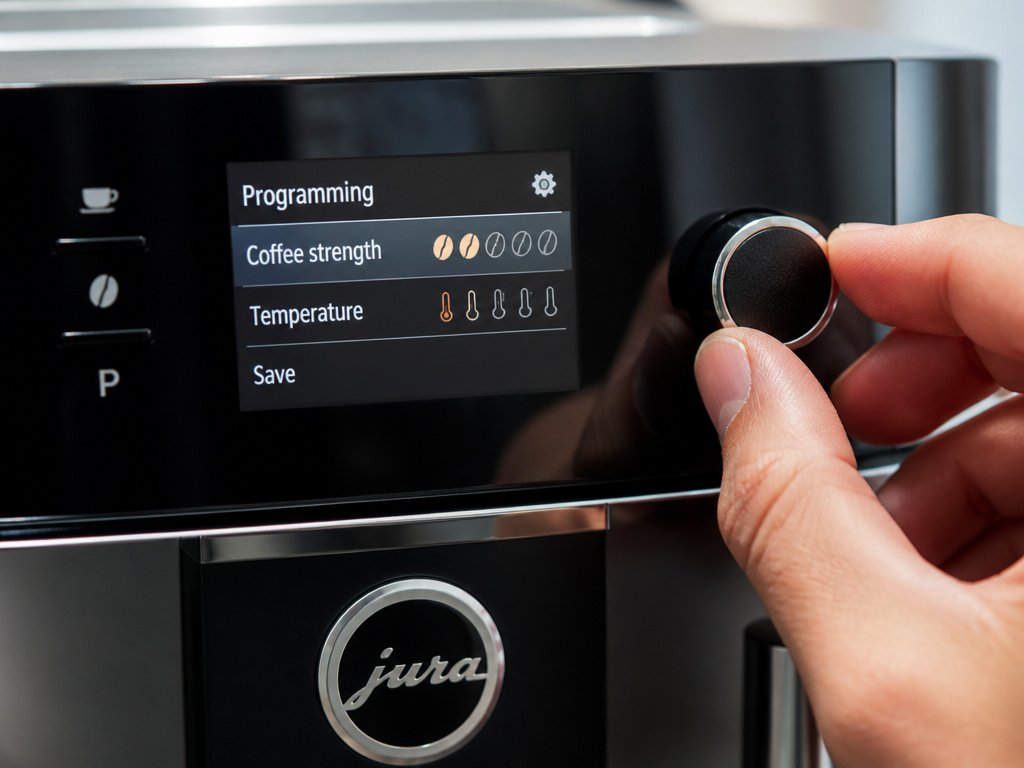
Out of the box, the drinks are good. After programming, they’re perfect for you. The menu depth varies by model.
On an ENA 4, you can adjust coffee strength (grind fineness), volume, and temperature. Press and hold the drink button until the display enters programming mode. Use the rotary dial or arrow buttons to adjust. A finer grind yields stronger flavor but risks over-extraction if the coffee is dark. A higher temperature (up to 94°C) is better for light roasts.
The Jura Z10 offers more control: 10 intensity levels, 3 brew temperatures, and 3 hot water temperatures. Intensity adjusts the coffee-to-water ratio, not the grind. This is useful for dialing in a specific single-origin coffee without changing the texture of the espresso.
To save a custom drink, program it as above, then press and hold one of the numbered favorite buttons. The machine beeps to confirm. Now that button delivers your exact recipe every time. This is ideal for creating a perfect cafe Americano with a specific water volume after the espresso shot.
You can also adjust the machine’s language, audio volume, and auto-off timer. Dive into the main settings menu with the rotary dial. The auto-off timer is a power saver, but setting it below 30 minutes means more frequent reheating if you have multiple coffee drinkers in the house.
Troubleshooting Common Jura Issues
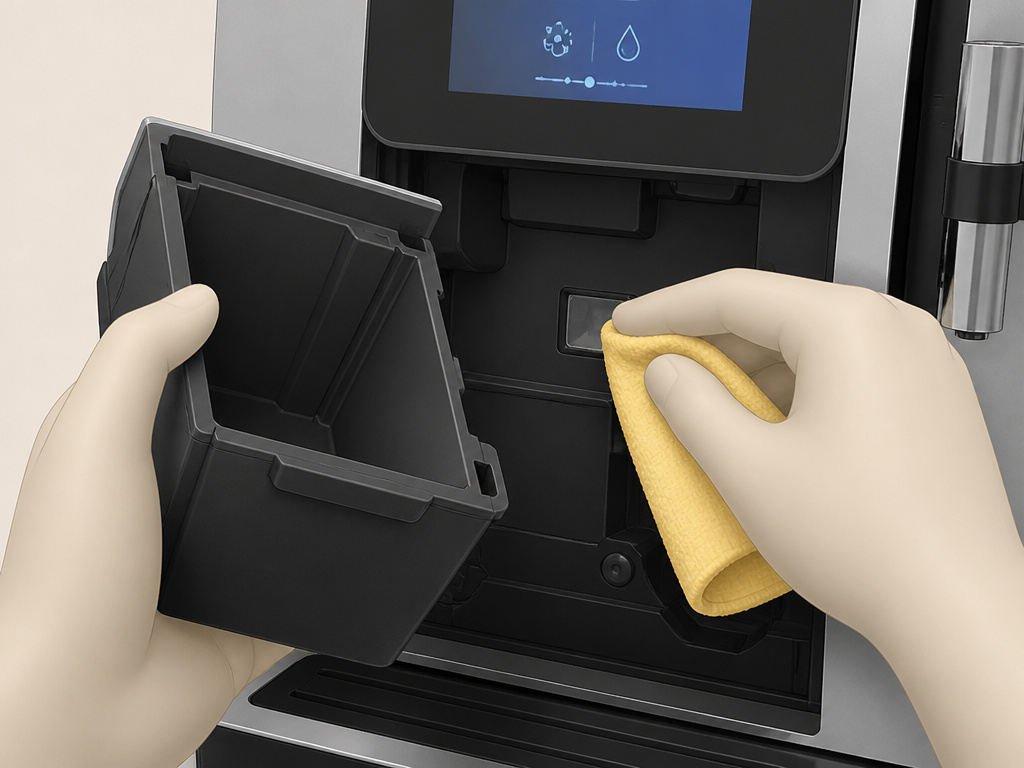
Even a well-maintained Jura can hiccup. Here’s how to decode the beeps and messages.
Machine says “EMPTY GROUNDS CONTAINER” but it’s not full.
The sensor is likely blocked by a damp coffee puck. Remove the drip tray and grounds container. Wipe the sensor area (a small plastic window inside the compartment) with a dry cloth. Check the container itself for cracks or debris. Reinsert it firmly until it clicks.
Coffee runs weak or watery.
First, check your beans. Stale beans won’t produce crema. Second, your grind setting is too coarse. Go one step finer in the programming menu. Third, the brewing unit might be overdue for a cleaning cycle. Oily buildup prevents proper pressure. Run the “CLEAN MACHINE” cycle.
Machine beeps three times and won’t start.
This is often a water supply error. Check that the water tank is fully seated and the tank lid is closed. Ensure the tank isn’t empty. On models with a CLARIS filter, make sure the filter is properly installed and not expired. An old filter can slow water flow enough to trigger an error.
Milk frothing is weak or inconsistent.
The milk tube might be clogged. Detach it and run warm water through it. Ensure you are using cold, fresh milk, the fat content matters. Whole milk froths best. Also, run the “CLEAN MILK SYSTEM” cycle twice in a row to clear any dried residues from the internal frother.
| Symptom | Likely Cause | Immediate Fix | If Persists |
|---|---|---|---|
| No power | Not plugged in / outlet dead | Check plug and outlet | Check home circuit breaker |
| Grinder makes loud noise | Foreign object (rock) in beans | Turn off, empty bean hopper | Contact service for burr inspection |
| Water leaks underneath | Loose tank or internal hose | Check tank seal, empty drip tray | Internal leak – requires technician |
| “ERROR” on display | General system fault | Power off, wait 2 mins, restart | Note error code, call Jura support |
TL;DR: Most errors are fixed by a reset (power off/on), a good clean, or checking the obvious: beans, water, and empty containers.
Frequently Asked Questions
How often should I clean my Jura coffee machine?
You don’t decide, the machine tells you. The “CLEAN MACHINE” alert appears after approximately 180 coffee preparations. For an average household making 3 drinks a day, that’s about every two months. Never ignore this prompt for more than a week.
Can I use pre-ground coffee in my Jura?
Yes, via the bypass chute. Use only the provided measuring spoon, leveled off, for one drink at a time. Add the grounds immediately before brewing. Do not store grounds in the chute, as moisture will cause clogs and mold.
What’s the difference between cleaning and descaling?
Cleaning removes coffee oils and residues from the brewing unit and grinder using a specific cleaning tablet. Descaling removes mineral deposits (limescale) from the heating element and water lines using an acidic descaling solution. Both are separate, mandatory processes triggered by different alerts.
Why is my Jura so loud when grinding?
sudden loud grinding or rattling noise usually means a foreign object like a small stone from the coffee beans is in the grinder. Turn the machine off immediately. Empty the bean container completely and inspect the beans. If the noise continues, the grinder burrs may be damaged and need service.
How long do Jura machines last?
With proper maintenance, responding to all alerts, using recommended filters and chemicals, a Jura can easily last 8-12 years. The most common point of failure is the brewing unit, which can wear out after 5-7 years of heavy use, but it is a replaceable part.
Do I need to use Jura brand beans?
No. You can use any high-quality, fresh whole bean coffee. However, avoid very oily dark roast or flavored beans. The oils coat the grinder and brewing unit, accelerating the buildup that leads to required cleaning and potential clogs. A medium roast Arabica coffee bean is ideal.
The Bottom Line
A Jura coffee machine is a precision instrument, not an appliance. Its intelligence, the prompts, the counters, the sensors, is there to guarantee a perfect drink and a long life. Your role is to partner with that intelligence, not work around it. Set the water hardness correctly on day one. Answer the cleaning and descaling alerts promptly. Use fresh beans and clean water.
That partnership yields a decade of flawless espresso, coffee, and cappuccino at the touch of a button. The alternative is a persistent beep, a weakening brew, and a costly repair. The choice is simple. Listen to the machine. It knows what it needs.
