
Ninja Coffee Maker Guide: How to Work It & Prevent Drip-Stop
To work a Ninja coffee maker, fill the reservoir with cool water, insert the correct filter, add coffee, close the lid, select your brew size and strength, then press Brew. The critical step most users miss is leaving the Drip Stop lever open during the entire brew cycle; closing it mid-brew triggers a 30-second pause and can cancel the pot.
People think the Drip Stop lever is for pausing a pour. It is not. It is a safety feature designed to be opened before brewing and left alone. Close it while coffee is flowing, and the machine will beep, stop for half a minute, and if you don’t reopen it within five minutes, it cancels the brew entirely. You get half a carafe of weak coffee and a mess to clean.
This guide walks through the basic operation for every Ninja model, explains the settings that matter, and covers the cleaning routine that keeps the machine from locking up. You will also learn the high-altitude trick for pod machines and the model-specific filter rule that voids the warranty if ignored.
Key Takeaways
- The Drip Stop lever must be open before you press Brew. Closing it mid-cycle pauses the machine for 30 seconds, then cancels the brew after 5 minutes.
- Ninja’s Intelligent Clean Cycle takes 75 minutes on most models. Ignoring the clean indicator light can cause the brewer to stop mid-brew and display “CLn.”
- Use only the permanent filter on Ninja Single-Serve Pods & Grounds models (PB040/050). Putting a paper filter in those machines clogs the system.
- High-altitude users with DualBrew models must run a one-time calibration brew. Skipping it leads to excessive steam and weak coffee.
- The Over Ice setting brews a 4-ounce concentrated shot directly over ice to prevent dilution, a feature unique to Ninja’s pod and grounds machines.
The 5-Step Brew Process for Any Ninja Model
Fill the removable water reservoir with cool, fresh water to your chosen cup line. Ninja manuals specify cool water because hot tap water can carry mineral deposits that scale the heater faster. Use the permanent filter that came with your machine for grounds, or a #4 paper cone filter if your model specifies it. Place your carafe or mug on the warming plate.
Add medium-ground coffee to the filter. The rule is one level Ninja scoop per cup, but a heaping scoop works for the Classic Rich setting. Close the lid until it clicks. An unsealed lid lets steam escape and drops brew temperature by a few degrees—enough to mute flavor notes.
Select your brew size and strength. The control panel varies by model: buttons for Small, Large, XL, or dials for 1-4 cups. Strength options are usually Classic, Rich, or Over Ice. Press the illuminated Brew button. The machine will prime for a few seconds before water flows.
Before you start: Ensure the Drip Stop lever is in the open position (carafe icon visible). Closing it before or during brewing activates the pause function. The heating element reaches 130°C; never touch it or the plate directly after a cycle. Always handle the carafe by the handle, not the hot glass.
Walk away. The machine beeps when the cycle finishes. If you need to pause the brew to grab a mug, you can close the Drip Stop lever. You have 30 seconds before it beeps at you. Reopen it within five minutes to resume. Wait longer, and the brew cancels.
TL;DR: Cool water, correct filter, closed lid, open Drip Stop, then press Brew. The machine handles the rest.
What Is the Drip-Stop Feature and How Does It Work?
The Drip Stop is a mechanical lever that blocks the coffee outlet. On models like the Ninja DualBrew Pro CFP300, it’s a sliding switch on the front. Its purpose is to let you remove the carafe mid-brew without coffee dripping onto the warming plate. That is its only job.
Closing the Drip Stop lever while coffee is flowing triggers a 30-second pause with an audible reminder. If the lever is not reopened within five minutes, the Ninja CFP300, CFP200, and CFN600 models will cancel the brew cycle entirely.
Most users mistake it for a pause button you can engage at any time. You cannot. If you close it before pressing Brew, the machine will beep three times and the Drip Stop indicator will light up, refusing to start. The system assumes you’ve forgotten to place a carafe.
Here is the sequence the machine follows, pulled directly from the Ninja Espresso & Coffee Barista System CFN600 manual:
| Action | Machine Response | What To Do |
|---|---|---|
| Drip Stop closed BEFORE brew | 3 beeps, indicator lights | Open the lever, then press Brew. |
| Drip Stop closed DURING brew | Flow pauses, 30-second timer starts | Reopen lever within 30 seconds to resume. |
| Drip Stop left closed >5 min | Brew cancels, “CLn” may display | Open lever, discard partial brew, restart. |
The feature exists for convenience, not for brewing control. Use it to swap a full carafe for an empty one, or to pause for a moment if your mug isn’t ready. Never leave it closed.
Model-Specific Filters You Cannot Swap
Ninja coffee makers use two filter systems, and using the wrong one breaks the machine.
The classic Ninja Coffee Brewer (the basic 12-cup model) uses a #4 paper cone filter or an optional permanent mesh filter. The paper filter gives a cleaner cup, trapping oils and fine sediment. The permanent filter allows more body but lets some silt through.
The Ninja Single-Serve Pods & Grounds machine (models PB040/050) uses only the included permanent filter. The manual states this in bold: “DO NOT use a paper filter in this coffee maker.” The water flow path is designed for the coarse mesh of the permanent filter. A paper filter clogs the narrow exit, causing water to back up into the internal tubing. This can flood the base or trip a thermal fuse.
| Ninja Model Series | Correct Filter | Incorrect Filter | Consequence |
|---|---|---|---|
| Classic Coffee Brewer | #4 paper cone OR permanent filter | Any other size paper filter | Poor fit, grounds in carafe. |
| Single-Serve Pods & Grounds (PB040/050) | Permanent filter only | Paper filter | Clog, internal flood, possible failure. |
| DualBrew / DualBrew Pro (CFP200/300) | Permanent filter for grounds; Ninja Pod Adapter for pods | Paper filter in pod adapter | No coffee output, adapter jam. |
If you use a paper filter in a pod machine, you will know within two brews. The machine will gurgle loudly, the carafe will fill painfully slowly, and the warming plate will be wet. Stop immediately, remove the paper filter, and run a clean cycle with just water to clear the lines.
TL;DR: Paper filters for classic brewers, permanent only for pod/grounds models. Mixing them up floods the machine.
How to Use the Ninja Pod Adapter
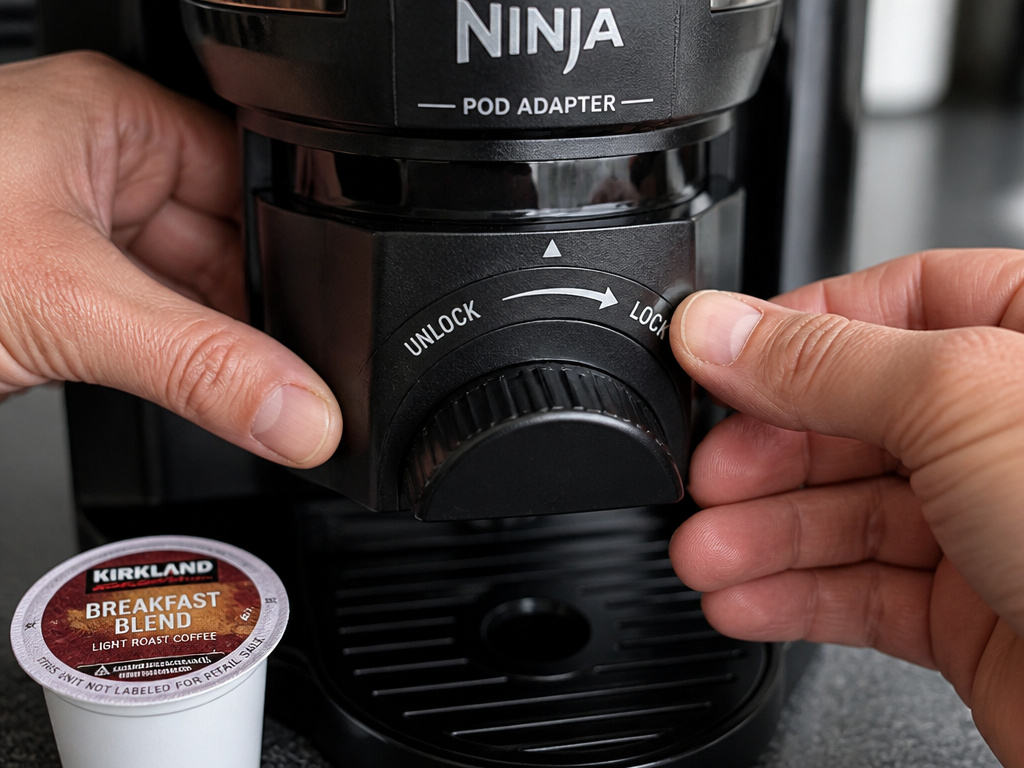
The Ninja Pod Adapter is a black plastic tray that slides into the brew head of DualBrew and Pods & Grounds models. It holds a K-Cup style pod. The adapter has two positions: LOCK and UNLOCK.
Slide the adapter into the brew chamber until it clicks. Rotate the front dial to the LOCK position. This seals the pod against the upper puncture needle. If you brew with the adapter in UNLOCK, the seal is incomplete. Water sprays around the pod instead of through it, resulting in a weak, under-extracted cup that’s mostly hot water.
Place a K-Cup pod into the adapter. Close the lid firmly. The upper needle will puncture the foil. Select the pod setting on your machine’s control panel—usually a dedicated button. The brew size will often default to a single cup.
Common mistake: Brewing a pod with the adapter in UNLOCK — you get a cup of hot, faintly brown water because the pressure bypasses the coffee grounds entirely. The machine sounds normal, so you don’t know until you taste it.
For high-altitude brewing with the PB040/050 model, there’s an extra step. The manual instructs you to manually puncture the bottom of the K-Cup pod with a toothpick before loading it. This prevents “pod blowout” from gas buildup at lower atmospheric pressure. Skip it, and the pod can rupture, spraying wet grounds into the adapter tray.
Decoding the Brew Strength Settings
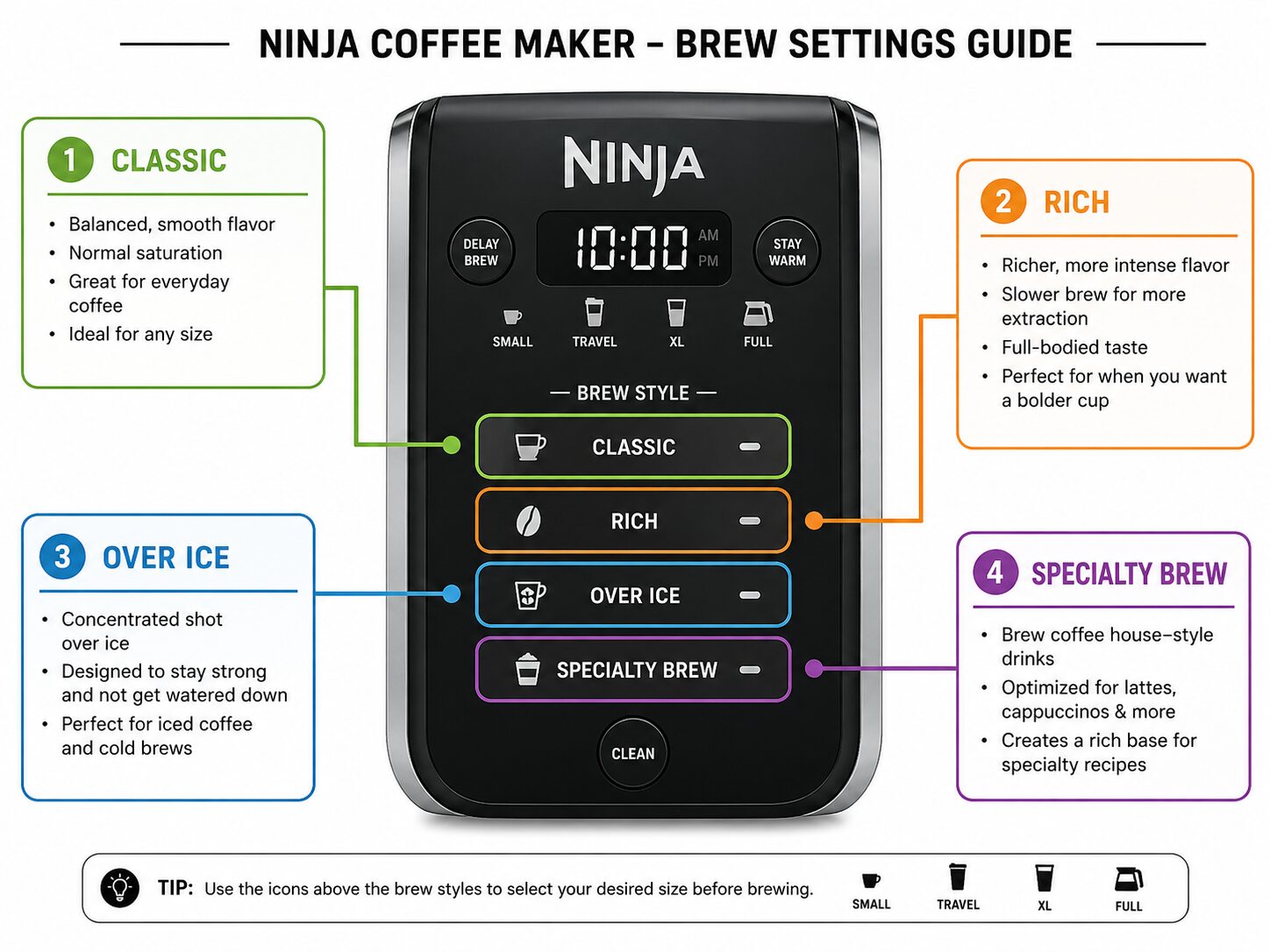
Ninja brewers offer multiple strength options, but they don’t all work the same way.
- Classic: This is the standard setting. It runs a normal brew cycle, saturating the grounds once. Use it for everyday coffee.
- Rich: The Rich setting on most Ninja models extends the bloom phase and increases water temperature slightly. It also slows the flow rate. The result is a more complete extraction, pulling more oils and solubles from the same amount of coffee. It makes a bolder, less acidic cup.
- Over Ice: This is not a strength setting but a program. On the Pods & Grounds machine, the Over Ice function brews a 4-ounce concentrated shot directly over a tumbler full of ice. The coffee is stronger to account for dilution as the ice melts. If you use this setting without ice, you’ll get an overpoweringly strong, small coffee.
- Specialty Brew: On the Ninja DualBrew Pro CFP300, the Specialty Brew button always produces approximately 4 ounces of coffee, regardless of the cup size selected. It’s designed for stronger, espresso-like drinks.
Choosing the wrong setting for your goal wastes coffee. Using Over Ice for a hot cup gives you a tiny, bitter shot. Using Classic for iced coffee yields a watery, diluted mess. Match the setting to the drink.
The Intelligent Clean Cycle and Why You Cannot Skip It
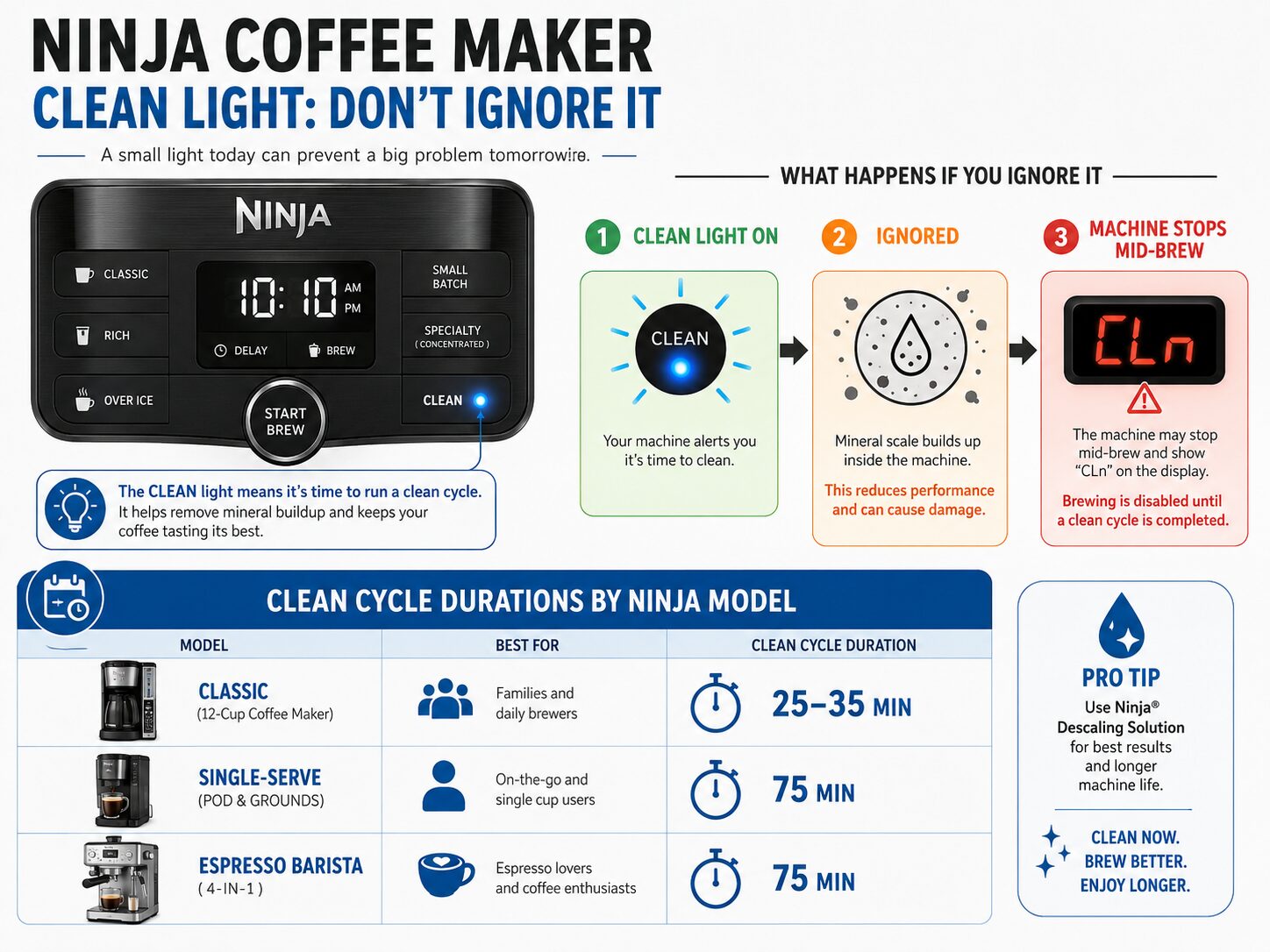
The Intelligent Clean Cycle indicator is a light on the control panel, often labeled “CLEAN.” It illuminates after a set number of brew cycles—usually between 30 and 60. This is not a suggestion.
When the CLEAN light turns on, the machine has counted the mineral buildup from your water. Ignoring it allows scale to coat the heating element and thermostat. The next time you brew, the machine may detect an overheating risk and stop mid-brew to display “CLn.” At this point, it will not brew again until you run the full clean cycle.
The cycle duration is model-specific:
* Ninja Coffee Brewer (classic): 25–35 minutes
* Ninja Single-Serve Pods & Grounds (PB040/050): 75 minutes
* Ninja Espresso & Coffee Barista System (CFN600): 75 minutes
To run it, fill the reservoir with a 50/50 mix of white vinegar and water, or with a commercial descaling solution up to the “Full” line. Place a large carafe on the warming plate. Press and hold the Clean button for 3 seconds. The machine will run through multiple fill, heat, and pause stages. It finishes with a rinse cycle. You must run a fresh water brew cycle afterward to clear any vinegar taste.
Common mistake: Using straight vinegar instead of a 50/50 mix with water — the high acidity can degrade rubber seals inside the water lines over multiple cleanings. The Ninja CFN600 manual explicitly says 16 oz of vinegar to the Travel Mug line, then fill to Full with water.
Skipping this cycle because it takes 75 minutes is a false economy. A scaled-up heating element draws more power, takes longer to heat, and eventually fails. Replacement involves disassembling the entire base.
High-Altitude Calibration for DualBrew Models
If you live above 3,000 feet, your Ninja DualBrew (CFP200/300 series) needs a one-time calibration. Water boils at a lower temperature at altitude. Without calibration, the machine’s thermostat misreads the boiling point, causing it to over-steam during brewing. The coffee tastes weak and the group head drips for minutes after the cycle ends.
The calibration is a simple brew cycle with no coffee. Fill the reservoir with cool water. Ensure the Drip Stop is open and a carafe is in place. Press and hold the “12oz” and “Café” buttons simultaneously for five seconds. The machine will run a special brew cycle. It is listening for the exact moment the water boils to recalibrate its internal sensor.
Do this the first time you set up the machine. If you move to a significantly higher elevation, run it again. The manual for the CFP200 series states that skipping this step results in “excessive steaming during brewing.” That steam is energy and water not going into your coffee.
Warming Plate Settings and Auto-Off
The Intelligent Warming Plate on models like the CFN600 defaults to a 2-hour hold at medium temperature. You can usually adjust it to 4 hours, and some models offer Low, Medium, or High temperature settings.
The High setting is for ceramic or thick stoneware mugs. It will burn paper-thin porcelain. The Low setting is just enough to keep a full carafe warm without cooking the coffee. After the timer elapses, the plate shuts off completely. There is no “keep warm indefinitely” mode.
If you want coffee ready when you wake up, use the programmable clock. Set the brew time and ensure the reservoir is full, grounds are loaded, and the Drip Stop is open. The machine will grind through its start-up sequence and brew at the set time. The warming plate will then engage for its programmed duration.
Leaving coffee on the plate for longer than four hours does more than burn it. The volatile aromatic compounds that give coffee its brightness evaporate. What remains is a flat, bitter liquid that tastes of over-extracted tannins. If you’ve walked away for a meeting and come back to old coffee, pour it out and start fresh.
Frequently Asked Questions
Why did my Ninja coffee maker stop brewing and show “CLn”?
The CLEAN indicator light was ignored past its warning cycle. Scale buildup triggered the machine’s safety lockout. You must run the full 75-minute Intelligent Clean Cycle with a vinegar-water solution before the machine will brew again.
Can I use a paper filter in my Ninja Pods & Grounds machine?
No. The Ninja Single-Serve Pods & Grounds owner’s guide explicitly states “DO NOT use a paper filter in this coffee maker.” The water path is engineered for the permanent filter’s mesh. A paper filter will clog the system, potentially causing an internal flood.
What does the Over Ice setting actually do?
It brews a 4-ounce concentrated shot of coffee. The program uses less water over the same amount of grounds, creating a stronger brew designed to be poured directly over a full tumbler of ice. Using it without ice results in an intensely strong, small coffee.
How do I know if my Ninja needs the high-altitude calibration?
If you live above 3,000 feet and your DualBrew model produces a lot of steam during brewing and the coffee tastes weak, you likely skipped the calibration. Run the calibration brew (hold 12oz + Café buttons) with just water in the reservoir.
My Drip Stop lever was closed and now my brew is cancelled. What happened?
Closing the Drip Stop lever mid-brew starts a 30-second pause. If you don’t reopen it within five minutes, the Ninja CFN600, CFP200, and CFP300 models cancel the brew cycle as a safety precaution to prevent overheating. Open the lever, discard the partial brew, and start over.
Can I grind coffee beans in a Ninja blender?
Technically yes, but the results are inconsistent and can damage the blender’s blades. A blade blender creates uneven particles, from dust to large chunks, which leads to over- and under-extraction. For better flavor, use a dedicated burr grinder vs blade grinder designed for coffee.
Before You Go
Your Ninja coffee maker works on a simple principle: hot water through grounds. The complexity is in the details it manages for you—the Drip Stop safety, the clean-cycle reminders, the high-altitude calibration. Respect those details. Use the right filter for your model. Never put a paper filter in a pod machine. Run the clean cycle when the light comes on, even if it takes 75 minutes.
When the machine beeps, your coffee is ready. The warming plate will keep it drinkable for two hours, four if you adjust the setting. After that, the chemistry turns against you. Pour a fresh cup. The machine is built to do this every day for years, as long as you give it cool water and a monthly vinegar rinse. Ignore the clean light, and it will ignore your next brew.
{
“@context”: “https://schema.org”,
“@type”: “HowTo”,
“name”: “How to Work a Ninja Coffee Maker”,
“totalTime”: “PT15M”,
“tool”: [
{
“@type”: “HowToTool”,
“name”: “Ninja coffee maker”
},
{
“@type”: “HowToTool”,
“name”: “Ninja reusable permanent filter or #4 paper cone filter”
},
{
“@type”: “HowToTool”,
“name”: “Cool, fresh water”
},
{
“@type”: “HowToTool”,
“name”: “Medium-ground coffee”
},
{
“@type”: “HowToTool”,
“name”: “White vinegar or commercial descaling solution”
}
],
“step”: [
{
“@type”: “HowToStep”,
“name”: “Prepare the brewer”,
“text”: “Fill the removable reservoir with cool water. Insert the correct filter for your model: the permanent filter for pod/grounds models, a #4 paper cone for the classic brewer. Place an empty carafe on the warming plate.”
},
{
“@type”: “HowToStep”,
“name”: “Add coffee and select brew”,
“text”: “Add grounds to the filter. Close the lid securely. Select your brew size and strength setting on the control panel.”
},
{
“@type”: “HowToStep”,
“name”: “Start the brew and monitor”,
“text”: “Press the Brew button. Do not close the Drip Stop lever mid-brew unless you intend to pause. The brewer will beep when finished.”
},
{
“@type”: “HowToStep”,
“name”: “Clean after use”,
“text”: “Discard grounds and rinse the filter. Wipe the warming plate. Run the Intelligent Clean Cycle when the indicator light turns on to prevent the machine from stopping mid-brew.”
}
]
}
{
“@context”: “https://schema.org”,
“@type”: “FAQPage”,
“mainEntity”: [
{
“@type”: “Question”,
“name”: “Why did my Ninja coffee maker stop brewing and show \”CLn\”?”,
“acceptedAnswer”: {
“@type”: “Answer”,
“text”: “The CLEAN indicator light was ignored past its warning cycle. Scale buildup triggered the machine’s safety lockout. You must run the full 75-minute Intelligent Clean Cycle with a vinegar-water solution before the machine will brew again.”
}
},
{
“@type”: “Question”,
“name”: “Can I use a paper filter in my Ninja Pods & Grounds machine?”,
“acceptedAnswer”: {
“@type”: “Answer”,
“text”: “No. The Ninja Single-Serve Pods & Grounds owner’s guide explicitly states \”DO NOT use a paper filter in this coffee maker.\” The water path is engineered for the permanent filter’s mesh. A paper filter will clog the system, potentially causing an internal flood.”
}
},
{
“@type”: “Question”,
“name”: “What does the Over Ice setting actually do?”,
“acceptedAnswer”: {
“@type”: “Answer”,
“text”: “It brews a 4-ounce concentrated shot of coffee. The program uses less water over the same amount of grounds, creating a stronger brew designed to be poured directly over a full tumbler of ice. Using it without ice results in an intensely strong, small coffee.”
}
},
{
“@type”: “Question”,
“name”: “How do I know if my Ninja needs the high-altitude calibration?”,
“acceptedAnswer”: {
“@type”: “Answer”,
“text”: “If you live above 3,000 feet and your DualBrew model produces a lot of steam during brewing and the coffee tastes weak, you likely skipped the calibration. Run the calibration brew (hold 12oz + Café buttons) with just water in the reservoir.”
}
},
{
“@type”: “Question”,
“name”: “My Drip Stop lever was closed and now my brew is cancelled. What happened?”,
“acceptedAnswer”: {
“@type”: “Answer”,
“text”: “Closing the Drip Stop lever mid-brew starts a 30-second pause. If you don’t reopen it within five minutes, the Ninja CFN600, CFP200, and CFP300 models cancel the brew cycle as a safety precaution to prevent overheating. Open the lever, discard the partial brew, and start over.”
}
},
{
“@type”: “Question”,
“name”: “Can I grind coffee beans in a Ninja blender?”,
“acceptedAnswer”: {
“@type”: “Answer”,
“text”: “Technically yes, but the results are inconsistent and can damage the blender’s blades. A blade blender creates uneven particles, from dust to large chunks, which leads to over- and under-extraction. For better flavor, use a dedicated burr grinder vs blade grinder designed for coffee.”
}
}
]
}
