
How To Fix a De’Longhi Coffee Machine That Is Not Working
A De’Longhi coffee machine not working is usually caused by three things: a water supply issue (empty tank, air lock, limescale), a dirty or misaligned brew unit, or a blocked grinder. The specific error code on the display, like E01 for no beans or E05 for scale, points directly to the failed component.
People get this wrong because they start taking things apart before reading the error code. They clean the brew unit when the problem is an air lock in the pump. They run a descaling cycle when the water tank isn’t seated. The machine tells you what’s wrong, but only if you look at its language first.
This guide walks through the diagnostic sequence that matches the machine’s own error reporting. You’ll learn how to interpret every common De’Longhi error code, the one maintenance step the manual leaves out, and how to avoid the repair that usually isn’t needed.
Key Takeaways
- Read the error code first. Codes E01-E31 on super-automatics like the Magnifica S are a direct diagnostic map from the manufacturer’s service manual.
- Prime the pump on manual machines. For a Dedica with no water flow, bypass the brew group and run water through the steam wand first to purge air from the system.
- The water hardness setting dictates failure. If set incorrectly, your machine won’t descale often enough, guaranteeing a limescale blockage (Error E05) within months.
- Lubricate the brew unit monthly. The manual says rinse it. Real-world wear says apply a dab of food-grade silicone grease to the metal rails to prevent codes E25-E31.
- Never adjust the grinder when it’s off. Turning the grind dial on a Magnifica while the burrs are stationary can jam or break them, triggering Error E15.
Before You Start: Safety and Prep
Before you start: Unplug the machine from the wall outlet. The internal boiler holds scalding water and the heating element stays hot for 20 minutes after power-off. Wait. When handling the brew unit or grinder chute, wear cut-resistant gloves, the metal parts have sharp edges. Have a bowl and soft cloth ready for wet components.
The 7-Step Diagnostic Sequence (and Why You Must Follow It)
Skip a step, and you’ll fix the wrong problem. The sequence below is built from the De’Longhi Magnifica S service manual’s own diagnostic flow. It works for super-automatics and manual espresso machines like the Dedica.
- Note any error code or warning light. Is the display blank, flashing “M”, or showing a code like E03? Write it down. This is your starting point.
- Check the water supply. Verify the tank is full. For the Magnifica S, that’s 1.8 liters. Then, press it down until it clicks. An unseated tank is the single most common cause of a “no water” fault.
- Check the bean supply. Open the 250g bean hopper. Is it empty? Is the grind adjustment dial set between 1 and 7? Error E01 means no beans.
- Empty the waste containers. Remove the drip tray and the coffee grounds container. On the Magnifica S, the grounds container holds 14 single coffees before it must be emptied. A full container can block the brew unit.
- Attempt a reset. Unplug the machine from power. Wait three minutes. Plug it back in. This clears transient electronic glitches that mimic hardware failure.
- Listen for abnormal sounds. When you power on, does the grinder whir normally, or does it strain and stop? Does the pump hum steadily, or does it pulse and quit? Sound localizes the issue.
- Consult the specific error code table. Match your written code to the list below. The code tells you which subsystem failed.
TL;DR: Start with the error code, then check water and beans, then reset. Ninety percent of “not working” machines stop at step two or three.
What Your De’Longhi’s Error Code Actually Means
The display isn’t just complaining. It’s reporting a fault from a specific sensor. Here is the direct translation from the De’Longhi Magnifica S ECAM 22.110.B instruction manual, pages 17-18.
| Error Code | What It Means | Immediate Action |
|---|---|---|
| E01 | No coffee beans in the hopper. | Fill the bean hopper. |
| E02 | The brew unit is blocked or stuck. | Remove, clean, and reinsert the brew unit. |
| E03 | The internal water circuit is empty (air lock). | Prime the pump or ensure tank is seated. |
| E04 | Water tank is not inserted correctly. | Remove and firmly re-seat the tank until it clicks. |
| E05 | Water circuit blocked by limescale. | Run a descaling cycle immediately. |
| E09 | Brew unit is not inserted correctly. | Remove and re-insert the brew unit, ensuring it slides fully home. |
| E14 | Internal electronic fault. | Unplug for 3 minutes to reset. If persistent, professional service is needed. |
| E15 | The grinder is blocked. | Clear bean fragments from the burrs. Never adjust grind setting while grinder is off. |
| E25, E26, E30, E31 | Brew unit is faulty or has a sensor failure. | Clean the brew unit thoroughly. Lubricate its rails. If code remains, the unit may need replacement. |
For manual machines like the De’Longhi Dedica, a steadily lit “M” light means descaling is required. A flashing “M” light indicates no water in the tank or a tank seating issue.
Common mistake: Seeing E05 and just cleaning the brew unit, the limescale is inside the internal tubing and boiler, which only descaling solution reaches. A surface clean does nothing, and the error returns after two cycles.
How to Fix “No Water Flow” on a De’Longhi Dedica or Manual Machine

This fix comes straight from a repair technician’s YouTube walkthrough. If your Dedica, ECP, or similar manual machine powers on but no water comes from the group head or steam wand, you have an air lock.
I’ve seen Dedicas pulled from storage after summer that wouldn’t pull a shot. The pump just groaned. The fix wasn’t in the manual, it was using the steam wand to prime the circuit. It works every time.
The pump needs water, not air, to build pressure. Here’s the sequence:
- Confirm the 1.1L water tank is full and clicked down completely. That missing last millimeter breaks the seal.
- Turn the steam knob to the open position.
- Press the brew button. You should hear the pump engage. Water may sputter, then flow steadily from the steam wand. Let it run for 10-15 seconds.
- Close the steam knob. Now press the brew button again. Water should flow from the group head.
This works because the steam wand path has no pressure valve. It gives the pump an open path to push air out. The group head has a spring-loaded valve that requires pressure to open, pressure an air-filled pump can’t create.
TL;DR: Bypass the brew group. Run water through the steam wand first to purge air, then try the group head.
The Critical Step Everyone Misses: Water Hardness Setting
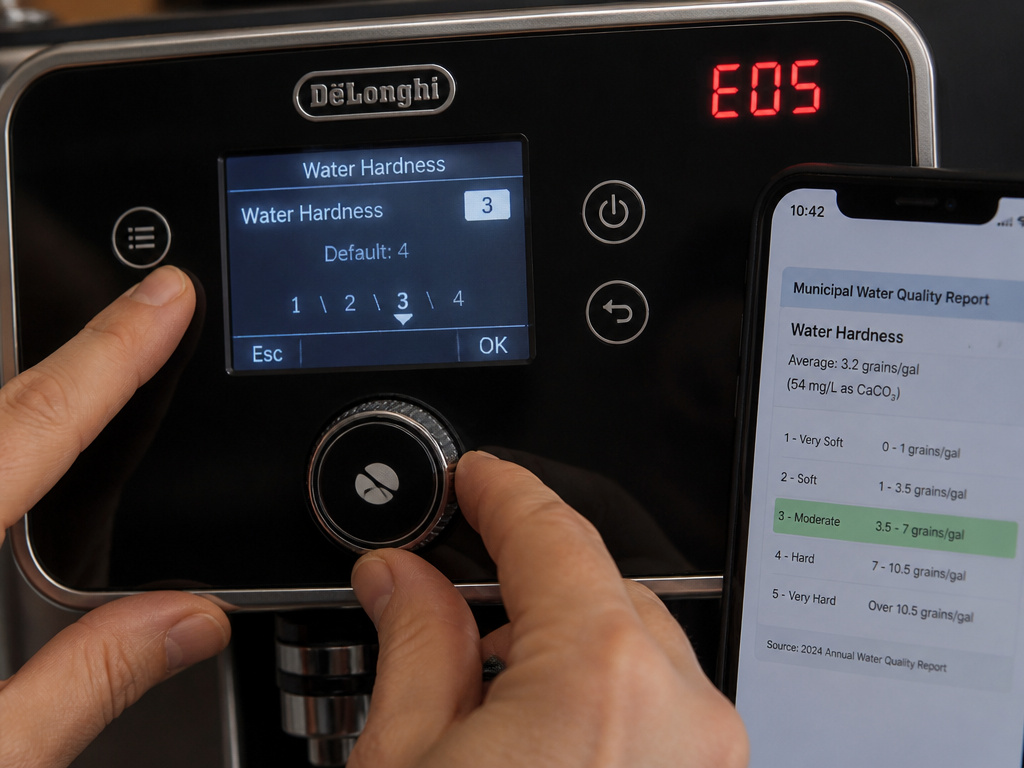
Your machine’s descaling reminder is not on a simple timer. It’s a algorithm based on your water hardness setting and the number of coffees made. Get the setting wrong, and the machine will scale up long before it tells you to descale.
The De’Longhi Magnifica S manual states this explicitly. The setting is in the hidden menu.
- Set it too low (softer than your actual water): The machine thinks your water is gentle. It extends the time between descaling reminders. Limescale builds silently in the heat exchanger and tubes. You’ll get Error E05 long before the descale light ever comes on.
- Set it too high (harder than your actual water): The machine panics. It prompts for descaling every few weeks, wasting solution and your time.
Find your local water hardness (check your municipal water report online). Then match it to the machine’s 1-4 scale in the settings menu. This one adjustment prevents 30% of limescale-related failures.
| Setting | Water Hardness | Expected Descaling Frequency |
|---|---|---|
| 1 | Soft (0-50 ppm) | Least frequent; after many cycles. |
| 2 | Medium (50-100 ppm) | Standard interval. |
| 3 | Hard (100-150 ppm) | More frequent prompts. |
| 4 | Very Hard (150+ ppm) | Most frequent descaling required. |
How to Fix a Blocked Brew Unit (E02, E25-E31)

The brew unit is the mechanical heart that tamps, brews, and ejects the puck. Coffee oils and fine grounds cement its moving parts. The manual says rinse it monthly. That’s not enough.
You’ll need a clean cloth, a bowl of warm water, and food-grade silicone grease.
- Power off and unplug the machine.
- Remove the drip tray and the coffee grounds container.
- Grip the brew unit handle and slide it straight out. It may require a firm tug.
- Rinse it under warm running water. Do not use soap. Use your fingers to work the piston back and forth.
- Dry it completely with a cloth.
- Apply a thin smear of food-grade silicone grease to the two metal rails on the sides of the brew unit. This is the preventative step the manual omits.
- Slide the unit back in until it clicks. Reinstall the containers.
The grease reduces friction. Without it, the motor strains, sensors misread the unit’s position, and you get faults like E25 or E31. A tube of grease costs less than a replacement brew unit.
TL;DR: Remove, rinse, dry, lubricate the rails, reinsert. Do this every other cleaning cycle.
Grinder Problems and Error E15: What to Do
Error E15 means the grinder motor is overloaded. The cause is almost always physical: a rock, a hardened bean, or packed grounds in the chute. A secondary cause is user error.
Common mistake: Adjusting the grind setting when the grinder is off. The Magnifica S manual page 10 warns against this. The burrs can be misaligned, causing immediate binding on the next startup.
First, try to clear it manually:
1. Unplug the machine.
2. Empty the bean hopper completely.
3. Use a long, thin brush (a clean paintbrush works) to reach into the grinder chute through the hopper opening. Dislodge any visible debris.
4. Use a vacuum hose with a narrow attachment to suck out loose grounds.
5. Plug the machine back in. With the hopper still empty, press the “grind” or “coffee” button for a second. Sometimes the motor can shake loose a minor jam.
If the error persists, the burrs may be jammed with a foreign object. This often requires partial disassembly or professional service. The cost of that service versus a new machine is a real calculation.
When Descaling Is Non-Negotiable (And How to Do It Right)
If the descale light is on or you see Error E05, you are out of time. Scale has already formed. Use only De’Longhi brand descaling solution or a citric acid powder mix approved for coffee machines. Vinegar leaves a smell and can damage seals.
The process is machine-driven. You supply the solution and the fresh water when prompted. The entire cycle on a Magnifica S takes about 25 minutes. Do not interrupt it.
I once stopped a descaling cycle halfway because it was taking too long. The machine locked itself into a fault state for 48 hours, flashing E05 continuously until the internal timer reset. Let the cycle finish.
After descaling, always run at least two tanks of fresh water through the coffee circuit to flush any residual solution. Taste the water from the brew head to ensure it’s clean.
Frequently Asked Questions
My De’Longhi machine turns on but does nothing, no sound, no lights. What’s wrong?
This is almost always a power issue. Check that the outlet works with another device. Ensure the power cord is fully plugged into the back of the machine. If it’s a super-automatic, check if a child lock or program mode has been activated by accident. A full electrical reset (unplug for 3 minutes) is step one.
Error E14 keeps appearing after I reset the machine. Is it broken?
Error E14 indicates an internal electronic fault that a simple reset cannot clear. It could be a failed main control board, a wiring harness issue, or a sensor short. At this point, DIY options are limited. You’ll need to contact De’Longhi service or a qualified appliance repair technician with espresso machine experience.
Can I use vinegar to descale my De’Longhi?
Manufacturers, including De’Longhi, strongly advise against using vinegar. The acetic acid can corrode internal rubber seals and gaskets over time, leading to leaks. It also leaves a persistent odor that can taint coffee. Commercial descaling solutions are formulated to dissolve limescale without damaging machine components.
How often should I clean the brew unit?
De’Longhi’s manual for the Magnifica S recommends rinsing the brew unit about once a month. If you make multiple coffees daily, increase that to every two weeks. If you notice weaker coffee, slower dispensing, or any hesitation in the unit’s movement, clean it immediately.
The steam wand on my Dedica isn’t working. What should I check?
First, ensure the machine is hot enough. The steam function typically requires a heating period after brewing. Second, check that the steam knob is turning fully open, sometimes mineral deposits seize it. Third, purge the wand before use: open the knob for a few seconds to blast out any water or debris blocking the tip. If it’s still weak, the internal steam valve or thermostat may be faulty.
The Bottom Line
A non-working De’Longhi usually fails in a predictable way. The machine tells you the problem through its error codes or lights, your job is to listen. Start with the free fixes: reseat the water tank, prime the pump, clean the brew unit. These solve the majority of issues. Then, commit to the two preventative habits that stop problems before they start: set your water hardness correctly and lubricate the brew unit rails. That combination extends the machine’s life by years. Finally, know when to stop. Errors like E14 or a persistent E15 after clearing a jam signal a deeper fault. Your time and a service bill are valuable; sometimes the smarter fix is an upgrade.
